Splunk Observability Cloud, Infrastructure Monitoring Org(Access) Token Expiration and Rotation
Available Languages
Applicability
Infrastructure Monitoring, Application Performance Monitoring
Description
When a token secret expires for a source, that source will no longer be able to emit metrics to its ingest endpoint. Access Tokens (Org Tokens) are used to emit metrics from a source for a given Organisation. Tokens can be used to better track specific teams and their individual usage. For more detailed information about Access Tokens, see Set up authentication with tokens.
Investigation
How to check when an org token is about to expire or expired.
1. A red banner appears at the top of the Splunk Observability user interface warning about expiring tokens
2. Or check the Access Tokens page.
Settings > Access Tokens > look at the Expires column for the chosen token.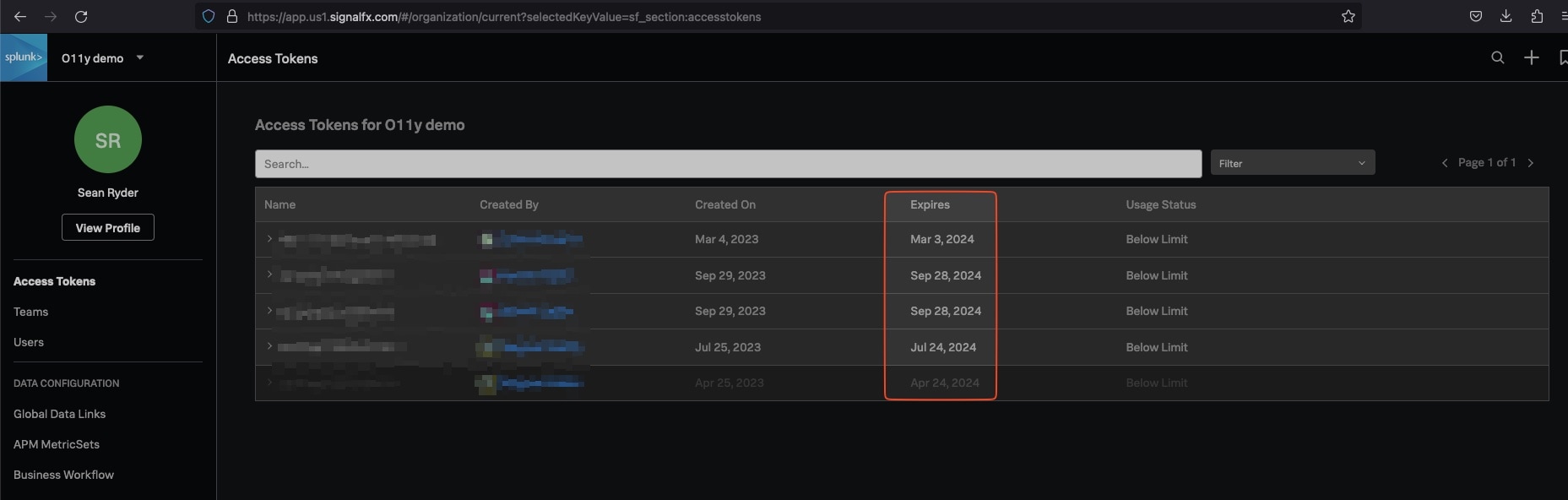
Resolution
How to rotate a token that is about to expire.
1. Get a user session token
Use the Splunk Observability Cloud API to get a user session token. You will need an admin user email, org ID, and password. Example from documentation linked above:
curl -X POST "https://api.{REALM}.signalfx.com/v2/session" \
    -H "Content-Type: application/json" \
    -H "X-SF-Token: <value>" \
    -d '{
            "email": "edickinson@example.com",
            "organizationId": "abcdefgh1234",
            "password": "DontUseThisPassword"
        }'
This returns the "accessToken" used to rotate the org token in the next step.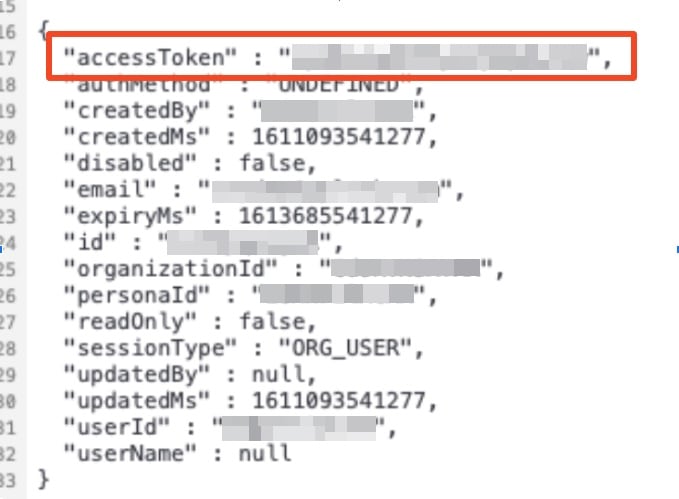
A user cannot rotate a token that is past its expiration date.
2. Rotate token with new secret
Rotate the token as discussed on this dev page. The name of the token is required to rotate the token and the admin user session token from the above command output results. Example:
curl -X POST "https://api.{REALM}.signalfx.com/v2/token/{name}/rotate" \
    -H "Content-Type: application/json" \
    -H "X-SF-TOKEN: <value>"
How to rotate a token that has expired
A user cannot rotate a token that is past its expiration date. Generate a new token instead using the Create and manage organization access tokens using Splunk Observability Cloud guide.
Common Questions
How can I find out what sources are using a specific Org Token?
As Org Tokens can be used interchangeably without recourse, there is no method available within our system to track what token is in play for a given metric. Since a source can use multiple tokens tracking this is not feasible. Because of this, you should create separate Org Tokens and distribute their usage to specific teams versus the entire org using the default token). This can make rotation quicker and tracking more efficient. Having usage broken down by token is also a good way to track if one team/environment is creating more data than anticipated and limits can be applied as necessary without disrupting other groups. If using a single token, proactively move groups to different tokens to avoid disruptions as both tokens will be active and accepted by our ingest endpoint.
How can I update these tokens quickly?
There is no automation currently within Splunk Infrastructure Monitorinfg that can update the token secret that a source is using. Once a token secret is rotated, the sources must be updated. Do this manually by simply updating the yaml file by hand. Splunk also supports other configuration options and various configuration management options. For questions regarding deployment or management configuration, contact the Splunk Observability Sales Team.
How can I monitor Org Token expiration?
The Splunk product team is working towards providing a banner or other notification method for when an Org Token nears its expiration date.
Until that is done, the best option would be to do this manually in whatever way works best. The Splunk Org Token endpoint provides output that lists each token and its expiration time. As an example, a monthly cronjob could be run to execute a script calling the above API and parse the expiration date to report when that expiration was coming up. Users that require assistance with developing a method that works best, reach out to the Splunk Infrasturcture Monitoring Sales Team to schedule time with the Splunk Professional Services group.
Revision History
| Revision | Publish Date | Comments |
|---|---|---|
1.0 |
29-Sep-2026
|
Initial Release |
 Feedback
Contact Cisco
- Open a Support Case

- (Requires a Cisco Service Contract)