Unable to install Universal Forwarder in windows servers.
Available Languages
Applicability
Splunk EnterpriseDescription
When trying to install the Splunk Universal Forwarder the installation is failing with the below errors :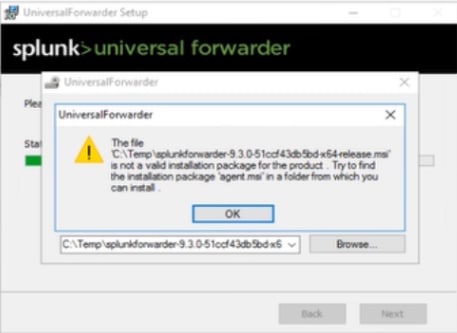
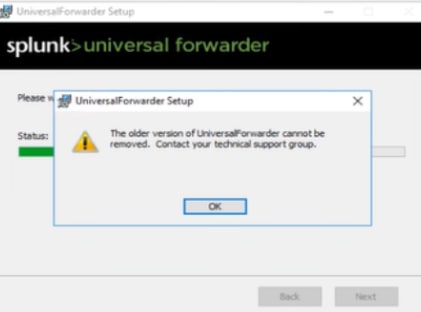
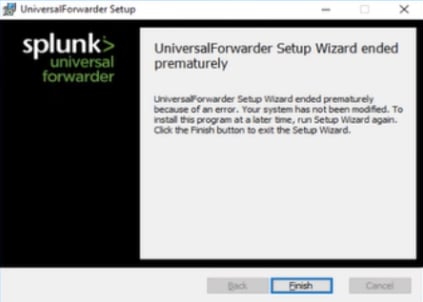
Investigation
- Upon investigating the MSI installer.log, observed that the installation was failed with the below error messages :
MSI (s) (64:BC) [13:18:50:075]: Warning: Local cached package 'C:\Windows\Installer\38746.msi' is missing.
GetPreviousSettings:  Info: Examine registry for SOFTWARE\Microsoft\Windows\CurrentVersion\Uninstall\<{product_code_here_xxxx}>\.
GetPreviousSettings:  Info: Examine registry for SOFTWARE\Wow6432Node\Microsoft\Windows\CurrentVersion\Uninstall\<{product_code_here_xxxx}>
MSI (s) (64:BC) [13:18:50:075]: SOURCEMGMT: Looking for sourcelist for product <{product_code_here_xxxx}>
MSI (s) (64:D8) [13:18:50:075]: Product: UniversalForwarder -- Error 1714. The older version of UniversalForwarder cannot be removed.  Contact your technical support group.  System Error 1612.
Action ended 13:18:50: RemoveExistingProducts. Return value 3.
MSI (s) (64:D8) [13:18:50:107]: Note: 1: 1402 2: HKEY_LOCAL_MACHINE\Software\Microsoft\Windows\CurrentVersion\Installer\Rollback\Scripts 3: 2
MSI (s) (64:D8) [13:18:50:107]: No System Restore sequeumbernce n for this installation.
MSI (s) (64:D8) [13:18:50:107]: Unlocking Server
Windows Installer installed the product. Product Name: UniversalForwarder. Product Version: 9.1.2.0. Product Language: 1033. Manufacturer: Splunk, Inc.. Installation success or error status: 1603
 MainEngineThread is returning 1603
- After investigating further, found that due to the old Splunk Universal Forwarder version key files still being present in the windows registry, the windows server is unable to install the new Splunk forwarder version.
Resolution
To resolve the issue, the product keys related to the old versions should be removed from the windows registry by following the below steps :
i. Open command prompt and enter "regedit" to enter the windows registry
ii. In the registry, search with the product code mentioned in the MSI installer.log to find the out the Product Key where the Splunk UniversalForwarder is installed.
iii. Then delete the product key from the below locations :
HKLM:\SOFTWARE\Microsoft\Windows\CurrentVersion\Installer\userdata\$-1-5-18\Products\<product key>
HKEY_LOCAL_MACHINE\SOFTWARE\Classes\Installer\Products\ <product key>
- After the above change, the new UF was installed successfully.
Revision History
| Revision | Publish Date | Comments |
|---|---|---|
1.0 |
01-Oct-2026
|
Initial Release |
 Feedback
Contact Cisco
- Open a Support Case

- (Requires a Cisco Service Contract)
This Document Applies to These Products
Related Articles
- Universal Forwarder failing to install on Windows Servers - Fresh Install/Upgrades
- Universal Forwarder Compatibility with Windows Server Core
- Universal Forwarder Connectivity/Handshake Issues with Deployment Server
- Windows Universal Forwarder (UF) compatibility with Windows Server 2012 Datacenter Edition OS