Migrating from vCPU Licensing to Ingest/Volume Licensing considerations
Available Languages
Applicability
If you are currently running vCPU licensing and wish to migrate to Ingest/Volume licensing.Description
A planned vCPU to Ingest/Volume Licensing migration resulted in various issues and the License Manager becoming unresponsive.
The expectation was the Ingest license would take over and with correct sizing provide the same functionality.
On switchover, Splunk immediately had various issues with operations and the Licence Manager became unresponsive.
A restart and license reset resolved the issue but the root cause as to why this occurred was needed.
Investigation
1) The vCPU license was present and due to expire on a specific day/time. A Ingest/Volume license was provided and installed prior to the vCPU license expiring.
2) The licenses were confirmed installed correctly and Splunk had accepted them as installed.
3) On switchover, Splunk immediately had various issues with operations and the Licence Manager became unresponsive.
4) A licence reset was applied which resolved the issue.
5) Further investigation began into why the licence migration responded this way.
6) It was found that:
a) The vCPU license suppresses warning messages about licence quotas, but the Ingest/Volume license does not, as it functions around quotas.
You can read about this here:
How Splunk Enterprise licensing works
Types of Splunk Enterprise licenses
About license violations
b) When the Ingest/Volume licence took over as the primary licence, these warnings became unsuppressed. When these warnings are produced, this creates extra operational reporting. Specifically to /licenser/pools and /licenser/messages endpoints.
License quota warning messages being unsuppressed:
06-03-2025 07:04:28.716 +0000 INFO LMStackMgr [110663 TcpChannelThread] - reset hide quota warning from "1" to "0"
In this case, some of the calls were taking 20 seconds or more: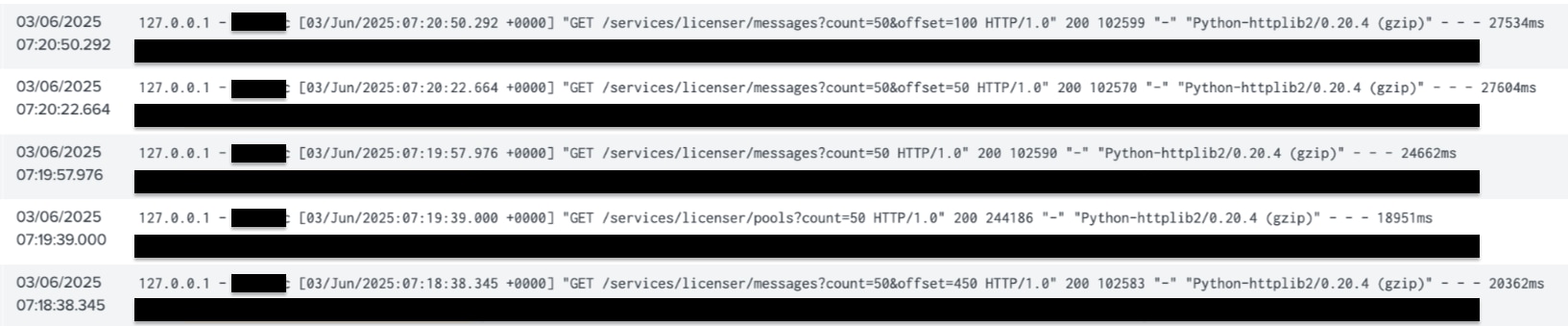
c) The licence reset cleared these warnings and the extra operations for over quota were reduced. This is why the licence reset resolved the issue.
How to use license reset key
Resolution
There is a current fix in development to prevent this quota warnings being produced during a vCPU to Ingest/Volume license migration.
This document is to highlight the consideration if you are planning on migrating a vCPU to Ingest/Volume license, to either wait for a release with the fix to be introduced or know the workaround if the issue described is seen is to request/use a license reset key.
Related Links
How Splunk Enterprise licensing works
Types of Splunk Enterprise licenses
About license violations
How to use license reset key
Revision History
| Revision | Publish Date | Comments |
|---|---|---|
1.0 |
01-Oct-2026
|
Initial Release |
 Feedback
Contact Cisco
- Open a Support Case

- (Requires a Cisco Service Contract)