KV Store Failure Due to Expired CA Certificate Despite Renewed server.pem
Available Languages
Applicability
Splunk EnterpriseDescription
The KV Store shows failed:
bash-4.4$ /opt/splunk/bin/splunk show kvstore-status --verbose
WARNING: Server Certificate Hostname Validation is disabled. Please see server.conf/[sslConfig]/cliVerifyServerName for details. This member:
    backupRestoreStatus : Ready
    disabled            : 0
    featureCompatibilityVersion : An error occurred during the last operation ('getParameter', domain: '15', code: '13053'): No suitable servers found: 'serverSelectionTimeoutMS' expired: [Failed to connect to target host: 127.0.0.1:8191]
    guid                : xxx-xxx
    port                : 8191
    standalone          : 1
    status              : failed
    storageEngine       : wiredTiger
The splunkd log shows mongod is down:
05-08-2025 16:46:32.864 -0600 INFO MongodRunner [68065 MongodLogThread] - mongod exited normally (exit code 0, status: PID 68068 exited with code 0).05-08-2025 16:46:32.386 -0600 INFO KVStoreConfigurationProvider [68064 KVStoreConfigurationThread] - Mongod service shutting down05-08-2025 16:46:32.386 -0600 ERROR KVStoreConfigurationProvider [68064 KVStoreConfigurationThread] - Failed to start mongod on first attempt reason=Failed to receive response from kvstore error=, service not ready after waiting for timeout=301519ms05-08-2025 16:46:32.386 -0600 ERROR KVStoreBulletinBoardManager [68064 KVStoreConfigurationThread] - Failed to start KV Store process. See mongod.log and splunkd.log for details.Investigation
■ KV Store was still showing failed after renewing server.pem
- splunkd.log
05-08-2025 17:10:37.558 -0600 WARN SSLCommon [69305 webui] - Received fatal SSL3 alert. ssl_state='SSLv3 read finished A', alert_description='certificate unknown'.- mongod.log
{"t":{"$date":"2025-05-08T22:41:30.905Z"},"s":"I", "c":"NETWORK", "id":4913010, "ctx":"main","msg":"Certificate information","attr":{"subject":"O=SplunkUser,CN=SplunkServerDefaultCert","issuer":"emailAddress=support@splunk.com,CN=SplunkCommonCA,O=Splunk,L=San Francisco,ST=CA,C=US","thumbprint":"..","notValidBefore":{"$date":"2025-05-08T22:40:21.000Z"},"notValidAfter":{"$date":"2028-05-07T22:40:21.000Z"},"keyFile":"/opt/splunk/etc/auth/server.pem","type":"Server"}}{"t":{"$date":"2025-05-08T22:41:32.820Z"},"s":"E", "c":"NETWORK", "id":23256, "ctx":"conn5","msg":"SSL peer certificate validation failed","attr":{"error":"SSL peer certificate validation failed: certificate has expired"}}{"t":{"$date":"2025-05-08T22:41:32.820Z"},"s":"I", "c":"-", "id":4333222, "ctx":"ReplicaSetMonitor-TaskExecutor","msg":"RSM received error response","attr":{"host":"127.0.0.1:8191","error":"HostUnreachable: Error connecting to 127.0.0.1:8191 :: caused by :: SSL peer certificate validation failed: certificate has expired","replicaSet":"...","response":{}}}■ When verifying if server.pem is valid and trusted by cacert.pem, it shows "error 10 at 0 depth lookup:certificate has expired"
bash-4.4$ /opt/splunk/bin/splunk cmd openssl verify -verbose -x509_strict -CAfile cacert.pem server.pem
server.pem: C = US, ST = CA, L = San Francisco, O = Splunk, CN = SplunkCommonCA, emailAddress = support@splunk.com
error 10 at 1 depth lookup:certificate has expired     <-
OKbash-4.4$ /opt/splunk/bin/splunk cmd openssl verify -verbose -x509_strict -CAfile ca.pem server.pem
server.pem: C = US, ST = CA, L = San Francisco, O = Splunk, CN = SplunkCommonCA, emailAddress = support@splunk.com
error 10 at 1 depth lookup:certificate has expired     <-
OK
-> This means that the CA certificate (cacert.pem) used to sign server.pem has expired — not the server cert itself.
■ Confirmed the ca.pem expired by command below,
bash-4.4$ openssl x509 -in /opt/splunk/etc/auth/ca.pem -noout -text | grep -A2 "Validity"
            Validity
                Not Before: May 11 19:51:37 2015 GMT
                Not After : May  8 19:51:37 2025 GMT
bash-4.4$
Resolution
1. Renew the Splunk default root certificates using the command below
Linux:
/opt/splunk/bin/genRootCA.sh -d /opt/splunk/etc/auth/ -l 2048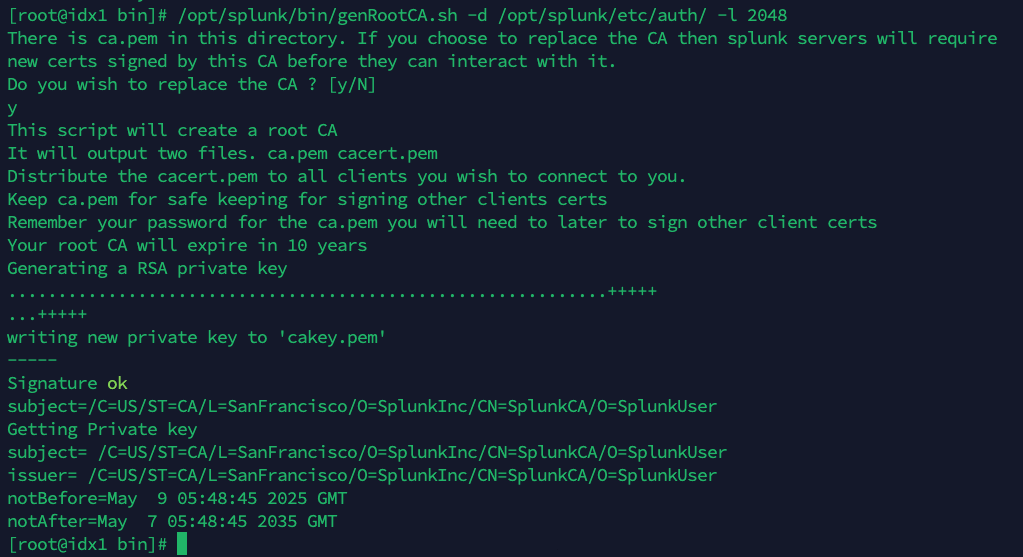
Windows:
Before proceeding, the SPLUNK_HOME environment variable must be set.
%SPLUNK_HOME%\bin\splunk cmd genRootCA.bat -d %SPLUNK_HOME%\etc\auth\certs -l 2048 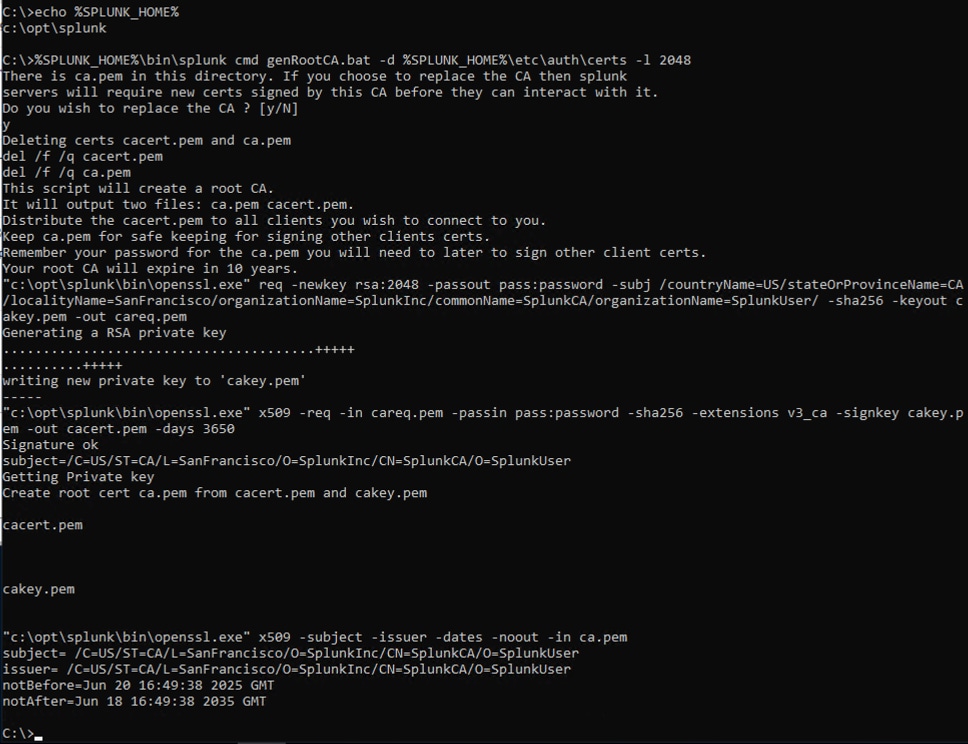
2. After the root certificate has been renewed, a new server certificate must be created. To regenerate the server certificate, rename the current server.pem and restart Splunk.
3. Post-check
a. Verify the following 4 files were created:
ca.pem
cacert.pem
cakey.pem
careq.pem
b. Verify the new server certificate is valid and trusted the new root certificate:
# /opt/splunk/bin/splunk cmd openssl verify -verbose -x509_strict -CAfile cacert.pem server.pem
server.pem: OK# /opt/splunk/bin/splunk cmd openssl verify -verbose -x509_strict -CAfile ca.pem server.pem
server.pem: OK
4. After steps above, KV Store is now functioning properly.
IMPORTANT NOTE: If the environment is clustered, it is important to perform the above steps on one host and then copy cacert.pem and ca.pem to all of the other hosts it communicates with. Remove server.pem after making that change and restart Splunk on affected hosts. This will ensure all hosts have a matching ca certrificate set. Failure to perform this step will result in a broken cluster with certificates unusable for clustering.
Related Links
How to renew certificates in Splunk
Revision History
| Revision | Publish Date | Comments |
|---|---|---|
1.0 |
01-Oct-2026
|
Initial Release |
 Feedback
Contact Cisco
- Open a Support Case

- (Requires a Cisco Service Contract)