The index processor has paused data flow.
Available Languages
Applicability
Splunk Enterprise.Description
The index queues are causing data duplicates due to too many tsidx file in an index "idx=prod_everest_transaction".throttled: The index processor has paused data flow. Too many tsidx files in idx=prod_everest_transaction bucket="/splunkhot/prod_everest_transaction/db/hot_v1_77" , waiting for the splunk-optimize indexing helper to catch up merging them. Ensure reasonable disk space is available, and that I/O write throughput is not compromised.
Investigation
1. Splunk version is 8.2.7.
2. Splunk Architecture:
-> 4 Search Head Cluster, 2 Indexer Cluster, Management Server ( Cluster master, License Master and Deployment server & Deployer) and an Heavy Forwarder.
3. This error indicates that the ingestion rate is so high that tsidx files are being created faster than Splunk can merge them.
4. When the Indexer host runs out of CPU resources, it can lead to a blocked indexing queue, which will affect the rest of the processing queues.
The screenshots below demonstrate that, in this example, the "fds_apr" app is consuming a significant amount of CPU resources on the Indexer.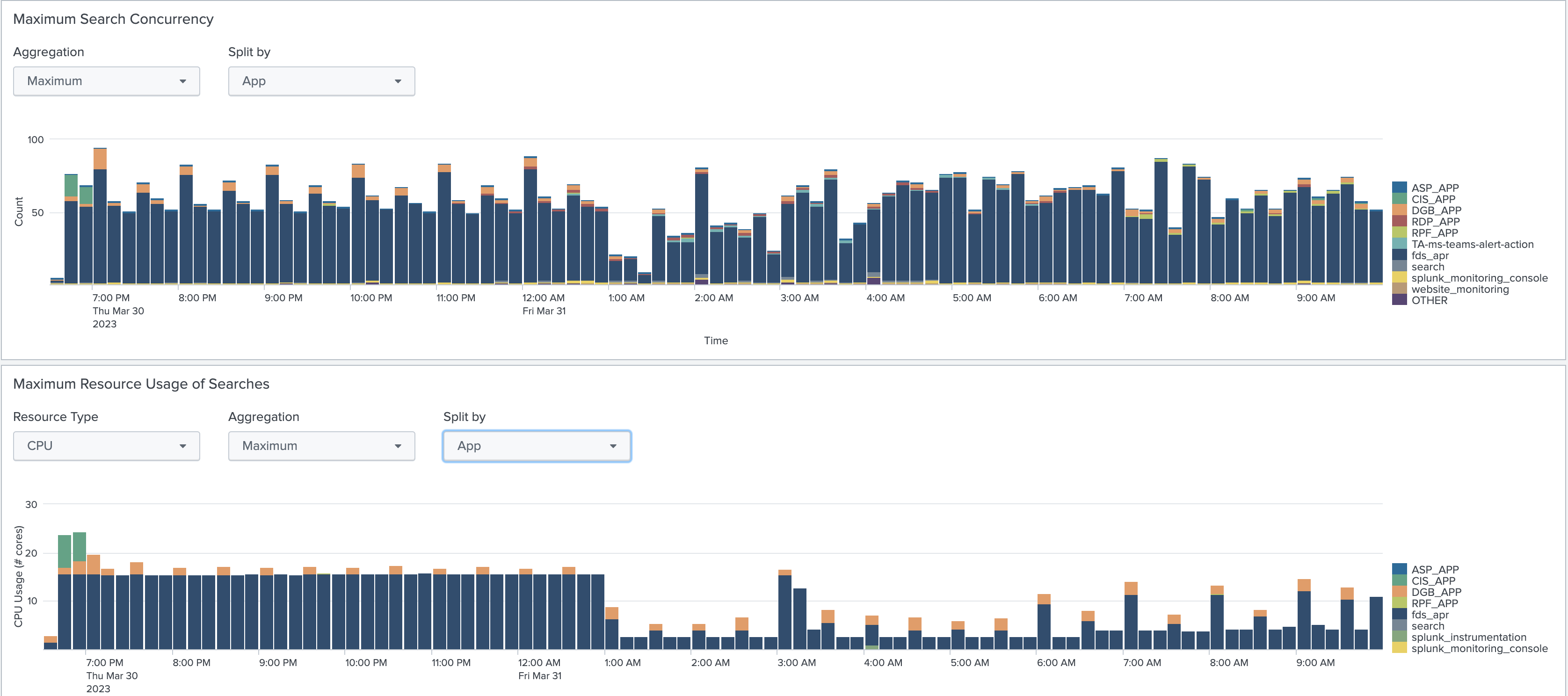
5. Please adjust the below queue setting to your server.conf in $SPLUNK_HOME/etc/system/local/server.conf.
$SPLUNK_HOME/etc/system/local/server.conf
[general]
parallelIngestionPipelines = 2
[queue=parsingQueue]
maxSize = 20MB
[queue=typingQueue]
maxSize = 20MB
[queue=aggQueue]
maxSize = 20MB
[queue=httpInputQ]
maxSize = 20MB
[queue=indexQueue]
maxSize = 20MB
Resolution
To resolve the issue, please try the following settings and reduce outage.
Prior to Splunk version 9.1, it is recommended to set maxConcurrentOptimizes to 1
In $SPLUNK_HOME/etc/system/local/server.conf
[queue=indexQueue]
maxSize=500MB
In $SPLUNK_HOME/etc/system/local/indexes.conf
[default]
throttleCheckPeriod=5
maxConcurrentOptimizes=1
maxRunningProcessGroups=32
processTrackerServiceInterval=0
Post Splunk version 9.1, you can increase maxConcurrentOptimizes to a value greater than 1 to help prevent "too many tsidx files" errors.
Please ensure that the maxRunningProcessGroups setting is higher than the maxConcurrentOptimizes.
If the error still persists, you can try manually running Splunk optimization by executing the following command on the Indexers.
$SPLUNK_HOME/bin/splunk-optimize -d|--directory <bucket_directory>This will optimize the bucket to prevent these errors.
Related Links
Revision History
| Revision | Publish Date | Comments |
|---|---|---|
1.0 |
30-Sep-2026
|
Initial Release |
 Feedback
Contact Cisco
- Open a Support Case

- (Requires a Cisco Service Contract)
This Document Applies to These Products
Related Articles
- The Indexers Were Going Down Frequently and the next Message Was Appearing: The index processor has paused the data flow.
- The number of splunk optimize processes is at 100% of the maximum. As a result, the index processor has paused data flow
- The TCP output processor has paused the data flow due to issues with SSL certificates
- TCP output processor has paused the data flow due to "can't resolve a valid IP address for host"