How to implement FIPS for Splunk Instance with KV Store.
Available Languages
Applicability
Splunk Enterprise KV Store FIPSDescription
It's important to verify that FIPS is enabled on the system before enabling FIPS on Splunk. Please reference the Splunk Documentation for an overview of Securing Splunk Enterprise with FIPS.
In addition, refer to How to self-sign certificates and How to prepare your signed certificates for Splunk.
Investigation
The steps below describe implementing Splunk in FIPS mode, on a new server where Splunk has not been run yet.
A few notes to consider:
- Assume a new install, where Splunk has not yet been run.
- If performing this process for FIPS-enabled Splunk in 9.4 or greater, must be using 9.4.2 or higher
- Follow steps in their entirety (including the Resolution section) before Splunk is started for the first time.
- Ensure any custom certificates, whether self-signed or 3rd party, are dual-purpose certs (enabled for
serverAuthandclientAuthextensions). The following steps assume these are enabled by default, but your environment may vary. - Commands use Splunk's delivered openssl because by default the certs it creates will be dual purpose for the KV Store (no openssl.cnf file required; in fact, from 9.4.x onward, Splunk suggests NOT using a custom .cnf file)
- Your organizational requirements may not work for the steps below. For example, if a custom openssl.cnf file is required or you wish to allow Splunk to check for app updates on Splunkbase.
- Switch the system to be in FIPS mode if needed (this example assumes RHEL8. Enabling FIPS may differ for other kernels/OS's).
# fips-mode-setup --enable
- Restart system to allow the kernel to switch to FIPS mode.
#reboot
- After restarting, verify that FIPS mode is enabled (again, assumes RHEL8).
# fips-mode-setup --check
FIPS mode is enabled
- For Splunk Version 8.x and above, before starting the Splunk Service for the 1st time, make the following setting in splunk-launch.conf.
$SPLUNK_HOME/etc/splunk-launch.conf
SPLUNK_FIPS=1
- For the KV Store, in Splunk 9.4.3 and above, before starting Splunk the first time, certificates need to be applied (even if you are using Splunk's default certificates). The reason for this is that from 9.4.0 onward, if FIPS mode is enabled, Splunk will rely on certificates defined in the [kvstore] stanza of server.conf, but by default they are not defined. Splunk does not support custom certificates until 9.4.3. To use custom certificates, they should also be applied before Splunk starts. Below are example commands for creating a self-signed certificate for a FIPS-enabled Splunk Deployment.
- Enable FIPS for OpenSSL, then use
echoto verify it has been set:export OPENSSL_FIPS=1 echo $OPENSSL_FIPS
-
Create a new directory within the Splunk platform instance installation for the certificates:
mkdir $SPLUNK_HOME/etc/auth/mycerts cd $SPLUNK_HOME/etc/auth/mycerts - Create your CA certificate:
- Create a private key for your root certificate authority certificate. When prompted, enter a passphrase (this will be the
sslPasswordused inserver.conf/[sslConfig]and[kvstore]stanzas:$SPLUNK_HOME/bin/splunk cmd openssl genrsa -aes256 -out myCertAuthPrivateKey.key 2048 - Use the private key myCertAuthPrivateKey.key to generate a CSR for your certificate:
NOTES:- if using your own openssl.cnf file (not suggested), include it at the end of this command with
-config <path/to/config/file.cnf>. Make sure that file contains a section for cert extensions, with serverAuth and clientAuth included, as KV Store must have both ("dual purpose"). - If no config file, the Splunk-delivered version of OpenSSL will do it automatically.
- If using 3rd party certs, this is the last command you need to complete (send this file to your certificate authority and advise them you are creating dual purpose client/server certificates)
$SPLUNK_HOME/bin/splunk cmd openssl req -new -key myCertAuthPrivateKey.key -out myCertAuthCertificate.csr
- if using your own openssl.cnf file (not suggested), include it at the end of this command with
- Use the CSR file you created and sign it with the private key you created previously to create the root certificate authority certificate:
$SPLUNK_HOME/bin/splunk cmd openssl x509 -req -in myCertAuthCertificate.csr -sha512 -signkey myCertAuthPrivateKey.key -CAcreateserial -out myCertAuthCertificate.pem -days 1095
- Create a private key for your root certificate authority certificate. When prompted, enter a passphrase (this will be the
- Create a server certificate
- Create a private key for the server certificate:
$SPLUNK_HOME/bin/splunk cmd openssl genrsa -aes256 -out myServerPrivateKey.key 2048 - Use the private key
myServerPrivateKey.keyto generate a CSR for your server certificate:
NOTES:- if not using a custom .cnf file, the Common Name value used here must differ from the Common Name value used for the CA certificate.
- If using your own openssl.cnf file, include it at the end of this command with
-config <path/to/config/file>$SPLUNK_HOME/bin/splunk cmd openssl req -new -key myServerPrivateKey.key -out myServerCertificate.csr
- Create a private key for the server certificate:
- Create a signed server certificate
- Use the CSR file you created and sign it with the private key you created previously, the certificate authority certificate, and its private key to create the server certificate:
$SPLUNK_HOME/bin/splunk cmd openssl x509 -req -in myServerCertificate.csr -SHA256 -CA myCertAuthCertificate.pem -CAkey myCertAuthPrivateKey.key -CAcreateserial -out myServerCertificate.pem -days 1095 - Create a single combined certificate file:
cat myServerCertificate.pem myServerPrivateKey.key myCertAuthCertificate.pem > merged.pem
- Use the CSR file you created and sign it with the private key you created previously, the certificate authority certificate, and its private key to create the server certificate:
- Enable FIPS for OpenSSL, then use
The steps above were taken from the Splunk documentation and enhanced for FIPS requirements. Refer to the following links:
Resolution
To configure the Splunk Management Port and KV Store to use your self-signed certificate:
- Configure the following in server.conf:
[sslConfig]
sslRootCAPath = $SPLUNK_HOME/etc/auth/mycerts/myCertAuthCertificate.pem
serverCert = $SPLUNK_HOME/etc/auth/mycerts/merged.pem
sslPassword =  <password>[kvstore]
serverCert = $SPLUNK_HOME/etc/auth/mycerts/merged.pem
sslPassword = <password>
NOTE: KV Store will default to
[sslConfig]/sslRootCAPathfor the root ca file (myCertAuthCertificate.pemin the example above), though it can be specified with[kvstore]/caCertFile - Verify your self/signed/custom certificate will work with KV Store:
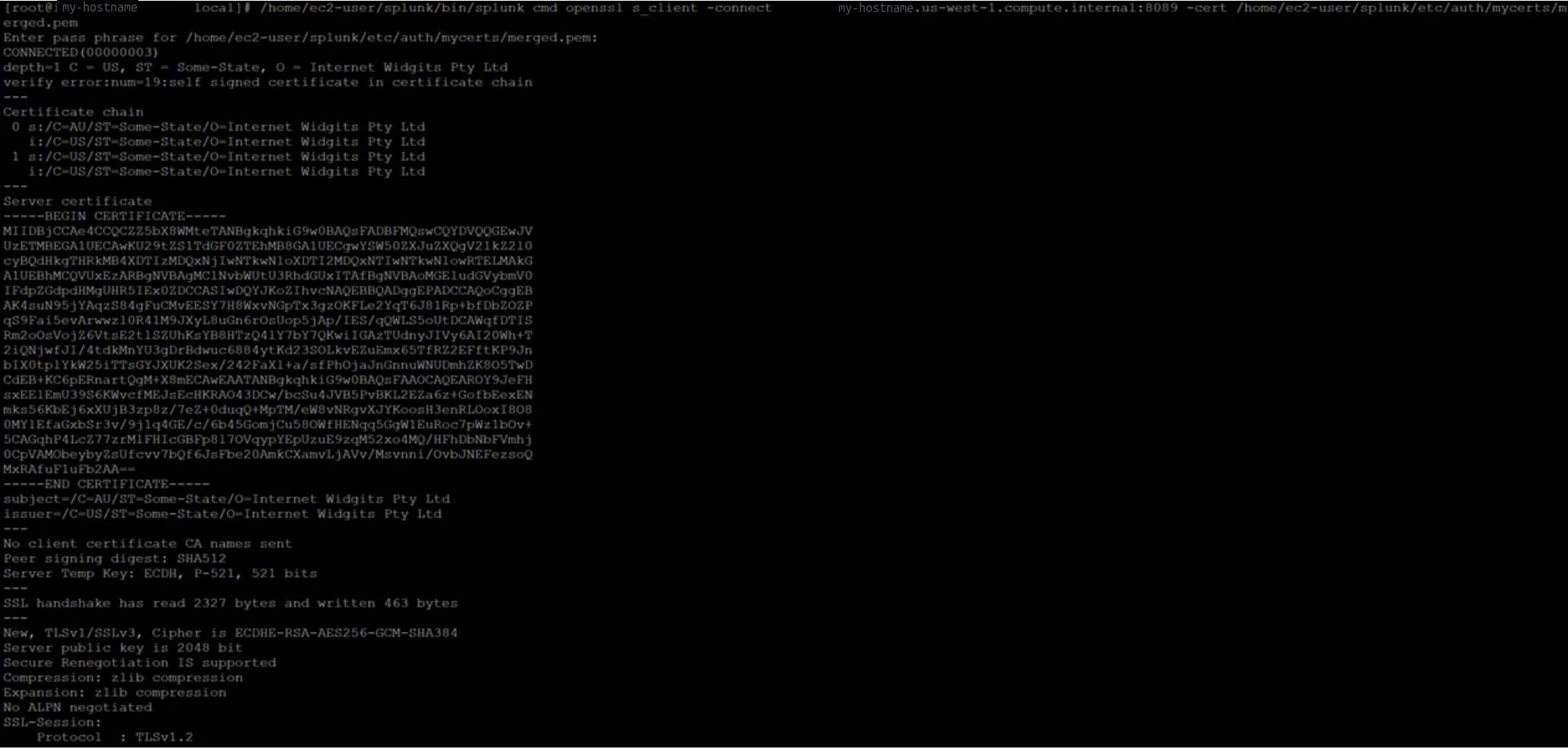
$SPLUNK_HOME/bin/splunk cmd openssl verify -verbose -x509_strict -CAfile <file path to sslRootCAPath or caCertFile> <file path to serverCert> - Verify the Management port is Configured for your self-signed/custom certificate (assumes Splunkd is already running):
$SPLUNK_HOME/bin/splunk cmd openssl s_client -connect localhost:8089 -cert $SPLUNK_HOME/etc/auth/mycerts/merged.pem
- Restart Splunk
$SPLUNK_HOME/bin/splunk restart - Verify the KV Store Status is ready.
$SPLUNK_HOME/bin/splunk show kvstore-status

 This member:
                           backupRestoreStatus : Ready
                                          date : Sun Apr 16 21:37:23 2023
                                       dateSec : 1681681043.714
                                      disabled : 0
                                          guid : 37BC6DC8-757F-45FE-BA7C-C7B251A22748
                             oplogEndTimestamp : Sun Apr 16 21:37:20 2023
                          oplogEndTimestampSec : 1681681040
                           oplogStartTimestamp : Sun Apr 16 20:22:55 2023
                        oplogStartTimestampSec : 1681676575
                                          port : 8191
                                    replicaSet : 37BC6DC8-757F-45FE-BA7C-C7B251A22748
                             replicationStatus : KV store captain
                                    standalone : 1
                                        status : ready
                                 storageEngine : wiredTiger KV store members:
        xxx.xxx.xxx.xxx:8191
                                 configVersion : 1
                                  electionDate : Sun Apr 16 21:18:40 2023
                               electionDateSec : 1681679920
                                   hostAndPort : xxx.xxx.xxx.xxx:8191
                                    optimeDate : Sun Apr 16 21:37:20 2023
                                 optimeDateSec : 1681681040
                             replicationStatus : KV store captain
                                        uptime : 1134
Related Links
- Securing Splunk Enterprise with FIPS
- How to self-sign certificates
- How to prepare your signed certificates for Splunk
- Preparing custom certificates for use with KV Store
- server.conf
- Splunk and FIPS on youtube
Revision History
| Revision | Publish Date | Comments |
|---|---|---|
1.0 |
30-Sep-2026
|
Initial Release |
 Feedback
Contact Cisco
- Open a Support Case

- (Requires a Cisco Service Contract)