Troubleshooting scheduled skipped searches in Search Head Cluster
Available Languages
Applicability
Splunk EnterpriseDescription
Scheduled searches are intermittently skipped on a Search head cluster. Concurrency limit is set and still, there are skipped searches due to concurrency limit hit.
Messages:
1. The maximum number of concurrent running jobs for this historical scheduled search on this cluster has been reached.
2. The maximum number of concurrent historical scheduled searches on this cluster has been reached.
Investigation
1) Prioritization of searches:
Splunk differentiates between the type of searches run to assist in determining which searches should run when the system begins to run up against config limitations imposed on search concurrency and that can be referred to in detail as the priority order of different types of searches.
2) Where to observe the states of the searches?
The Monitoring Console (MC) provides a view: Monitoring Console > Search > Scheduler Activity: Instance into the situation.
a) Beginning with a view of all three search states. The ideal state is all searches are completed, with no deferrals and no skipped searches. Under Historical Charts, there is a mix of completed, skipped, and deferred on the given server, with a distinct pattern that emerges when searches are skipped.
b) Also in Monitoring Console > Search > Scheduler Activity: Instance > Check for "Concurrency of scheduled reports (Running/limit)" which in other words is also termed as " Maximum concurrent scheduled searches ".
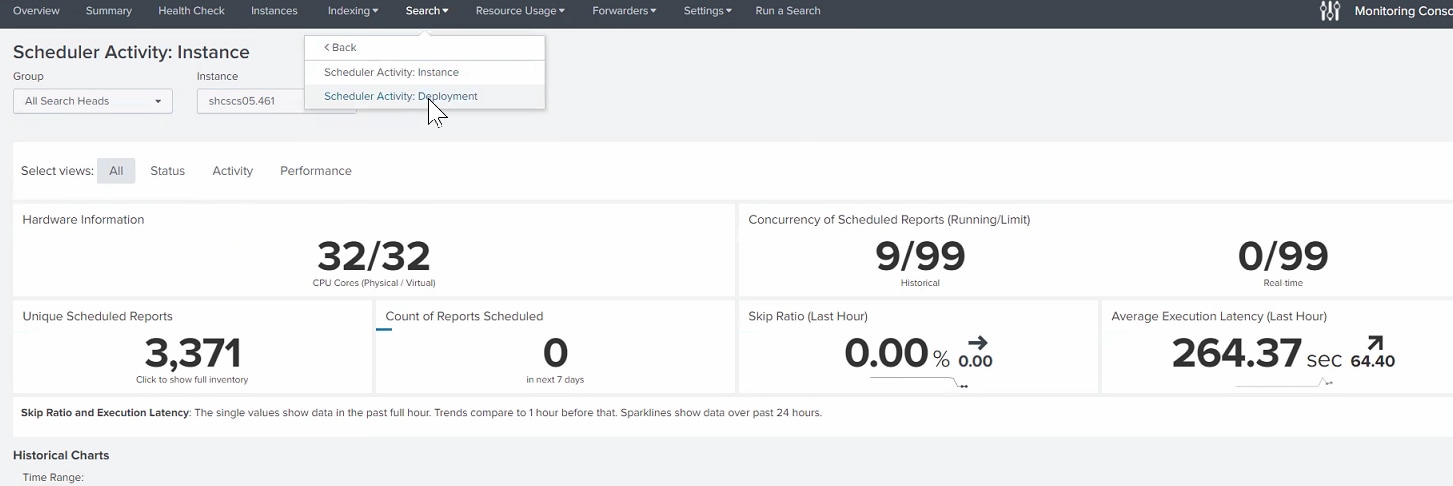
Calculate the limit of maximum concurrent scheduled searches as per the below-given formula:
Total max concurrency = <max_searches_per_cpu> x number of CPU cores in SH/SHC + <base_max_searches>
Max concurrent scheduled searches = <max_searches_perc> x total max concurrency
Max auto-summarization searches = <auto_summary_perc> x max concurrent scheduled searches
Note: max_searches_perc, max_searches_per_cpu, and base_max_searches can be found in limits.conf .
3. Why are there skipped searches?
a. User disk quota has been reached.
b. User role search quota has been reached.
c. Maximum searches system-wide have been reached (ad hoc + scheduled).
d. Max concurrent historical searches have been reached (searches that are non-summarization searches).
e. Max auto summarization searches have been reached (searches that are report accelerations and data model accelerations). Each search has a reason associated. The breakdown can be found on the same Scheduler Activity: Instance page in the Monitoring Console.
4. There are 3 different states of searches namely, Completed, Deferred, and Skipped. All search statuses can be found in the scheduler.log ( /opt/splunk/var/log/splunk/scheduler.log )
Resolution
Looking at the system-wide view, one of the easiest ways to alleviate skipped searches is to allow Splunk's scheduler greater flexibility when there are fewer higher-priority searches running. By default, Splunk reserves half of the available search slot capacity for Adhoc searches, so as to minimize the possibility of a user having their searches queued due to too many scheduled searches already running.
1) The maximum number of concurrent historical scheduled searches on an instance or cluster reached.
This is the most common reason for skipped searches. This happens because the searches have taken all available search slots and hence new searches cannot be scheduled.
a. Too many searches are scheduled at the same time.
Check if your search schedule aligns at specific times (e.g. 1PM, 1:15PM, 1:30PM etc.). If this is the issue you may try to use the <allow_skew> or <schedule_window> under savedsearches.conf (/opt/splunk/etc/system/local/savedsearches.conf):
> schedule_window for all searches, so Splunk can reschedule a search for a later time when there are search slots available.
Using schedule_window = auto allows Splunk's scheduler the maximum flexibility to move searches into the future. Splunk adjusts the earliest and latest time to compensate for any scheduling adjustment so the original times are retained. This works well for infrequently scheduled searches (like every 6 hours or once a day) that need to run, but are less time sensitive for their completion. This kicks in only when the search head has run out of available search slots. Think of this as a macro (high level) configuration as Splunk could potentially move searches around by many minutes or hours.
> allow_skew for all non-acceleration searches, so Splunk can adjust the scheduling for frequently scheduled searches.
Example savedsearches.conf:
[default]
schedule_window = auto
allow_skew = 5m
b. Ad-hoc searches taking search slots.
By default, the system total max concurrency (max search slots) is calculated based on the number of CPU cores on a search head (SH) or across a search head cluster (SHC). There are scheduled searches and ad-hoc searches that use these search slots. There is a default limit of the search slots that scheduled searches can use but there is no default limit on ad-hoc searches. It means that ad-hoc searches can use up to the max search slots, essentially leaving none for scheduled searches.
c. Indexer resource utilization.
Most of the search runs on indexers. If indexers are bottlenecked due to too many searches, poorly written searches (causing cache churn), or high ingest load, the searches may take longer to complete. Hence, they will hold the search slots for longer and new searches cannot be dispatched, causing skips. To ensure this is the real cause, find out if there is a pattern to skipping by using the search above.
d. Total max concurrency limit is too low.
You can tune the limits accordingly by referring to the calculation formula of "Total max concurrency" provided in the investigation steps. If you have short searches, you can think of increasing max_searches_per_cpu. Before increasing it, check if the indexer and search head CPU utilization is low enough (P95 < 50-60%).
e. Max concurrency limit for scheduled searches is low.
The concurrent scheduled searches are limited to 50% of the total maximum concurrency by default. If you are not running too many concurrent ad-hoc searches, you may want to raise max_searches_perc from 50 to 75% or higher. This will not help if ad-hoc searches increase as they will overrun the scheduled searches.
2) The maximum number of concurrent running jobs for a historical scheduled search reached.
Scheduled searches run at a certain frequency (e.g. every 5 minutes) and by default only 1 instance of a scheduled search can run at any given time. This is defined by max_concurrent in savedsearches.conf and generally you do not need to change this attribute to more than 1 (default).
If for any reason a scheduled search job cannot be completed before the next period starts, it will be skipped. For instance, if a job takes 10 minutes to complete and runs at a 5-minute frequency then it will skip. To remedy this, first identify which scheduled search(es) are skipped due to this reason and then:
- Change the schedule frequency such that it is higher than the execution time for the search, or reduce the search execution time.
- Check the load on indexers and determine whether they are resource constrained and require additional resources.
- If resource constrained, consider using workload management to place these searches in a high-priority pool so they receive more resources and complete more quickly.
3) To fix the issue of a high number of skipped data model acceleration searches, Splunk added auto-skewing. Auto-skewing must be enabled per data model. Once enabled, Splunk distributes the searches across the available time range instead of trying to run them all at the same time.
To enable auto-skewing, add the following to your datamodels.conf:
$SPLUNK_HOME/etc/apps/MY_APP/local/datamodels.conf
[<datamodel_name>]
acceleration.allow_skew = <percentage>|<duration-specifier>
acceleration.allow_skew acts just like allow_skew, except that it applies to Data Model Acceleration searches. This applies to the fourth priority type of scheduled searches noted earlier. The same rules apply for acceleration.allow_skew as for allow_skew.
Related Links
Tips and tricks: Splunk Performance
Additional discussion about schedule_window and allow_skew can be found at:
- Skew scheduled report start times
- Splunk blog on schedule windows vs skewing
- Making the most of the Splunk scheduler
Get in command of Splunk workload management.
Additional resource:
The following videos from Community Office Hours expand on the topic of performance issues and skipped searches.
Performance Issues and Skipped Searches:
- Question #3: https://youtu.be/0Fo48s10qR8?si=gKBxpVY6dNOYFhSS https://youtu.be/0Fo48s10qR8
- Question #4: https://youtu.be/MdQkOZ5iRTI?si=R7LFBfIr9h_vg8XU https://youtu.be/MdQkOZ5iRTI
Due to security restrictions, embedded YouTube iframes may not render. Use the direct links above to access the videos.
Revision History
| Revision | Publish Date | Comments |
|---|---|---|
1.0 |
30-Sep-2026
|
Initial Release |
 Feedback
Contact Cisco
- Open a Support Case

- (Requires a Cisco Service Contract)