KV Store Error after upgrading Splunk Enterprise to 9.x
Available Languages
Applicability
Splunk Enterprise Search HeadDescription
Observed multiple KV Store errors as follows on the Search Head:-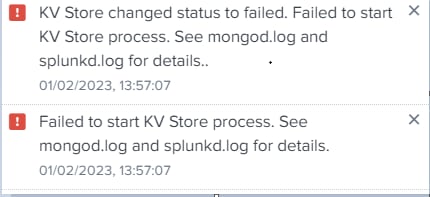
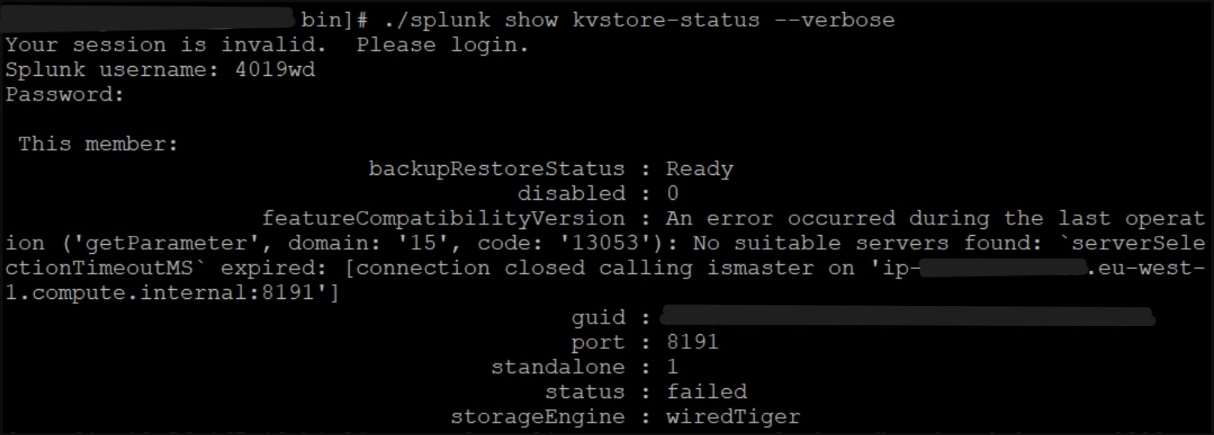
Investigation
1. Ran the command to check the KV Store status :-
./splunk show kvstore-status --verbose
- The status returned as failed.
2. Also, ran the command to check the validity of the SSL certificate on the Search Head :-
openssl x509 -enddate -noout -in $SPLUNK_HOME/etc/auth/server.pem
The certificate was valid.
3. Suggested to perform the following :-
Took the backup of the KV Store.
./splunk backup kvstore
Stopped Splunk.
./splunk stop
Renamed the current mongo folder to old.
$SPLUNK_HOME\var\lib\splunk\kvstore\mongo\mongod.lock
Started Splunk.
./splunk start
4. The status still returned as failed.
5. Observed the [kvstore] stanza in the local directory of server.conf on the Search Head :-
[kvstore]
sslVerifyServerCert = true
sslVerifyServerName = true
Resolution
-By analyzing the issue further, from 9.0, if the PEM file is a custom/third-party certificate, the KVStore validates the hostname through this parameter: sslVerifyServerName.
-The hostname should be identical as in the PEM file. If the hostname is not the same as the one mentioned in the PEM file, then using the parameters would make the KV Store in failed status.
-So, the workaround going forward is to disable or comment out the sslVerifyServerName, so as to bring KVStore up, if the hostname mentioned in the PEM file is the same as the hostname.
sslVerifyServerCert = <boolean>
* This setting is used by distributed search and distributed deployment clients.
  * For distributed search: Used when making a search request to another server in the search cluster.
  * For distributed deployment clients: Used when polling a deployment server.
* A value of "true" means make sure that the connected server is authenticated. Both the common name and the alternate name of the server are checked for a match if they are specified in this configuration file. A certificate is considered verified if either is matched.
* Default: false
sslVerifyServerName = <boolean>
* Whether or not splunkd, as a client, performs a TLS hostname validation check on an SSL certificate that it receives upon an initial connection to a server.
* A TLS hostname validation check ensures that a client communicates with the correct server, and has not been redirected to another by a machine-in-the-middle attack, where a malicious party inserts themselves between the client and the target server, and impersonates that server during the session.
* Specifically, the validation check forces splunkd to verify that either the Common Name or the Subject Alternate Name in the certificate that the server presents to the client matches the host name portion of the URL that the client used to connect to the server.
* For this setting to have any effect, the 'sslVerifyServerCert' setting must have a value of "true". If it doesn't, TLS hostname validation is not possible because certificate verification is not on.
* A value of "true" for this setting means that splunkd performs a TLS hostname validation check, in effect, verifying the server's name in the certificate.
  If that check fails, splunkd terminates the SSL handshake immediately. This terminates the connection between the client and the server. Splunkd logs this failure at the ERROR logging level.
* A value of "false" means that splunkd does not perform the TLS hostname validation check. If the server presents an otherwise valid certificate, the client-to-server connection proceeds normally.
* Default: false
- The KV Store status changed to ready.
-When these parameters are commented out or disabled, the KV Store status is in ready status.
Note: This issue persists with the use of third-party/custom certificates on the instances.
Giving some minutes to Splunk to automatically upgrade the KV store could be another resolution to avoid restarting the server or Splunk right after upgrading Splunk.
Note: In case Splunk default certificates are being used in kvstore stanza and custom certificates in sslConfig stanza, use sslVerifyServer = true only then will kvstore pick the default server.pem. If not, kvstore will pick serverCert from sslConfig stanza.
Related Links
Serverconf
Troubleshoot a failed upgrade
Revision History
| Revision | Publish Date | Comments |
|---|---|---|
1.0 |
30-Sep-2026
|
Initial Release |
 Feedback
Contact Cisco
- Open a Support Case

- (Requires a Cisco Service Contract)
This Document Applies to These Products
Related Articles
- KV Store Failed After Upgrading Splunk Enterprise from 8.2.5 to 9.4.0
- KV Store Status Shows “Failed” After Upgrading Splunk Enterprise from 9.3.5 to 9.4.4
- KV store fails to start after upgrading Splunk Enterprise on Windows platform to version 9.0.0
- KV Store will not start after upgrading to Splunk Enterprise Version 9.4