Unable to delete token for non-existent user
Available Languages
Applicability
Splunk Enterprise 9.1.3Description
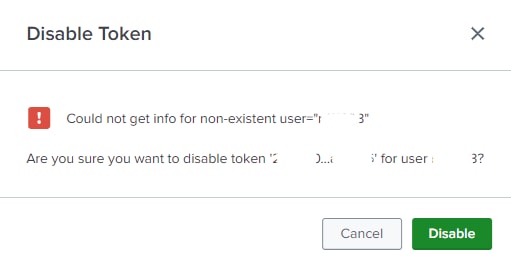
Splunk search head - unable to delete token - Could not get info for non-existent user="xyz123". This could happen for a previous user who was on an SHC is using single sign on / SAML, the user is no longer exists. And the token under this user cannot be disabled or removed.
A screenshot of this issue:
Investigation
This below workaround can help to delete the token:
Create a local user with the deactivated user's username. Then the token can be deleted through the UI. Once this can be done, the user can be deleted.
Resolution
A fix for resolution will be available in release 9.3.3 and 9.4.1. This will help to delete tokens for the users do not exist anymore.
The root cause was identified by Engineering that the code did not recognize the request when the user is "could not get info for non-existing". Code fix will cover this scenario.
Revision History
| Revision | Publish Date | Comments |
|---|---|---|
1.0 |
29-Sep-2026
|
Initial Release |
 Feedback
Contact Cisco
- Open a Support Case

- (Requires a Cisco Service Contract)