Splunk DB Connect: "Error in 'dbxquery' command: External search command exited unexpectedly with nonzero error code 1."
Available Languages
Applicability
Splunk Enterprise Splunk Apps & Add-onsDescription
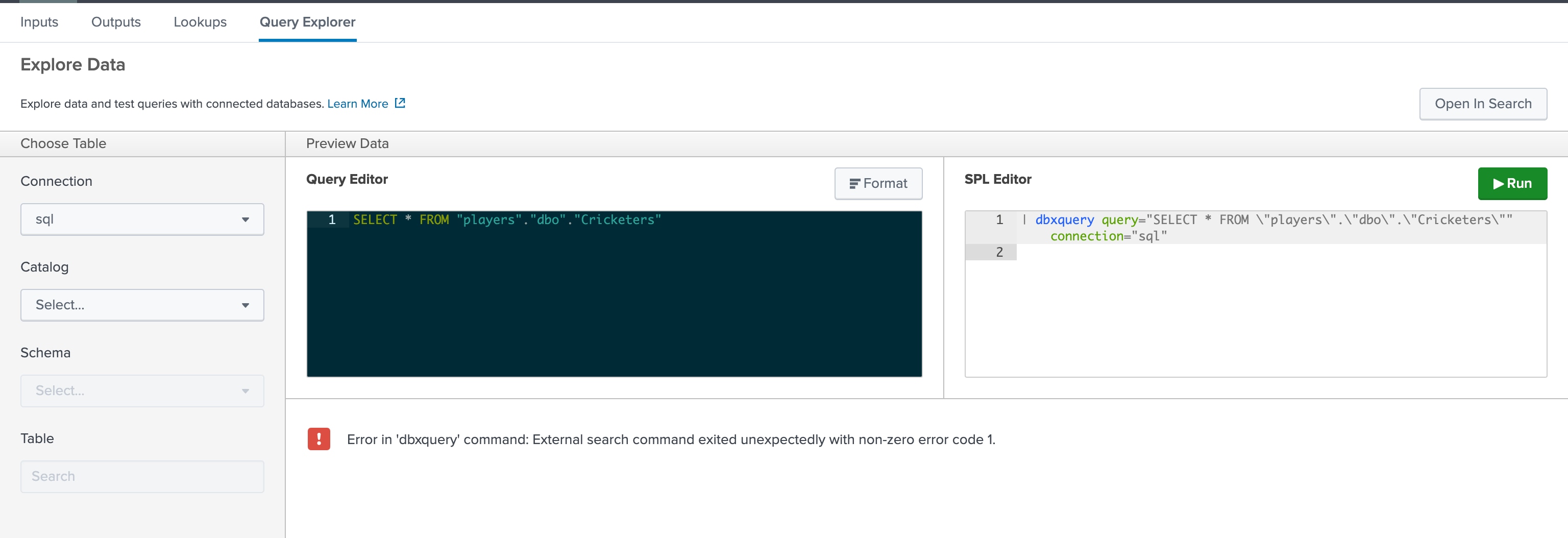
When running a query in the input configuration or the query explorer window, the following error is displayed:
Error in 'dbxquery' command: External search command exited unexpectedly with non-zero error code 1.This error occurs because the DBX query server fails to start due to an invalid port configuration.
Reference Screenshot:
Investigation
Step 1: Check Internal Logs for Errors
Run the following SPL command on the Splunk Search Head to inspect error logs:
index=_internal sourcetype="splunkd" log_level="ERROR"If the issue exists, logs will contain errors similar to:
ERROR ExecProcessor - message from "/opt/splunk/etc/apps/splunk_app_db_connect/linux_x86_64/bin/dbxquery.sh"
at [Source: (File); line: 1, column: 7] (through reference chain: com.splunk.dbx.command.DbxQueryServerConf["port"])
...
com.fasterxml.jackson.databind.exc.InvalidFormatException.from(InvalidFormatException.java:67)
The error message suggests that the query server is unable to read the port configuration from the file.
Step 2: Identify Incorrect Configuration in dbxquery_server.yml file
Upon investigation, the file $SPLUNK_HOME/etc/apps/splunk_app_db_connect/config/dbxquery_server.yml contains an incorrect port value, such as:
port: 999999999999
driversFolder: ${SPLUNK_HOME}/etc/apps/splunk_app_db_connect/drivers/
logbackConfigurationFile: ${SPLUNK_HOME}/etc/apps/splunk_app_db_connect/config/command_logback.xml
maxParallelQuery: 200
The port value (999999999999) is invalid, causing the DBX query server to crash.
Resolution
To fix the issue, follow these steps:
Step 1: Modify dbxquery_server.yml File
- Open the configuration file:
vi $SPLUNK_HOME/etc/apps/splunk_app_db_connect/config/dbxquery_server.ymlLocate the port parameter and update it with a valid value (e.g., 9999):
port: 9999
driversFolder: ${SPLUNK_HOME}/etc/apps/splunk_app_db_connect/drivers/
logbackConfigurationFile: ${SPLUNK_HOME}/etc/apps/splunk_app_db_connect/config/command_logback.xml
maxParallelQuery: 200
Save and exit the file (by wq!).
Step 2: Restart Splunk Services
- Run the following command to restart Splunk:
$SPLUNK_HOME/bin/splunk restartStep 3: Verify the Fix
- Retry executing the query in DB Connect Query Explorer.
Monitor logs using:
index=_internal sourcetype="splunkd" log_level="ERROR"
Ensure that the error is no longer present.
Revision History
| Revision | Publish Date | Comments |
|---|---|---|
1.0 |
29-Sep-2026
|
Initial Release |
 Feedback
Contact Cisco
- Open a Support Case

- (Requires a Cisco Service Contract)
This Document Applies to These Products
Related Articles
- ERROR: "Error in 'dbxquery' command: External search command exited unexpectedly with non-zero error code 1".
- Getting error "Error in 'dbxquery' command: External search command exited unexpectedly with nonzero error code 1." while executing DB Input.
- Error in 'dbxquery' command: External search command exited unexpectedly" error while upgrading the Splunk DB Connect