Resolving CERTIFICATE_VERIFY_FAILED Error in Add-on Builder Apps when Using REST API method.
Available Languages
Applicability
Splunk Enterprise Add-on Builder v4.3.0Description
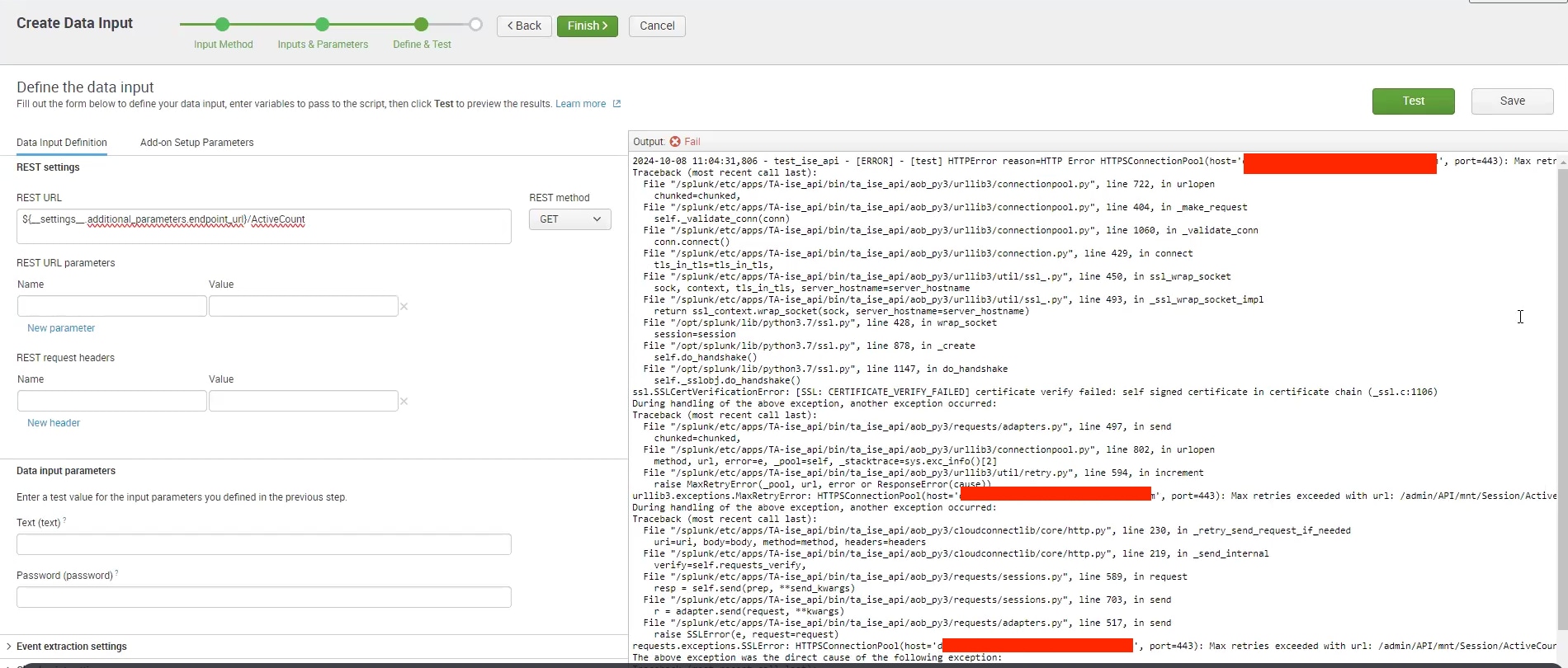
During the process of testing data input while creating a custom app using the REST API method in Add-on Builder, the following error was encountered:
Steps to create a custom App/add-on using the REST API method: Add-on Builder > New add-on and fill the details > Configure Data Collection > New Inputs > Rest API > set Data input Properties, Data Input parameters and Add-on Setup parameters (and click next) > Enter your REST API URL > click on Test.
Investigation
Upon investigation seeing error [SSL: CERTIFICATE_VERIFY_FAILED] certificate verify failed: self signed certificate in certificate chain.
Below log are shown in Splunkd.log
2024-09-30 11:22:53,971 INFO pid=2247380 tid=MainThread file=http.py:_retry_send_request_if_needed:226 | [test] Invoking request to [https://domain.test.link.com/admin/API/mnt/Session/ActiveCount/] using [GET] method
2024-09-30 11:22:54,280 ERROR pid=2247380 tid=MainThread file=http.py:_retry_send_request_if_needed:241 | [test] [SSL: CERTIFICATE_VERIFY_FAILED] certificate verification failed. The certificate of the https server [https://domain.test.link.com/admin/API/mnt/Session/ActiveCount/] is not trusted, You may need to check the certificate and refer to the documentation and add it to the trust list. Traceback (most recent call last):
  File "/splunk/etc/apps/TA-ise_api/bin/ta_ise_api/aob_py3/urllib3/connectionpool.py", line 722, in urlopen
.
.
    self.do_handshake()
  File "/opt/splunk/lib/python3.7/ssl.py", line 1147, in do_handshake
    self._sslobj.do_handshake()
ssl.SSLCertVerificationError: [SSL: CERTIFICATE_VERIFY_FAILED] certificate verify failed: self signed certificate in certificate chain (_ssl.c:1106)During handling of the above exception, another exception occurred:Traceback (most recent call last):
  File "/splunk/etc/apps/TA-ise_api/bin/ta_ise_api/aob_py3/requests/adapters.py", line 497, in send
    chunked=chunked,
  File "/splunk/etc/apps/TA-ise_api/bin/ta_ise_api/aob_py3/urllib3/connectionpool.py", line 802, in urlopen
    method, url, error=e, _pool=self, _stacktrace=sys.exc_info()[2]
.
.
urllib3.exceptions.MaxRetryError: HTTPSConnectionPool(host='domain.test.link.com', port=443): Max retries exceeded with url: /admin/API/mnt/Session/ActiveCount/ (Caused by SSLError(SSLCertVerificationError(1, '[SSL: CERTIFICATE_VERIFY_FAILED] certificate verify failed: self signed certificate in certificate chain (_ssl.c:1106)')))During handling of the above exception, another exception occurred:Traceback (most recent call last):
  File "/splunk/etc/apps/TA-ise_api/bin/ta_ise_api/aob_py3/cloudconnectlib/core/http.py", line 230, in _retry_send_request_if_needed
    uri=uri, body=body, method=method, headers=headers
.
.
  File "/splunk/etc/apps/TA-ise_api/bin/ta_ise_api/aob_py3/requests/adapters.py", line 517, in send
    raise SSLError(e, request=request)
requests.exceptions.SSLError: HTTPSConnectionPool(host='domain.test.link.com', port=443): Max retries exceeded with url: /admin/API/mnt/Session/ActiveCount/ (Caused by SSLError(SSLCertVerificationError(1, '[SSL: CERTIFICATE_VERIFY_FAILED] certificate verify failed: self signed certificate in certificate chain (_ssl.c:1106)')))
Resolution
1) Validate if the SSL certificate is correct using below curl command.
curl -H "Authorization: Basic $(echo -n 'username:password' | base64)" --cacert certificate.pem <Rest_API>- Based on the output of the command above, if the certificate is valid, proceed to step 2. If it is not valid, consider contacting the REST API team to obtain a valid certificate before proceeding.
2) Append the Self-signed certificate (cacert.pem private certificate file) of your API on the below path.
$SPLUNK_HOME/etc/apps/splunk_app_addon-builder/bin/ta_generator/resources_lib/4.3.0/aob_py3/certifi/cacert.pemNOTE: This certificate will be added on App level only.
3) After adding the certificate, restart the Splunkd service on the instance to apply the changes.
The add-on/app should now be able to successfully validate the self-signed certificate of the API.
Revision History
| Revision | Publish Date | Comments |
|---|---|---|
1.0 |
29-Sep-2026
|
Initial Release |
 Feedback
Contact Cisco
- Open a Support Case

- (Requires a Cisco Service Contract)