Apps/Add-ons failing to load configuration page after Splunk Upgrade
Available Languages
Applicability
Splunk EnterpriseDescription
About Splunk Add-on builder:
- The Add-on builder feature, can be used to build custom apps and add-ons for our deployment. It helps to create and validate the add-on features before getting it certified.
- While creating the custom apps, the add-on builder creates the folder 'aob_py3' that provides the necessary python libraries to run the app.
- Though the add-ons in Splunk generally do not have a GUI, the add-on builder also helps to create the apps with GUI by providing the required modules necessary for apps to handle the inputs and configurations.
Use Case:
Considering an app created with the help of the add-on builder and name it 'TA-custom-app', The app was currently running on Splunk version 9.0.8. When Splunk was upgraded from 9.0.8 to 9.0.9, it is observed that the app could not load its configurations page. Despite upgrading Splunk to the version 9.2.1 and performing multiple tests like re-installing the app and rolling back the Splunk version and re-upgrading, the configurations page could not be loaded and was throwing an error code 500 which is not Splunk induced. 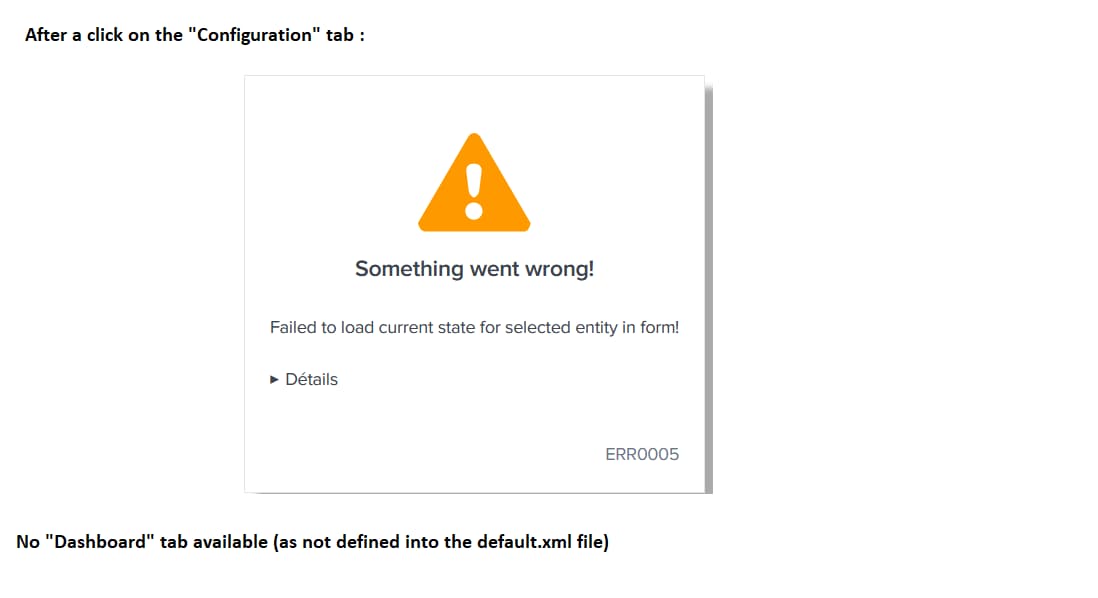
When the app is installed on another instance, it works fine unlike the particular problematic instance where the app was installed originally. It appears that the Splunk upgrade has caused the app functionality to break on that instance though the problem is environmental.
Also later on, the issue is also noted on a supported app : The Splunk Add-on for Microsoft Office 365 (#4055)
Investigation
While investigating the diag, a specific log is encountered,
\nTraceback (most recent call last):\n File "/opt/splunk/lib/python3.7/site-packages/splunk/admin.py", line 108, in init_persistent\n hand = handler(mode, ctxInfo, data)\n File "/opt/splunk/etc/apps/TA-custom-app/bin/ta_custom_app/aob_py3/splunktaucclib/rest_handler/admin_external.py", line 95, in __init__\n get_splunkd_endpoint(),\n File "/opt/splunk/etc/apps/TA-custom-app/bin/ta_custom_app/aob_py3/splunktaucclib/rest_handler/admin_external.py", line 77, in get_splunkd_endpoint\n splunkd_uri = get_splunkd_uri()\n File "/opt/splunk/etc/apps/TA-custom-app/bin/ta_custom_app/aob_py3/solnlib/splunkenv.py", line 208, in get_splunkd_uri\n scheme, host, port = get_splunkd_access_info()\n File "/opt/splunk/etc/apps/TA-custom-app/bin/ta_custom_app/aob_py3/solnlib/splunkenv.py", line 185, in get_splunkd_access_info\n host_port = get_conf_key_value("web", "settings", "mgmtHostPort")\n File "/opt/splunk/etc/apps/TA-custom-app/bin/ta_custom_app/aob_py3/solnlib/splunkenv.py", line 227, in get_conf_key_value\n stanzas = get_conf_stanzas(conf_name)\n File "/opt/splunk/etc/apps/TA-custom-app/bin/ta_custom_app/aob_py3/solnlib/splunkenv.py", line 284, in get_conf_stanzas\n parser.readfp(StringIO(out))\n File "/opt/splunk/lib/python3.7/configparser.py", line 762, in readfp\n self.read_file(fp, source=filename)\n File "/opt/splunk/lib/python3.7/configparser.py", line 717, in read_file\n self._read(f, source)\n File "/opt/splunk/lib/python3.7/configparser.py", line 1110, in _read\n raise e\nconfigparser.ParsingError: Source contains parsing errors: '<???>'\n [line 2067]: '| #UNAUTHORIZED ACCESS TO THIS DEVICE IS PROHIBITED.\xa0\xa0\xa0\xa0\xa0\xa0\xa0\xa0\xa0\xa0\xa0\xa0\xa0\xa0\xa0\xa0\xa0 #\n'\n [line 2069]: '| #Explicit permission is required to access or configure this device.#\n'\n [line 2071]: '| #Unauthorized attempts and actions to access or use this system\xa0\xa0\xa0\xa0 #\n'\n [line 2073]: '| #may result in civil and/or criminal penalties,\xa0\xa0\xa0\xa0\xa0\xa0\xa0\xa0\xa0\xa0\xa0\xa0\xa0\xa0\xa0\xa0\xa0\xa0\xa0\xa0 #\n'\n [line 2075]: '| #articles 323-1 and 323-7 of French Penal Code.\xa0\xa0\xa0\xa0\xa0\xa0\xa0\xa0\xa0\xa0\xa0\xa0\xa0\xa0\xa0\xa0\xa0\xa0\xa0\xa0 #\n'\n [line 2077]: '| #Any action taken on or against this device is logged and monitored.#\n'\n [line 2079]: '| #####################################################################\n'\nThis indicates an issue in the splunkenv.py, which is a script packed with the Splunk SDK for Python.
When tried to trace the splunkenv.py at the part indicated by the log message, in /etc/apps/TA-custom-app/bin/ta_custom_app/aob_py3/solnlib/splunkenv.py, the following function can be seen
if isinstance(out, bytes):
    out = out.decode()
parser = ConfigParser(**{"strict": False})
parser.optionxform = str
parser.readfp(StringIO(out))
This code checks if out is of type bytes and decodes it to a string if necessary. Then, it initializes a ConfigParser object and reads the configuration from out.
However, this reading does not seem to be working for the problematic server.
Resolution
The following lines of code are added to the file to make the reading work. The modified part of the code is as below,
if isinstance(out, bytes):
    out = out.decode()workString1 = re.sub("login_content = (.*)\n", "login_content = ", out)
workString2 = re.sub("(\|)(.*)\#", "", workString1)
out = workString2parser = ConfigParser(**{"strict": False})
parser.optionxform = str
parser.readfp(StringIO(out))
In addition to decoding out if it’s of type bytes, this code performs two regular expression substitutions:
First Substitution Removes any content after login_content = up to the newline character.
Second Substitution: Removes any content between | and #
Configuration Content:
The modified code alters the content of the configuration string out before it is parsed. This can resolve issues related to specific configuration entries that might be causing the parser to fail.
Environment Differences:
The discrepancy between the two servers (the problematic server and the working server) could be due to differences in the configuration files or the data being processed. The additional substitutions in the modified code might be necessary to handle specific entries that exist on one server but not the other.
Why It Works?
The additional regular expression substitutions likely sanitized the configuration data, making it compatible with the ConfigParser. This could explain why the modified code worked on the problematic server.
Conclusion:
The encountered error after the Splunk upgrade is environment related, and had to do with how the information passed through the function is processed. The additional processing steps of the string had solved the issue.
In addition to the above point, the issue is not only restricted to apps built using Add-on builder but also for Splunk supported apps. After making the equivalent changes, the pages started loading for the apps.
In other words, though the issue was noted after the Splunk upgrade, the problem is more environment related and not Splunk core related.
Revision History
| Revision | Publish Date | Comments |
|---|---|---|
1.0 |
29-Sep-2026
|
Initial Release |
 Feedback
Contact Cisco
- Open a Support Case

- (Requires a Cisco Service Contract)