error: curl: (56) Received HTTP code 403 from proxy after CONNECT
Available Languages
Applicability
Splunk Enterprise Search Head / Search Head ClusterDescription
After configuring `http_proxy` and `https_proxy` settings in the `server.conf` file on the Splunk deployment server, the settings did not reflect on the Search Head Cluster nodes.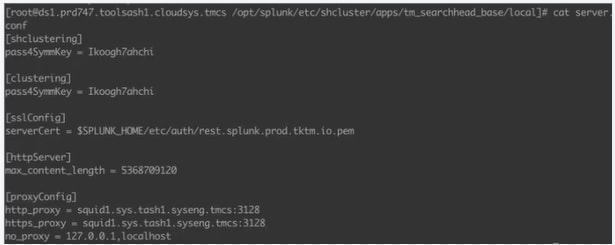
Attempts to run `curl` commands from the SHC nodes without manually specifying the proxy resulted in HTTP 403 errors, indicating that the proxy server was blocking the requests.
Investigation
1. Network connectivity was verified, and it was confirmed that the connection is established and functional. 
2. However, when the `curl` command was run without the proxy, it consistently resulted in the error mentioned below :-
error: curl: (56) Received HTTP code 403 from proxy after CONNECT
-This error suggested that the proxy settings were either not applied correctly, or the proxy server required authentication.
3. Errors in splunkd.log -
ProxyConfig [35758 MainThread] - Failed to initialize https_proxy from server.conf for splunkd. Please make sure that the https_proxy property is set as https_proxy=http://host:port in case HTTP proxying needs to be enabled.
-This message indicates that the https_proxy setting in server.conf file was not successfully initialized and it suggests that there might be a syntax error, incorrect formatting, or missing https_proxy setting in the server.conf. Splunk requires the proxy configuration to be in a specific format, like https_proxy=http://host:port.
4. Checked `server.conf` for correct `http_proxy` and `https_proxy` settings. The proxy settings are correctly defined and the correct section modified:
[proxyConfig]
http_proxy = http://squid1.sys.tash1.syseng.tmcs:3128
https_proxy = http://squid1.sys.tash1.syseng.tmcs:3128
Resolution
It was determined that the proxy server required authentication. To resolve the issue, the `-u` option was included in the `curl` command to provide the necessary proxy credentials.
Example of the corrected `curl` command:
curl -u username:password -I https://jira.livenation.com/rest/cvautomation/latest/hooksIn this command:-
`-u username: password` specifies the username and password required for proxy authentication.
After implementing the `-u` option, the `curl` command executed successfully, confirming that the proxy authentication was resolved.
Revision History
| Revision | Publish Date | Comments |
|---|---|---|
1.0 |
29-Sep-2026
|
Initial Release |
 Feedback
Contact Cisco
- Open a Support Case

- (Requires a Cisco Service Contract)