Unable to Ingest Action to S3 destination
Available Languages
Applicability
Splunk Enterprise 9.2.1 AWS EC2 instance Ingest Actions S3Description
When creating a new destination in ingest actions to be sent to Amazon S3 bucket, and setting IAM role as an authentication method a problem of authentication can come up when trying to validate the connection and verify that role policies are correct to send to S3 bucket but the issue persists.
Investigation
The error is reproduced by doing:
- Log in to Splunk Cluster manager
- Settings > Ingest Actions > Destinations > Create New Destination
- Fill out the form of Step 1, then click next
- Step 2, select IAM role
- Click "Test connection"
- The next message shows up
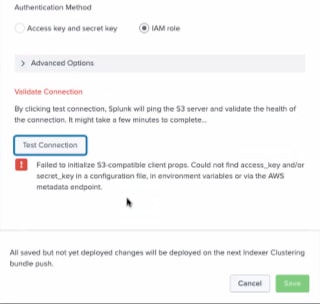
In log file:
$SPLUNK_HOME/var/log/splunk/splunkd.logThe following errors were found:
ERROR AwsCredentials [611422 TcpChannelThread] - S3ClientProps IamServiceAccountAwsCredentials error failed to open identity token file AWS_WEB_IDENTITY_TOKEN_FILE error=No such file or directory
ERROR AwsCredentials [611422 TcpChannelThread] - S3ClientProps did not find credentials in metadata endpoint ... giving up
Resolution
This issue can be resolved by performing the following modification in
$SPLUNK_HOME/etc/system/local/server.confAdd the following stanza, attribute and its value:
[imds]
imds_version = v2
This helps utilize the instance metadata service, which provides temporary security credentials for AWS services. Then, restart Splunkd service to apply changes.
Finally, login Splunk Cluster Manager and perform the same steps listed in the Investigation section, Test connection must establish the connection successfully now.
Revision History
| Revision | Publish Date | Comments |
|---|---|---|
1.0 |
29-Sep-2026
|
Initial Release |
 Feedback
Contact Cisco
- Open a Support Case

- (Requires a Cisco Service Contract)