Cluster manager fails to start due to missing pass4SymmKey ("Security Key" per UI) for indexer clustering.
Available Languages
Applicability
Splunk EnterpriseDescription
While setting up a cluster, or upon restarting the Splunkd service, the Cluster Manager (CM) and some or all indexers will not start.
From the command line (CLI), note Splunk Web tries to come up, then stops with the following message:
Waiting for web server at http://127.0.0.1:8000 to be available...............WARNING: web interface does not seem to be available!
Investigation
A cluster can be configured via the Splunk Web UI via Settings > Indexer Clustering, then clicking on the "Enable Indexer Clustering" button.
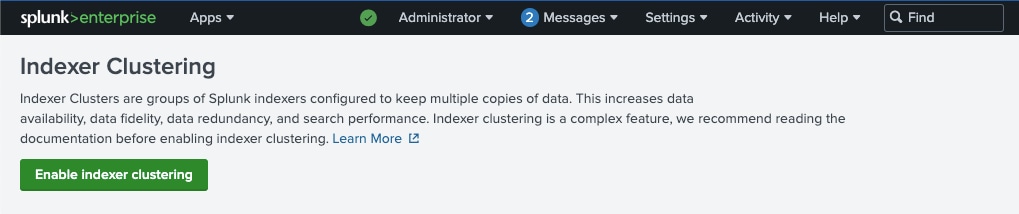
By using the Web UI to configure instances for indexer clustering, Splunk places appropriate configuration settings into the current instance's server.conf file. Once the settings are in place, a restart of Splunk will cause that instance to behave as a cluster member.
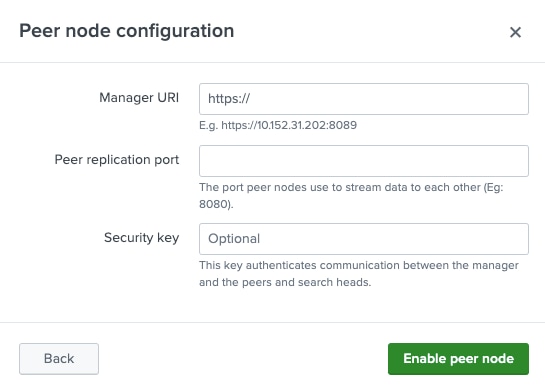
During this process, when selecting either the Manager Node radio button or the Peer Node radio button then clicking "Next", the resulting options show a "Security Key" field, which is listed as Optional:
This same field is visible when choosing Search Head node, but it does not mention the field as optional:
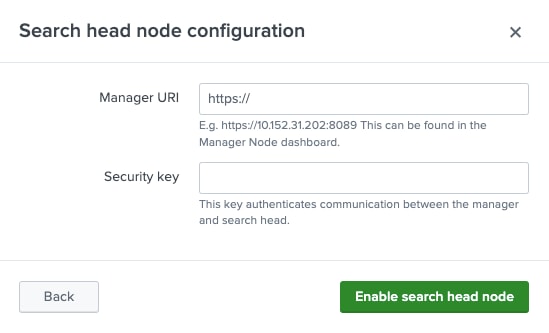
This "Security Key" setting from the UI corresponds to the pass4SymmKey value in server.conf's [clustering] stanza.
Of the pass4SymmKey value in the [general] stanza, Server.conf.spec says:
[general]

pass4SymmKey = <password>
* Authenticates traffic between:
  * License manager and its license peers.
  * Members of a cluster.
  * Deployment server (DS) and its deployment clients (DCs).
* When authenticating members of a cluster, clustering might override the
  passphrase specified in the clustering stanza. A clustering searchhead
  connecting to multiple managers might further override in the
  [clustermanager:stanza1] stanza.
* When authenticating deployment servers and clients, by default, DS-DCs
  passphrase authentication is disabled. To enable DS-DCs passphrase
  authentication, you must also add the following line to the [broker:broker]
  stanza in the restmap.conf file: requireAuthentication = true
* In all scenarios, every node involved must set the same passphrase in
  the same stanzas. For example in the [general] stanza and/or
  [clustering] stanza. Otherwise, the respective communication does not proceed:
    - licensing and deployment in the case of the [general] stanza
    - clustering in case of the [clustering] stanza)
* Unencrypted passwords must not begin with "$1$". This is used by
  Splunk software to determine if the password is already encrypted.
and in the [clustering] stanza, it shows this:
pass4SymmKey = <password>
* Secret shared among the nodes in the cluster to prevent any
  arbitrary node from connecting to the cluster. If a peer or
  search head is not configured with the same secret as the manager,
  it is not able to communicate with the manager.
* If it is not set in the [clustering] stanza, the key
  is looked in the [general] stanza
* Unencrypted passwords must not begin with "$1$", as this is used by
  Splunk software to determine if the password is already encrypted.
* No default.
Buried deep within the server.conf.spec's [clustering] stanza is this little-known setting:
allow_default_empty_p4symmkey = <boolean>
* Only valid for 'mode=manager'.
* Affects behavior of manager during start-up, if 'pass4SymmKey'resolves
  to the null string or the default password ("changeme").
* If set to true, the manager posts a warning but still launches.
* If set to false, the manager posts a warning and stops.
* Default: true
This setting allows the pass4SymmKey in [clustering] to be optional. Before version 9.1.0, this attribute was set to "true" by default. Starting with 9.1.0 onward, the default value for this attribute is instead "false".
Splunk 9.0.x or earlier clusters did not use a pass4SymmKey, once upgraded to 9.1.x or newer, the Cluster Manager will fail to start, as will its indexer peers if Splunkd is restarted on them (even if they have not yet been upgraded, as this attribute is set only on the Cluster Manager).
Splunk 9.1.x or above configuring their cluster via the UI, the same behavior occurs if the "Security Key" field is left blank for any instance being configured for the cluster.
If additional validation is needed:
- Confirm whether Splunkd is running at all with either (or both) of these commands. For the issue addressed in this article, splunkd process is not running:
Commands:$ netstat -tulpn | grep splunk $ ps -aux | grep splunk
Sample outputs:splunker@cm:~$ sudo netstat -tulpn | grep splunk splunker@cm:~$ sudo ps -aux | grep splunk root 70005 0.0 0.2 13688 9180 ? Ss 18:42 0:00 sshd: splunker [priv] splunker 70022 0.0 0.2 18916 9392 ? Ss 18:42 0:00 /lib/systemd/systemd --user splunker 70023 0.0 0.1 170664 4644 ? S 18:42 0:00 (sd-pam) splunker 70125 0.0 0.1 13980 6056 ? S 18:42 0:00 sshd: splunker@pts/0 splunker 70126 0.0 0.1 10168 5276 pts/0 Ss 18:42 0:00 -bash splunker 71216 0.0 0.0 8168 724 pts/0 S+ 18:51 0:00 grep splunkNote: if
netstatis not installed, it should be part of thenet-toolspackage from virtually any Linux distribution's package manager. Examples:$ sudo apt install net-tools [On Debian, Ubuntu and Mint] $ sudo yum install net-tools [On RHEL/CentOS/Fedora and Rocky/AlmaLinux] $ sudo emerge -a sys-apps/net-tools [On Gentoo Linux] $ sudo apk add net-tools [On Alpine Linux] $ sudo pacman -S net-tools [On Arch Linux] $ sudo zypper install net-tools [On OpenSUSE] - Tail of
splunkd.logfrom CLI shows the following messages:
Command:tail -f $SPLUNK_HOME/var/log/splunk/splunkd.log | grep ERROR
(use the entire file path tosplunkd.logif environment variables are not set for this instance)
Sample output:
splunker@cm:~$ tail -f $SPLUNK_HOME/var/log/splunk/splunkd.log | grep ERROR 07-26-2024 18:44:16.638 +0000 ERROR ClusteringMgr [70225 MainThread] - pass4SymmKey setting in the clustering or general stanza of server.conf is set to empty or the default value. You must change it to a different value. 07-26-2024 18:44:16.641 +0000 ERROR loader [70225 MainThread] - clustering initialization failed; won't start splunkd - This scenario exists where the btool output for Cluster Manager's server.conf shows a
pass4SymmKeyfor the[general]stanza, but none for the[clustering]stanza:
Commands: Run these from$SPLUNK_HOME/bin. Examples below grep for "local" because these settings are typically located in$SPLUNK_HOME/etc/system/local. If you are not certain, eliminate the| grepstatement entirely.$ ./splunk btool server list --debug general | grep local $ ./splunk btool server list --debug clustering | grep local
Sample outputs:splunker@cm:/opt/splunk/bin$ ./splunk btool server list --debug general | grep local /opt/splunk/etc/system/local/server.conf [general] /opt/splunk/etc/system/local/server.conf pass4SymmKey = $7$1aQMyQnP+7BKiRZXkDsxR/KXr4wzSkt/xF9Cjbhl1bD5VVdHLD7sGQ== /opt/splunk/etc/system/local/server.conf serverName = clustermanagersplunker@cm:/opt/splunk/bin$ ./splunk btool server list --debug clustering | grep local /opt/splunk/etc/system/local/server.conf [clustering] /opt/splunk/etc/system/local/server.conf cluster_label = idxcluster /opt/splunk/etc/system/local/server.conf maintenance_mode = false /opt/splunk/etc/system/local/server.conf mode = manager /opt/splunk/etc/system/local/server.conf replication_factor = 2
Resolution
This issue can be quickly resolved by adding one of these two attributes to $SPLUNK_HOME/etc/system/local/server.conf file's [clustering] stanza:
- EITHER
pass4SymmKey = <clear text Security Key - Splunk will hash it is started again> - OR a
llow_default_empty_p4symmkey = falseto allow the cluster to rely on the pass4SymmKey in server.conf's [general] stanza (not recommended for security reasons)
Notes:
- Please ensure the
pass4SymmKeyused on the CM is identical to the value used on the indexers and all instances configured to search this cluster. - Enter the
pass4SymmKey("Security key" referenced in Web UI) in plain text inserver.conf. Splunk will hash this value when it restarts. - Do not copy a hashed
pass4SymmKeyvalue from one instance to another, as each instance uses a different "secret" to hash these in .conf files. A value hashed by a different instance will be read as plain text by the current instance and get re-hashed. It will not resolve to the correct value. - To verify any hashed password or pass4SymmKey in a .conf file, run the following command from
$SPLUNK_HOME/bin(your hashed value must be enclosed in single quotes):./splunk show-decrypted --value '$1$XYZ#ThisIsMyHashedPass4SymmKeyValue-135'
Related Links
- Server.conf.spec
- Splunk Doc: About securing clusters
- About pass4SymmKeys in Splunk doc: Managing Indexers and Clusters of Indexers
- Splunk Community post regarding decrypting pass4SymmKey and password values in .conf files
Revision History
| Revision | Publish Date | Comments |
|---|---|---|
1.0 |
29-Sep-2026
|
Initial Release |
 Feedback
Contact Cisco
- Open a Support Case

- (Requires a Cisco Service Contract)