After upgrading Splunk from 8.x to 9.x, Splunk failed to start
Available Languages
Applicability
Splunk EnterpriseDescription
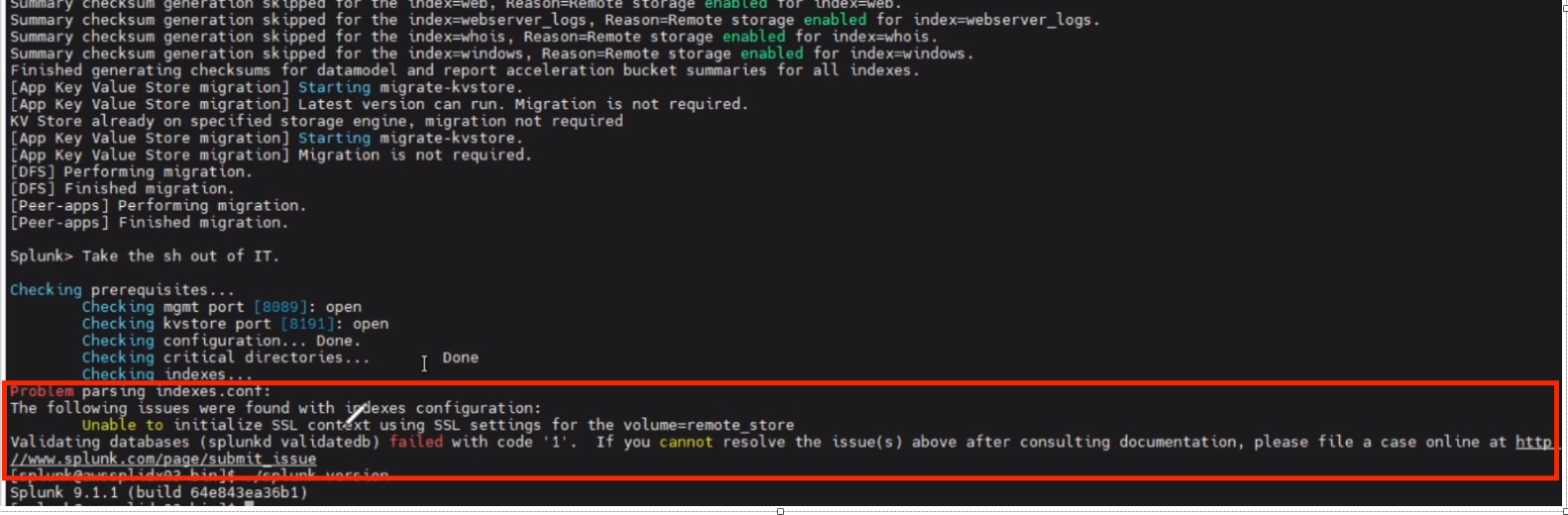
After upgrading Splunk from 8.x to 9.x, Splunk failed to start with the error below:
"Unable to initialize SSL context using SSL settings for the volume=remote_store
Validating databases (splunkd validatedb) failed with code '1'. If you cannot resolve the issue(s) above after consulting documentation, please file a case online at http://www.splunk.com/page/submit_issue"
Investigation
▶ What's the symptoms?
Splunk failed to start with the error
▶ Where is the SSL settings for Remote_Store?
Normally, we can configure remote.s3.sslRootCAPath in indexes.conf.
Note, if it is not configured here, splunk will use the CA Cert configured in [sslConfig/caCertFile] of server.conf
remote.s3.sslRootCAPath = <path>
* Full path to the Certificate Authority (CA) certificate PEM format file
  containing one or more certificates concatenated together. S3 certificate
  will be validated against the CAs present in this file.
* Optional.
* Default: [sslConfig/caCertFile] in server.conf
▶ There are no any SSL configuration and CA cert changes/updates, why it stop working after upgrade from 8.x to 9.x?
The root cause is as below:
#######
Issue 1
#######
Cx's CA cert used to be under $SPLUNK_HOME/etc/slave-apps. After 9.1.1 upgrade, the path "$SPLUNK_HOME/etc/slave-apps" doesn't exist anymore, it changed from "slave-apps" to "slave-apps.old", so Splunk is not able to find the cert.
+ What is configured in server.conf ?
[sslConfig]
sslRootCAPath = $SPLUNK_HOME/etc/slave-apps/AWS_xxx/local/xxx.pem
+ Where is the CA after 9.1.1 upgrade?
cert: xxx.pem is under /opt/splunk/etc/slave-apps.old/AWS_xxx/local/
#######
Issue 2
#######
CA cert is expired on Mar 17 2024
[splunk@idx03 local]$ openssl x509 -noout -dates -in xxx.pem
notBefore=Mar 17 00:00:36 2014 GMT
notAfter=Mar 17 00:00:36 2024 GMT
Resolution
[1] Renew cert under /opt/splunk/etc/slave-apps.old/AWS_xxx/local/
[2] Then update server.conf under /opt/splunk/etc/peer-apps/AWS_xxx/local/
-> From
[sslConfig]
sslRootCAPath = $SPLUNK_HOME/etc/slave-apps/AWS_xxx/local/xxx.pem
-> To
[sslConfig]
sslRootCAPath = $SPLUNK_HOME/etc/slave-apps.old/AWS_xxx/local/xxx.pem
---------------
In Splunk Doc: About upgrading to 9.0 READ THIS FIRST
The following is a list of important elements that you must consider before upgrading Splunk Enterprise and its components.
The indexer cluster slave-apps directory is renamed to peer-apps
Applicable components: Splunk Enterprise
Applicable OSes: all
Version introduced: 9.0
During the upgrade, the indexer cluster slave-apps directory is automatically renamed to peer-apps. To accommodate this renaming, you must manually change any external hardcoded references to slave-apps, such as external scripts, SSL certificates, and so on, to peer-apps. See Update common peer configurations and apps in Managing Indexers and Clusters of Indexers.
Ref:
https://docs.splunk.com/Documentation/Splunk/9.0.1/Installation/AboutupgradingREADTHISFIRST#The_indexer_cluster_slave-apps_directory_is_renamed_to_peer-apps
Revision History
| Revision | Publish Date | Comments |
|---|---|---|
1.0 |
29-Sep-2026
|
Initial Release |
 Feedback
Contact Cisco
- Open a Support Case

- (Requires a Cisco Service Contract)