Upgrading Deployment Server to 9.2.x Breaks Forwarder Management UI
Available Languages
Applicability
Deployment Server version 9.2.0, 9.2.1Description
When navigating to the Forwarder Management UI after upgrading your Deployment Server to 9.2.x, you might find that the UI shows 0 clients even though you had some before:
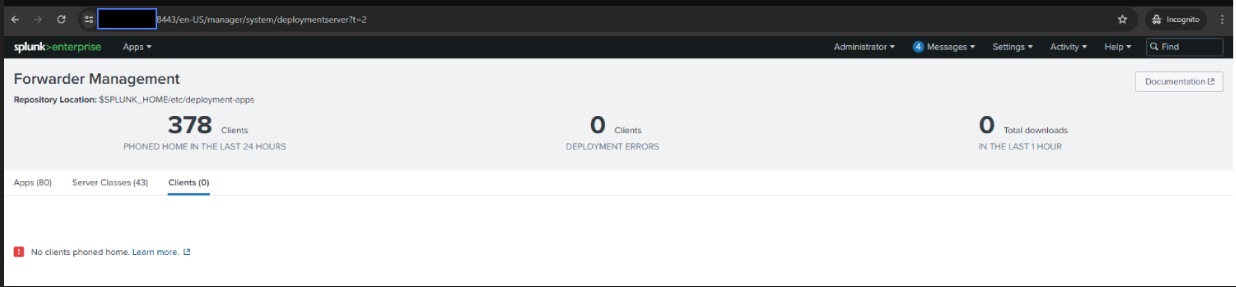
The reason for this is because in 9.2.x, the deployment server relies on logs in three new internal indexes, and is unable to search within those indexes:
_dsphonehome
_dsclient
_dsappevent
Investigation
Some things automatically happen with the Deployment Server upgrade to 9.2.x, so you check that these things are true:
Verify New Internal Indexes Exist
indexes.conf[_dsphonehome]
homePath   = $SPLUNK_DB/_dsphonehome/db
coldPath   = $SPLUNK_DB/_dsphonehome/colddb
thawedPath = $SPLUNK_DB/_dsphonehome/thaweddb
maxDataSize = 1024
frozenTimePeriodInSecs = 604800[_dsappevent]
homePath   = $SPLUNK_DB/_dsappevent/db
coldPath   = $SPLUNK_DB/_dsappevent/colddb
thawedPath = $SPLUNK_DB/_dsappevent/thaweddb
maxDataSize = 1024
frozenTimePeriodInSecs = 5184000[_dsclient]
homePath   = $SPLUNK_DB@OsDirSep@_dsclient@OsDirSep@db
coldPath   = $SPLUNK_DB@OsDirSep@_dsclient@OsDirSep@colddb
thawedPath = $SPLUNK_DB@OsDirSep@_dsclient@OsDirSep@thaweddb
maxDataSize = 1024
frozenTimePeriodInSecs = 5184000
Verify Sourcetypes Point to New Internal Indexes in inputs.conf
inputs.conf[monitor://$SPLUNK_HOME/var/log/client_events/phonehomes*] # should be the same path as in log.cfg or log-local.cfg
index = _dsphonehome
sourcetype = dsphonehome[monitor://$SPLUNK_HOME/var/log/client_events/appevents*] # should be the same path as in log.cfg or log-local.cfg
index = _dsappevent
sourcetype = dsappevent[monitor://$SPLUNK_HOME/var/log/client_events/clients*]
index = _dsclient
sourcetype = dsclient
Verify Sourcetype Configuration in props.conf
props.conf[dsphonehome]
SHOULD_LINEMERGE = false
TIMESTAMP_FIELDS = datetime
TIME_FORMAT = %m-%d-%Y %H:%M:%S.%l %z
INDEXED_EXTRACTIONS = json
KV_MODE = none
JSON_TRIM_BRACES_IN_ARRAY_NAMES = true[dsappevent]
SHOULD_LINEMERGE = false
TIMESTAMP_FIELDS = datetime
TIME_FORMAT = %m-%d-%Y %H:%M:%S.%l %z
INDEXED_EXTRACTIONS = json
KV_MODE = none
JSON_TRIM_BRACES_IN_ARRAY_NAMES = true[dsclient]
SHOULD_LINEMERGE = false
TIMESTAMP_FIELDS = datetime
TIME_FORMAT = %m-%d-%Y %H:%M:%S.%l %z
INDEXED_EXTRACTIONS = json
KV_MODE = none
JSON_TRIM_BRACES_IN_ARRAY_NAMES = true
These configurations should have been defined in the new app, SplunkDeploymentServerConfig. You can then verify that these logs exist by SSH'ing to the Deployment Server and looking for these log files (sample below):
$SPLUNK_HOME/var/log/client_events$ ls
appevents_936B00A9-B859-4C3D-BFD3-8DF208E2971E.log
clients_936B00A9-B859-4C3D-BFD3-8DF208E2971E.log
phonehomes_936B00A9-B859-4C3D-BFD3-8DF208E2971E.log
If Deployment Server is forwarding local data to other indexers but cannot search those indexers, configure outputs.conf
Add the following stanza and lines to outputs.conf so that the Deployment Server can keep it's local data internal
outputs.conf[indexAndForward]
index = true
selectiveIndexing = true
Resolution
Finally, to resolve the issue after verifying the above configurations, all you need to do is make sure that the Deployment Server can search itself for the indexed internal logs.
Add localhost to distsearch.conf
Find the default distributed search group (whichever stanza has default=true)
distsearch.confdistributedSearch:testgroup1
default = true
servers = somehostname.company.com
Add localhost:localhost to servers
distributedSearch:testgroup1
default = true
servers = somehostname.company.com,localhost:localhost
Reload the Deployment Server
After reloading the Deployment Server, it should start reading the phone homes and other logs from the connected forwarder clients and display those within the Forwarder Management UI.
Related Links
https://docs.splunk.com/Documentation/Splunk/9.2.0/Updating/Upgradepre-9.2deploymentservers
Revision History
| Revision | Publish Date | Comments |
|---|---|---|
1.0 |
29-Sep-2026
|
Initial Release |
 Feedback
Contact Cisco
- Open a Support Case

- (Requires a Cisco Service Contract)
This Document Applies to These Products
Related Articles
- After upgrade to 9.2.x, Deployment Server Forwarder Management UI experiences latency (slowness)
- Deployment Client bypasses Deployment Server and shows on License Manager's/Indexer's GUI in Forwarder Management
- Unable to delete Deployment Client from Deployment server after upgrading to 9.2.1
- After upgrading to version 9.2.x, the list of Deployment Clients (Forwarders) displayed under the Deployment Server is incomplete Or showing error "No clients phoned home"