Minimum Role Permissions required to View the Monitoring Console
Available Languages
Applicability
Splunk EnterpriseDescription
When applying permissions to User accounts in Splunk it is best practice to follow the least-privilege model and only apply the minimum capabilities that are required for the User to their job function.We have found a number of Splunk instances applying the admin_all_objects capability when creating a Role for access to the Monitoring Console which gives the User much greater access than what is required.
Investigation
When reviewing $SPLUNK_HOME/etc/system/local/authorize.conf you find that the Role created for Monitoring Console access has the admin_all_objects capability applied.For example:
cat authorize.conf
[role_monitoring_console]
accelerate_datamodel = disabled
accelerate_search = disabled
admin_all_objects = enabled
change_own_password = disabled
cumulativeRTSrchJobsQuota = 400
cumulativeSrchJobsQuota = 200
dispatch_rest_to_indexers = enabled
edit_bookmarks_mc = disabled
embed_report = disabled
export_results_is_visible = disabled
...(truncated)
Resolution
Step 1 - Create the RoleCreate a new role by editing $SPLUNK_HOME/etc/system/local/authorize.conf and adding the stanza and keys below. This will create a new role called role_mc_users with the capabilities listed:
[role_mc-users]
cumulativeRTSrchJobsQuota = 0
cumulativeSrchJobsQuota = 0
dispatch_rest_to_indexers = enabled
importRoles = power;user
license_tab = enabled
list_deployment_client = enabled
list_deployment_server = enabled
list_forwarders = enabled
list_health = enabled
list_httpauths = enabled
list_indexer_cluster = enabled
list_indexerdiscovery = enabled
list_search_head_clustering = enabled
list_search_scheduler = enabled
list_settings = enabled
srchIndexesAllowed = _*
srchIndexesDefault = _*
srchMaxTime = 0
If the roles also needs to launch the health check tab in the Monitoring Console please also add the following capabilities:
edit_dist_peer = enabled
edit_health = enabled
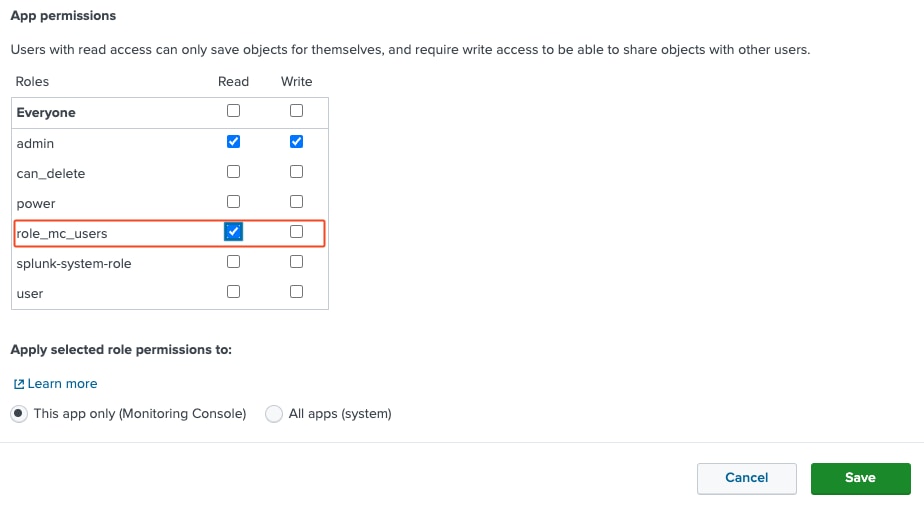
Step 2 - Allow the Role Read access to the App
Once the role has been created give the role Read access to the splunk_monitoring_console App in the menu Apps > Manage Apps > splunk_monitoring_console > Permissions
Step 3 - Apply the Role to the User
The Role role_mc_users can then be applied to the Users through the Splunk main menu Settings > USERS AND AUTHENTICATION > Users
Add the role_mc_users to the Selected item(s) in Assign roles and Save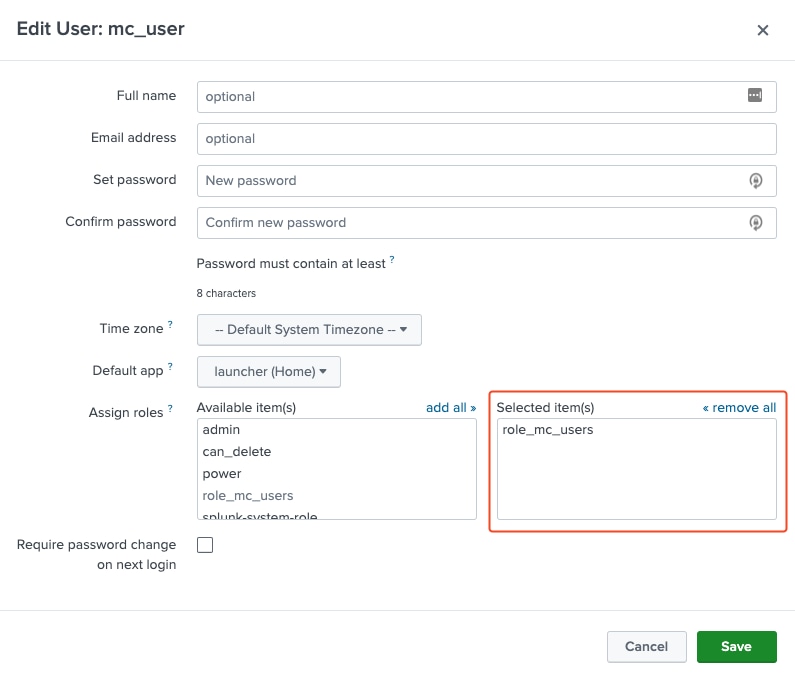
Step 4 - Reload Auth
$SPLUNK_HOME/bin/splunk reload auth
Related Links
For a list of what access each capability enables please see theList of Capabilties
About configuring role-based user access
Revision History
| Revision | Publish Date | Comments |
|---|---|---|
1.0 |
29-Sep-2026
|
Initial Release |
 Feedback
Contact Cisco
- Open a Support Case

- (Requires a Cisco Service Contract)