Unable to generate diag in the Indexer and Heavy forwarder.
Available Languages
Applicability
Splunk EnterpriseDescription
While trying to generate a Diagnostic Log in GUI setting -> Instrumentations -> New Diag -> Selecting the peer the status is failed as below: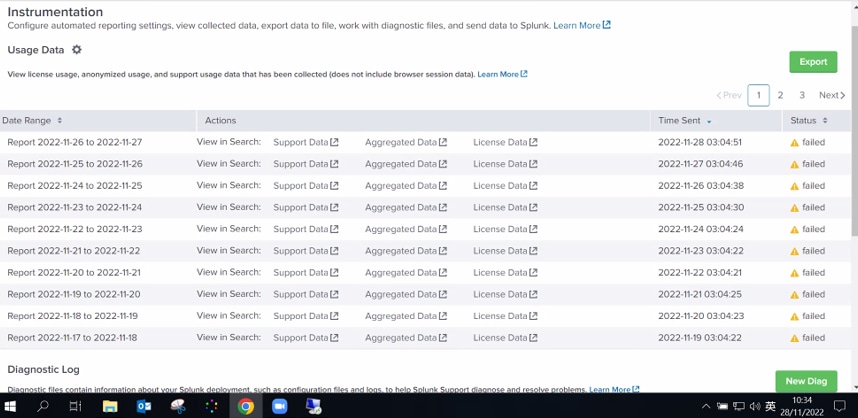
Investigation
1. Check the roles and capabilities of the user who tries to generate a diag, the user has admin permissions along with provided get_diag role which lets the user get a remote diag from a Splunk instance using the /streams/diag endpoint as per the below documents. Roles and Capabilities
2. Run the diag command Splunk diag, It takes several time to load after a period of time, the diag got generated but with the following error:
INFO TailReader [832 tailreader0] - Batch input finished reading file='C:\Program Files\Splunk\var\spool\splunk\tracker.log'WARN HttpListener [3224 webui] - Connection from x.x.x.x:54848 didn't send us any data, disconnectingINFO TailReader [832 tailreader0] - Batch input finished reading file='C:\Program Files\Splunk\var\spool\splunk\tracker.log'
3. As per the error, try to clear the cache in the browsers
1. Clear the cache in the browsers
Clear the cache within the browser. Note that this needs to be done on each browser. See http://www.refreshyourcache.com/en/home/ for how to do this.
2. Clear the cache in SplunkWeb
Clear the cache in SplunkWeb by calling the bump endpoint. This has the advantage of clearing the cache on all browsers without having to do it on each browser. Do this by going to the bump page here (replace mysplunkinstall with the domain name of your Splunk install): https://mysplunkinstall/en-US/_bump
Resolution
Found that the indexer and SH have been configured in the same instance and 1 HF as a standalone instance.
While checking the GUI on Search head we can see that the HF was disabled on the settings -> Distributed search -> search peers.
-> Enabled the HF by adding the search peer with the user details under settings -> Distributed search -> search peers after we were able to download the diag file successfully.
Related Links
RunningSplunkalongsideWindowsantivirusproducts
Revision History
| Revision | Publish Date | Comments |
|---|---|---|
1.0 |
29-Sep-2026
|
Initial Release |
 Feedback
Contact Cisco
- Open a Support Case

- (Requires a Cisco Service Contract)