ERROR : Failed to connect with JMX Server in the Splunk add-on for JMX while configuring the JMX account in Splunk.
Available Languages
Applicability
Splunk Add-on for Java Management Extensions Splunk Enterprise - version 8.x.x and 9.x.xDescription
While configuring the JMX account in the said add-on, it mainly asks for URL, username and password through which the add-on tries to connect with JMX server.
JMX server can be of different types such as IBM, Java, Tomcat, Kafka.
Based on the type, the URL will also differ.
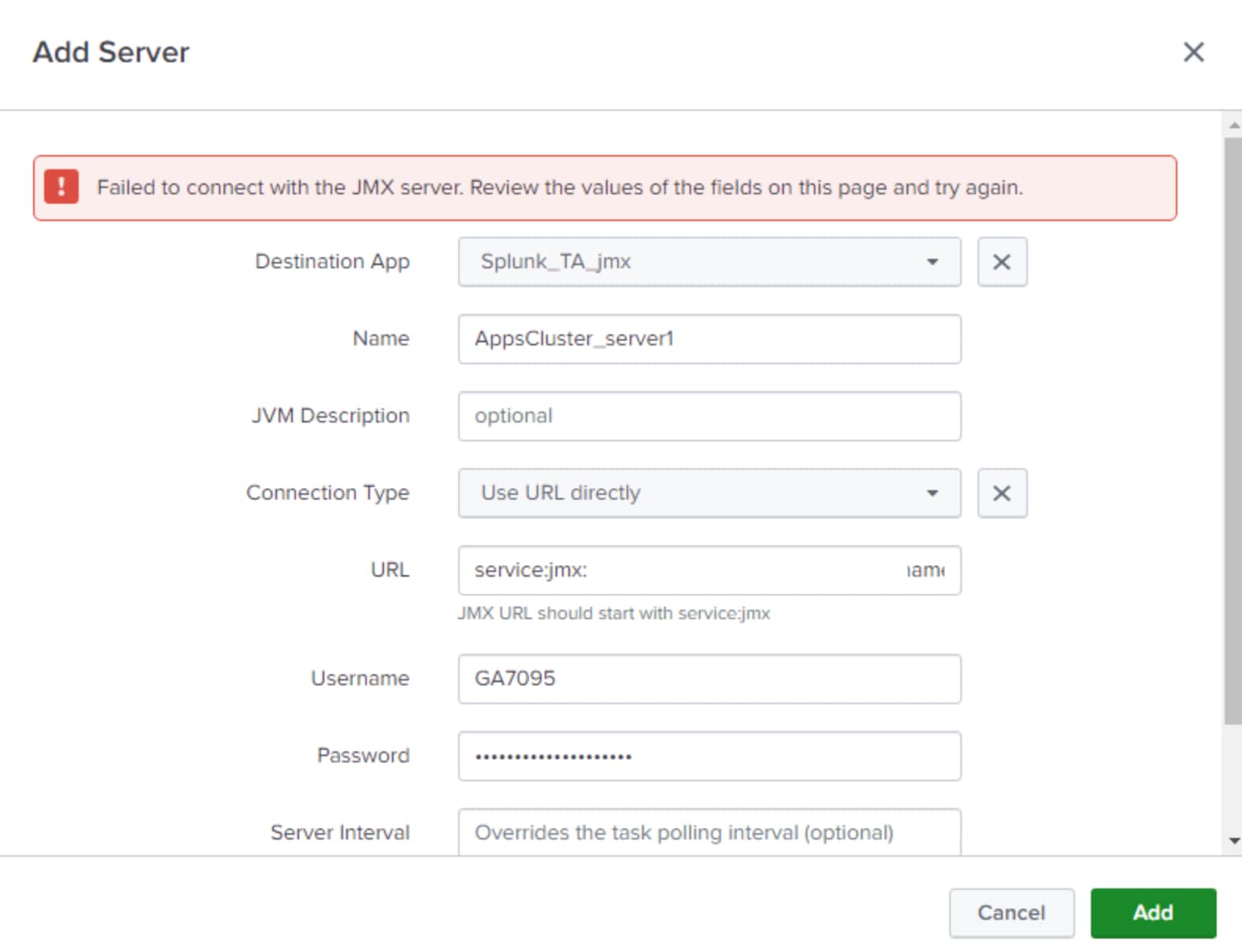
For Splunk Add-on for Java Management Extensions (JMX) with version 5.2.2, while adding the account to access JMX server, User gets an error as shown in the screenshot below:
Investigation
Below SPL Query can be used to check JMX Logs:
index=_internal source=*jmx* *Error*Exceptions observed:
2022-03-10 12:34:21,241 WARNING pid=30272 tid=MainThread file=jmx.py:<module>:85 | Failed to open the invoke the input. Reason: Traceback (most recent call last):

File "/opt/splunk/etc/apps/Splunk_TA_jmx/bin/jmx.py", line 81, in <module>

java_const.JAVA_MAIN_ARGS

File "/opt/splunk/lib/python3.7/subprocess.py", line 800, in __init__

restore_signals, start_new_session)

File "/opt/splunk/lib/python3.7/subprocess.py", line 1551, in _execute_child

raise child_exception_type(errno_num, err_msg, err_filename)

FileNotFoundError: [Errno 2] No such file or directory: 'java': 'java'
For more information on how to investigate a related issue based on different types of JMX server, please refer to :
Splunk Add-on for Java Management Extensions
About the Splunk Add-on for IBM WebSphere Application Server
About the Tomcat
Resolution
This error indicates that the Java package is not installed on the Splunk environment which is a pre-requisite for this add-on to work.
Below command can be used on the CLI of the splunk instance that has this add-on configured:
yum install java
NOTE: This command can change based on the OS of the host machine of the Splunk instance. Above syntax is for CentOS. Please validate the syntax based on the OS you are using.
Following are the additional docs that can be helpful with the different configuration parameters based on the type of JMX server:
Role of Splunk-launch.conf in configuring this add-on
Configure account and inputs in the add-on
Configure this add-on for IBM VAS
Related Links
Revision History
| Revision | Publish Date | Comments |
|---|---|---|
1.0 |
29-Sep-2026
|
Initial Release |
 Feedback
Contact Cisco
- Open a Support Case

- (Requires a Cisco Service Contract)