How to Configure a HF to Receive Data via HEC and Forward it to an Indexer
Available Languages
Applicability
Splunk EnterpriseDescription
This article is written to help you configure a Heavy Forwarder to receive data via HEC and then forward it to an indexer.
Topology:
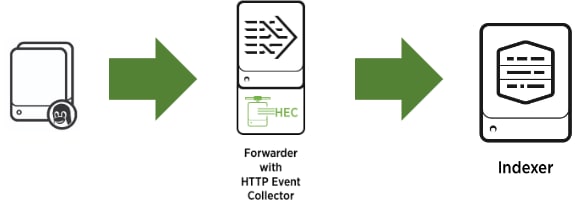
- Make sure the indexer has a port open to receive the data and that the forwarder is sending the data to that port and indexer(s).
- Configure HEC on the Heavy Forwarder (it is not possible to configure HEC on a Universal Forwarder)
Investigation
When configuring the HEC, probably you have noticed that the indexer(s) where you want to send the information has to exist on the Heavy Forwarder (HF).
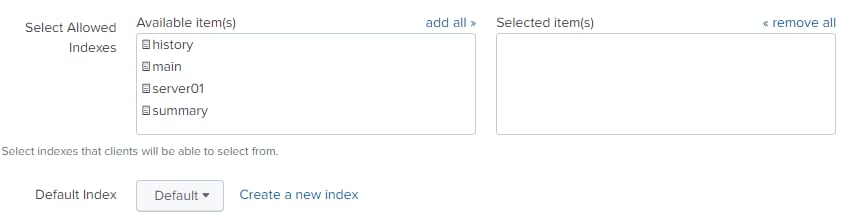
This is an inconvenience because maybe you don’t want to have this index on this heavy forwarder.
Resolution
Two options here:
The first one is to create the index on the HF so it will appear on the list when configuring HEC, or the other one is configuring the HEC via GUI.
HEC configuration is saved in inputs.conf:
vi /opt/splunk/etc/apps/search/local/inputs.conf
[http://token_name]
disabled = 0
index = server02
indexes = server02,server01,main
token = 1eaff02f-b3ga-47a6-830f-92c6e9951224
[http://token_name:] This is for the HEC, and token_name is where you put the name of this token configuration.
# disabled = 0 It means it is enabled
# index: Here you put the default index. It will only allow one index.
# indexes: Here you put the allowed indexes. It could be more than one.
# token: Put here the token. You can create your own.
Remember to restart Splunk every time you change a .conf file. Using the GUI, you can add to the index and indexes attributes that do not exist in the heavy forwarder.
After all this configuration you should be able to send data to the indexer via an HF that has HEC enabled. Using the previous configuration, test it:
$ curl -k https://<host_name>:8088/services/collector/event -H 'Authorization: Splunk 1eaff02f-b3ga-47a6-830f-92c6e9951224' -d '{"index":"server02","sourcetype":"mysourcetype", "event":"Hello, World!"}'
With this cURL command, sending data (Hello, World!) to the index “server02." Check on the indexer if the event was received. Remember, if the cURL command sent the information successfully, you have to receive a success code: {"text":"Success","code":0}
Related Links
Splunk DocumentationConfigure HTTP Event Collector using .conf files
http://dev.splunk.com/view/event-collector/SP-CAAAE6Q
Revision History
| Revision | Publish Date | Comments |
|---|---|---|
1.0 |
29-Sep-2026
|
Initial Release |
 Feedback
Contact Cisco
- Open a Support Case

- (Requires a Cisco Service Contract)