pass4SymmKey warn Signature mismatch between license slave and this License Master.
Available Languages
Applicability
Splunk EnterpriseDescription
Error:
Signature mismatch between license slave = splunk.1 and this License Master. Please make
sure that the pass4SymmKey setting in server.conf, under [general], is the same for the
License Master and all its slaves from ip = 10.10.10.10
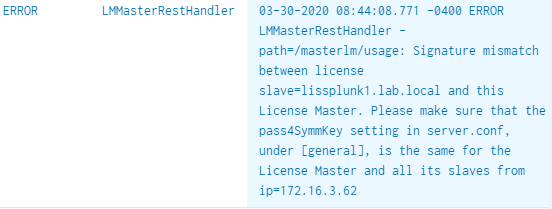
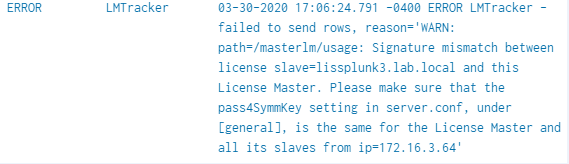
This error normally happens because the pass4SymmKey is encrypted using splunk.secret, so if for example, when copying an encrypted pass4SymmKey from the LM to hosts with different splunk.secret files this may happen, that's is why is recommending trying to type it or getting the password from a notepad or clipboard.
Investigation
Useful commands to investigate:
To confirm the pass4symkey:
# grep pass4Sym /opt/splunk/etc/system/local/server.conf
To decrypt the value is need it:
#/opt/splunk/bin/splunk show-decrypted --value
Bad Request - editTracker failed, reason=WARN: path=/masterlm/usage: Signature mismatch
between license slave=XX.XXX.XXX.XXX and this License Master. Please make sure that the
pass4SymmKey setting in server.conf, under [general], is the same for the License Master
and all its slaves from ip=XX.XXX.XXX.XXX
Possible causes of this error :
1. The LM and the slave do not have the same password, there must be a discrepancy from any of the passwords.
2. You are copying an encrypted pass4SymmKey from one Splunk instance to another and the hots have a different splunk.secret files
Resolution
1. Put in the pass4SymmKey in cleartext to all Splunk instances the slaves you are having this error Including the License Master in case if you are not sure of its password you can add one in plain text and restart splunkd (it'll encrypt automatically after restart).
2. Try changing one of the key values on the password in clear text and let it encrypt
3. Copy the password on a clipboard and past it on the instances.
4. Make sure to restart Splunk after any changes and the password will encrypt automatically
Related Links
Splunk Documentation
Use OpenSSL to generate a random passphrase for pass4SymmKey
Use_OpenSSL_to_generate_a_random_passphrase_for_pass4SymmKey
Revision History
| Revision | Publish Date | Comments |
|---|---|---|
1.0 |
28-Sep-2026
|
Initial Release |
 Feedback
Contact Cisco
- Open a Support Case

- (Requires a Cisco Service Contract)