Splunk Indexer Disk Space Usage Is at 100%
Available Languages
Applicability
Splunk EnterpriseDescription
This article describes a scenario where clustered, non-SmartStore enabled indexers are out of disk space. The solutions provided here are simple options to provide some immediate relief, which may not be applicable in all environments.
Some of these can be applied to non-clustered environments as well.
These steps are not applicable to SmartStore enabled environments.
Investigation
How to identify:
- Indexers are running out of space, preventing data from being rolled off, and no new data is ingested.
- Indexers in this deployment are clustered, with hot/warm and cold data located on separate mount points
- Some or all indexes are not volume managed.
maxVolumeDataSizeMBis configured, but because some or all indexes are not volume managed, it doesn't restrict the disk usage for all indexes that are not using volume (e.g.homePath = $SPLUNK_DB/xxx)- Errors seen in splunkd.log:
WARN ProcessTracker - (child_130__RollFixMetadata) IndexConfig - idx=index_name Path coldPath='/opt/path_to/index_name/colddb'
(realpath '/opt/coldstore/index_name/colddb') is inside volume=cold (path='/opt/coldstore', realpath='/opt/coldstore'), but does
not reference that volume. Space used by coldPath will *not* be volume-mananged. Please check indexes.conf for configuration errors.
- If changes are made in indexes.conf on Cluster Manager, attempts to push will result in bundle push errors indicating indexers are unable to untar due to lack of drive space.
Resolution
How to fix it:
Free up disk space by allowing the indexers to properly account calculate actual usage for all indexes, and if needed, eliminate replication of non-essential indexes across the cluster.
The steps below suggest applying proper configuration changes to indexes.conf on the Cluster Manager in the appropriate location within the manager-apps directory (or master-apps depending on where apps for your indexer are stored), then making the same changes manually (or deployed via automation such as Puppet or Ansible) to the indexers' corresponding peer-apps folder.
NOTE: Most administrators are accustomed to placing configs into $SPLUNK_HOME/etc/system/local. However, for clustered indexers, settings in $SPLUNK_HOME/etc/system/local are overridden by anything found in the indexer's peer-apps directory.
- Run the following search to identify indexes that are not volume managed:
index=_internal sourcetype=splunkd "does not reference that volume" | stats values(idx) - From the Cluster Manager's command line:
- Place the cluster in maintenance mode:
/opt/splunk/bin/splunk enable maintenance-mode - verify the following updates have been made to the indexes.conf file being distributed to your indexers (in
$SPLUNK_HOME/etc/manager-apps/_cluster/local/indexes.confor deployed via a custom app)- Confirm volumes are defined for hot/warm and cold data, and settings are correct. Example shows separate partitions for each, but this could just as easily be defined for buckets stored on a single partition. Your actual setting choices may differ from below.
[volume:hotwarm] path = /mnt/fast_disk maxVolumeDataSizeMB = 100000[volume:cold] path = /mnt/big_disk maxVolumeDataSizeMB = 150000 - For ease of maintenance, best practice is to set
homePathandcoldPathin the[default]stanza to apply the configuration to all indexes:[default] homePath = volume:hotwarm/$_index_name/db coldPath = volume:cold/$_index_name/colddb -
Check the stanzas for each index identified from the search above, and remove any homePath or coldPath values (if they exist) in those stanzas. This will allow the values placed in
[default]to apply to these stanzas. Later, once the current issue is resolved and you have confirmed data is being saved properly to the volumes for these specific stanzas, you may wish to ensurehomePathandcoldPathare not defined for any other indexes. - If additional space is needed, consider also disabling bucket replication for internal index(es). If you do this, start with just the [_internal] index. Include others if more space is needed. Tread carefully: if any indexer is lost, data from its internal indexes are also lost.
[_internal)
repFactor = 0
- Confirm volumes are defined for hot/warm and cold data, and settings are correct. Example shows separate partitions for each, but this could just as easily be defined for buckets stored on a single partition. Your actual setting choices may differ from below.
- Place the cluster in maintenance mode:
-
One at a time on each indexer (via command line)
- Stop Splunk. For example:
/opt/splunk/bin/splunk stop
or,systemctl stop Splunkd.service - In the appropriate app located in the indexer's
$SPLUNK_HOME/etc/peer-appsdirectory, make the same edits toindexes.confas were applied to the Cluster Manager in the steps above. - Start Splunk
/opt/splunk/bin/splunk start
or,systemctl start Splunkd.service
- Stop Splunk. For example:
- Go to the Cluster Manager's Indexer Clustering dashboard (Settings > Indexer Clustering) to verify all indexers are up and stable.
- Check bundle status and push the updated configurations to the indexers if needed.
- Once all bundles are pushed to to the indexers (and indexers are stable), disable maintenance mode.
/opt/splunk/bin/splunk disable maintenance-mode - Free up additional space by clearing excess buckets.
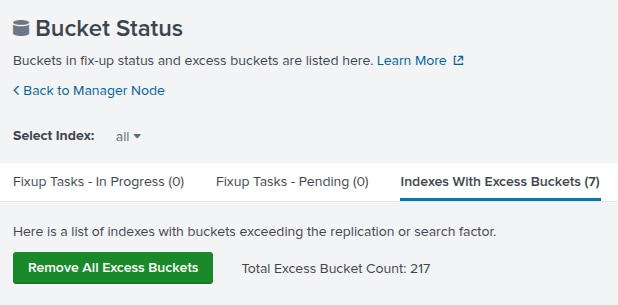
- From the Cluster Manager's Indexer Clustering dashboard (Settings > Indexer Clustering), go to the Indexes tab and select the Bucket Status button.
- Once all fix-up tasks have cleared (refresh the page to watch fix-ups update), if the UI shows there are excess buckets, click Indexes with excess buckets, then select the Clear excess buckets button.
- Go back to the Manager Node and verify indexers are still stable.
Linux commands that may be useful in troubleshooting:
Show disk usage:
du --max-depth=2 -hc /opt/splunk/var/lib/splunkSort by disk usage of datamodel_summary folder:
du --max-depth=2 -h|grep /opt/splunk/var/lib/splunk --color datamodel_summary|sortRelated Links
Splunk documentation:
- Define volumes in indexes.conf
- Use variables to define index locations
- Configuration order of precedence for clustered indexers
Revision History
| Revision | Publish Date | Comments |
|---|---|---|
1.0 |
28-Sep-2026
|
Initial Release |
 Feedback
Contact Cisco
- Open a Support Case

- (Requires a Cisco Service Contract)