ERROR: "Invalid key in stanza"
Available Languages
Applicability
Splunk EnterpriseDescription
After changing the settings in a .conf file it might be seen in the logs during the resetting of the instance some errors related to an invalid key in the stanza.Investigation
How to identify it:
See this error during the starting process of the instance:
Invalid key in stanza [monitor:///home/Splunk/test2] in /opt/splunk/etc/apps/search/local/inputs.conf, line 4: attribute_name {value: yes}.
Like in the example below: 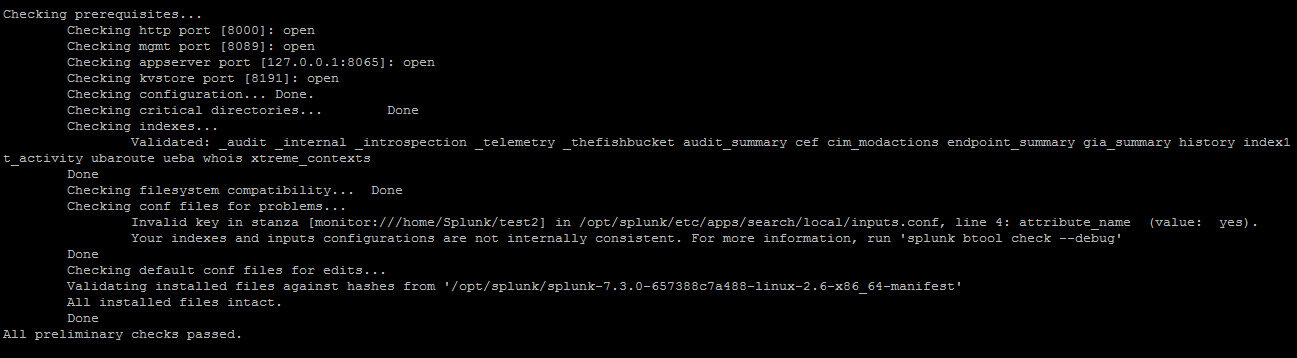
Resolution
How to fix it:Some of the reasons why it might receive these errors could be:
1. The attribute has a typo, for example, "indexer" instead of "index"
2. The attribute does not belong in that stanza.
3. The attribute is not supported in that version.
4. The attribute value is invalid, for example, the value can only be a Boolean and it is set as a string as the value.
Here is an example of how to read the message and find the reason
Error log:
Invalid key in stanza [monitor:///home/Splunk/test2] in /opt/splunk/etc/apps/search/local/inputs.conf, line 4: attribute_name (value: yes).See the stanza that contains the invalid key:
[monitor:///home/Splunk/test2]The same log brings the information of the file where the stanza is located, in this case, inputs.conf:
/opt/splunk/etc/apps/search/local/inputs.confThe attribute name is:
attribute_nameAnd the attribute value is:
yes
Finally, check the Splunk manual for that conf file and make sure a valid attribute it's being used.
Related Links
inputs.confRevision History
| Revision | Publish Date | Comments |
|---|---|---|
1.0 |
27-Sep-2026
|
Initial Release |
 Feedback
Contact Cisco
- Open a Support Case

- (Requires a Cisco Service Contract)