Db connect input stopped retrieving PostgreSQL data
Available Languages
Applicability
Splunk Enterprise Splunk Cloud Splunk DB ConnectDescription
The DB Connect input configured for the PostgreSQL database stopped ingesting data into Splunk, even though the input configuration appeared to be correct. The scheduled DB Connect jobs were failing during execution, preventing new records from being retrieved from the database. As a result, no new PostgreSQL data was being indexed in Splunk.
Investigation
Upon reviewing the DB Connect internal logs dbx_server.log a database permissions error was identified during the DB Connect input execution.
SPL Used:
"index=_internal sourcetype=splunk_app_db_connect_server *error* *permission denied*"
From the search results, the below error was observed:
"org.postgresql.util.PSQLException: ERROR: permission denied for materialized view siem_assets"
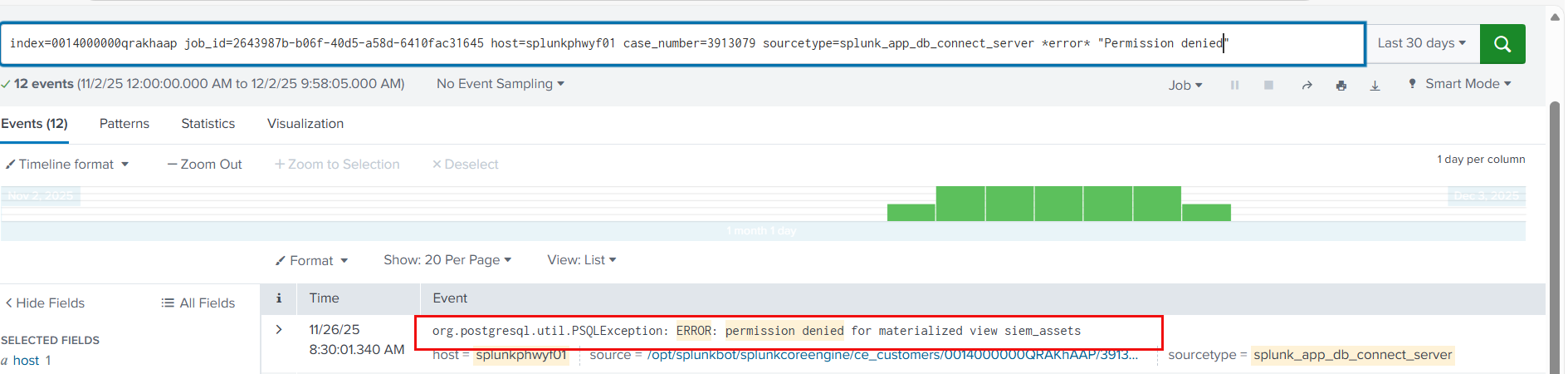
The above error indicates that the PostgreSQL database user configured in the DB Connect connection does not have sufficient privileges to access the materialized view siem_assets. Due to this lack of access, the DB Connect input is unable to read data from the database, resulting in failure of the scheduled job and preventing data ingestion into Splunk.
Resolution
To resolve this issue, the PostgreSQL database user used in the Splunk DB Connect connection must be granted the required access to the materialized view siem_assets
Resolution Steps
- Log in to the PostgreSQL database server using an account with administrative or sufficient privileges.
- Connect to the required database
"psql -h <hostname> -U <admin_user> -d <database_name>"
- Verify the issue by running a query on the materialized view:
"SELECT * FROM siem_assets LIMIT 10;"
- Grant SELECT permission on the materialized view to the DB Connect database user using the following command:
"GRANT SELECT ON MATERIALIZED VIEW siem_assets TO ;"
- After updating the permissions, verify that the DB Connect user can successfully query the materialized view without errors.
- Re-run or restart the DB Connect input in Splunk.
- Monitor the DB Connect internal logs and confirm that the input job executes successfully and data ingestion resumes normally.
Once the required permissions were granted, the DB Connect input was able to access the materialized view successfully, and PostgreSQL data started ingesting into Splunk as expected.
Revision History
| Revision | Publish Date | Comments |
|---|---|---|
1.0 |
01-Oct-2026
|
Initial Release |
 Feedback
Contact Cisco
- Open a Support Case

- (Requires a Cisco Service Contract)