Troubleshooting Splunk Login Failures: "SAML response does not contain group information"
Available Languages
Applicability
Splunk Cloud Splunk On-prem Okta Identity Provider(IDP)Description
Users have been added to the designated SAML groups in the Okta Identity Provider (IDP), and the corresponding roles have been assigned to these groups in Splunk. However, when users enter their credentials on the login URL, they are unable to log in to Splunk and encounter an error. This issue affects all users added to the SAML groups.

Investigation
1.) Verified that the group name on the Identity Provider (IDP) side matches the SAML group name configured in Splunk.
2.) Confirmed that the IDP certificate is valid and not expired.
3.) Auto role mapping in Splunk's SAML authentication was enabled, and users were added to groups that already had a roles in Splunk, so creating a new SAML groups in Splunk was not necessary.
4.) Disabled auto role mapping, then created a new group with a different name on the IDP, added user to it, and created a matching SAML group in Splunk with an assigned role. however, the issue persisted.
5.) Enabled DEBUG logging for the following SAML log channels on the Search Head under Settings > Server Settings > Server logging: Saml, UiSAML, UserManager, and UserManagerPro.
6.) After enabling DEBUG logs, a user attempted to log in to the Search Head.Ran the query below, but found no results for that user.
index=_internal host=sh* saml user=<user_name> component!=UserManagerPro
7.) This confirmed that Splunk was unable to find the group assigned to the respective user during authentication because the group names on the Okta Identity Provider (IdP) did not match the pattern expected by Splunk.
9.) Since the role option is configured to use "Match regex" the SSO process was designed to match groups between Splunk and Okta based on the defined regex pattern. If group names were not aligned with this pattern, the mapping was not completed successfully.
9.) In the above case, the user set the value as "test_*", but the groups on Okta and Splunk were named with the company prefix like "xyz_test" and "xyz_all", causing the group mapping to fail.
Resolution
To resolve this issue, the configured regex value needs to match the group names created in both the IdP and Splunk. For example, if the regex value is set to "organisation_name_*", all group names were required to begin with "organisation_name".
The steps performed on the IDP side:
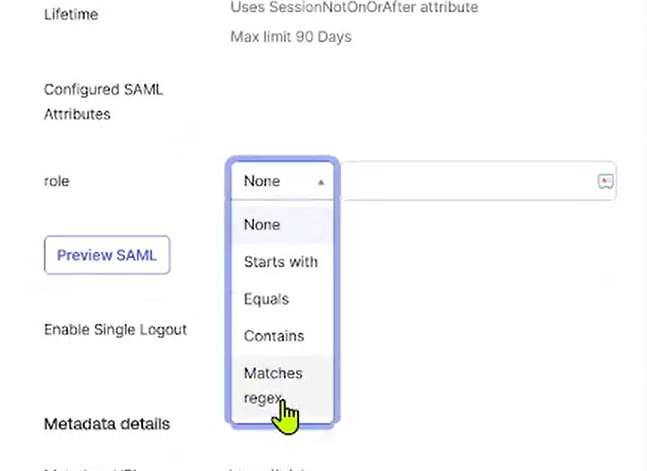
1.) In the Okta IdP, under the Splunk application’s sign-on settings, the "role" parameter was set to "Matches regex".
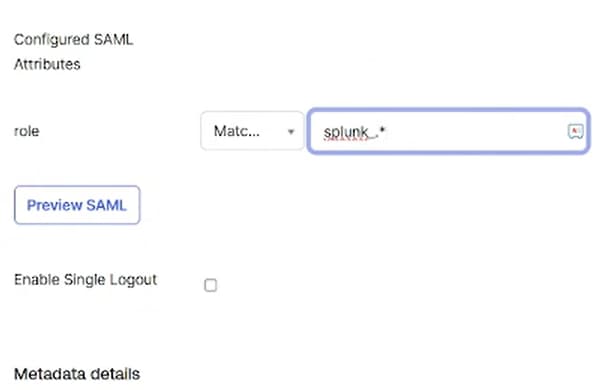
2.) The role regex value was configured as "splunk_*", and group names were created accordingly with the "splunk_" prefix, such as "splunk_admin" and "splunk_power".
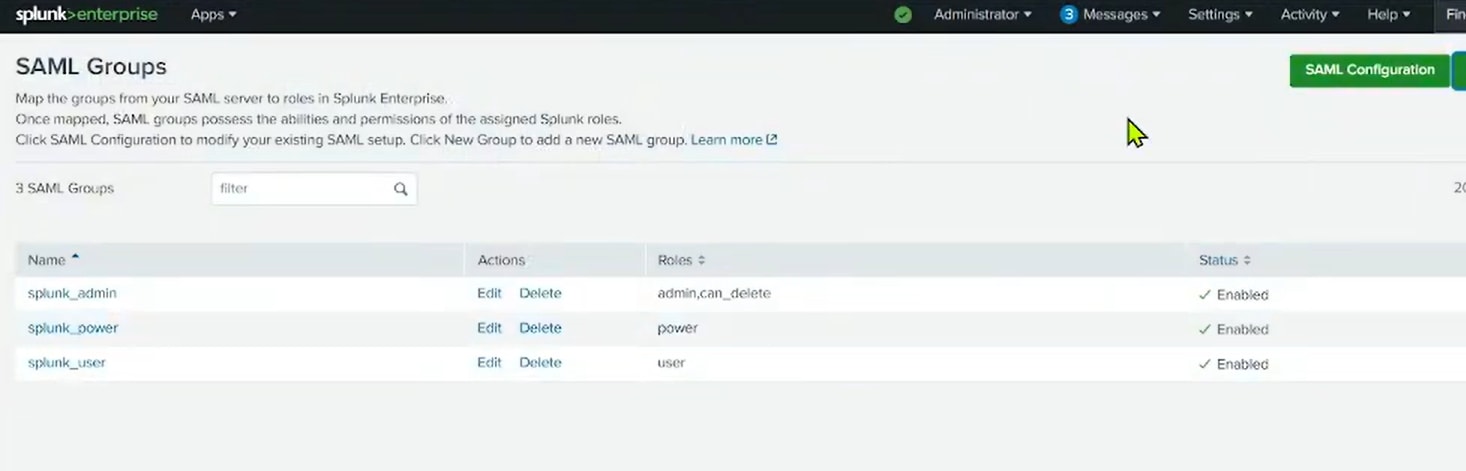
3.) After completing the configuration, the role was assigned to the respective group, and the user was able to log in successfully.
Related Links
How to Configure SAML 2.0 for Splunk Cloud
Configuring Okta SAML Single Sign On with Splunk Cloud - Using the Okta Splunk Cloud App
Known issue on SSO group mapping.
Revision History
| Revision | Publish Date | Comments |
|---|---|---|
1.0 |
01-Oct-2026
|
Initial Release |
 Feedback
Contact Cisco
- Open a Support Case

- (Requires a Cisco Service Contract)