Search history not replicated across nodes
Available Languages
Applicability
Splunk CloudDescription
Search history replication allows users to access all previously run search commands on every search head on the search head cluster (SHC).
Example of the search history:
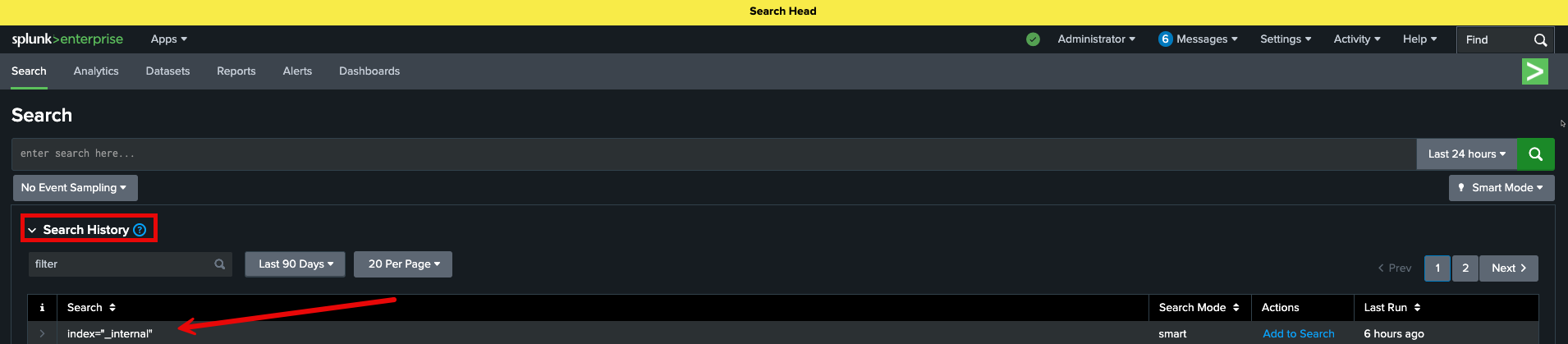
For Splunk Enterprise, the search history replication is set to the value csv which means it is disabled by default. It can be confirmed by running the command:
splunk btool limits list --debug | grep search_history_storage_modeOutput example:
/opt/splunk/etc/system/default/limits.conf search_history_storage_mode = csvNote that this feature is on the default limits.conf file.
This can be enabled by adding to the history stanza the parameter search_history_storage_mode with the value kvstore to the local configuration file /opt/splunk/etc/system/local/limits.conf:
search_history_storage_mode = kvstoreNote: The file /opt/splunk/etc/system/local/limits.conf might need to be created and then add the history stanza to it.
Example of a history stanza:
############################################################################
# History
############################################################################
# This section contains settings for search history.# Enable search history?
enable_history = true# Max number of searches to store in history
# for each user/app, if search_history_storage_mode is csv;
# for each user, if search_history_storage_mode is kvstore.
max_history_length = 500# Max time search history records to store in history (for each user).
max_history_storage_retention_time = 90d# History storage
search_history_storage_mode = kvstore
Then restart the splunk service:
/opt/splunk/bin/splunk restartNote: This should be done on every search head of the search head cluster.
For Splunk Cloud, that feature is present in the default history stanza and can be added to the local configurations, however, the feature is not yet supported in cloud environments.
Investigation
1. Access the Splunk Web interface.
2. Navigate to Activity > Search History.
3. Verify if search history from other cluster members is visible.
4. If search history is local to each node only, the replication feature is not yet active.
Resolution
1. Verify the Splunk Cloud Platform environment meets eligibility requirements for the KV Store-backed search history feature.
2. Anticipate the automated fleet-wide rollout scheduled for completion during Q2 2026.
3. Await the automatic application of the migration to the specific environment as part of the scheduled rollout phase.
4. Check the Search History page under the Activity menu periodically to confirm when the replication feature becomes active.
5. Note that the feature is delivered exclusively through the automated rollout process to ensure environment stability; manual enablement is not available at this time.
Related Links
For further details and instructions about the feature check the following links:
Search Head history replication
limits.conf official documentation
Revision History
| Revision | Publish Date | Comments |
|---|---|---|
1.0 |
01-Oct-2026
|
Initial Release |
 Feedback
Contact Cisco
- Open a Support Case

- (Requires a Cisco Service Contract)