Deployment clients not showing in forwarder management UI with successful phone homes
Available Languages
Applicability
Splunk Enterprise Splunk CloudDescription
The upgrade documentation and multiple KB articles address issues related to the indexAndForward configuration added in 9.2.x Deployment Server (DS) configurations. One common issue they do not address, however, is that many environments have multiple functions for the DS. In the configuration where the DS is or was previously functioning as a Distributed Monitoring Console (DMC), this issue is observed regularly even though the indexAndForward configuration is correct.
Investigation
Review the $SPLUNK_HOME/var/log/splunk/splunkd.log on the client side for errors from the httpPubSubConnection component. Review the $SPLUNK_HOME/var/log/client_events/phonehomes.log on the DS side for errors in the phone homes and review the $SPLUNK_HOME/var/log/splunk/splunkd.log for errors from the PubSubSvr component. Provided there are no fatal errors, review the outputs.conf configuration for indexAndForward per the documentation on the DS. Provided there are no issues in the configuration, proceed to check the distsearch.conf on the DS for DMC configurations. There will be stanzas like [distributedSearch:dmc_group_cluster_master], [distributedSearch:dmc_group_deployment_server], [distributedSearch:dmc_group_indexer], [distributedSearch:dmc_group_kv_store], etc. After confirming the DS is also configured as a DMC, check that the DS is in the servers parameter under the main [distributedSearch] stanza.
[distributedSearch]
servers = idx1,idx2,idx3
The DS server missing from the main [distributedSearch] stanza is common when the DS was configured as a DMC, then reverted to a standalone monitoring console (MC). When a Splunk instance is configured as a DMC, then reverted to a standalone MC, the distsearch.conf only has the default parameter removed from the [distributedSearch:dmc_group_indexer] stanza. None of the DMC group stanzas are removed.
If the DS is functioning as both the DS and DMC, then the main [distributedSearch] stanza is not used for distributed searches. The DMC group stanza which has default = true is the group that will be used to determine which peers are searched for populating the Forwarder Management GUI. In many cases the dmc_group_indexer group is the default in distsearch.conf.
[distributedSearch:dmc_group_indexer]
servers = idx1,idx2,idx3,idx4,idx5
default = true
Resolution
If there is no DMC group with default = true, then proceed with manual modification of the distsearch.conf.
Add the DS to the servers list under the main [distributedSearch] stanza in distsearch.conf. Then restart Splunk.
[distributedSearch]
servers = idx1,idx2,idx3,DS
If there is a DMC group with default = true, then proceed with modifying the DMC server roles in the DMC GUI.
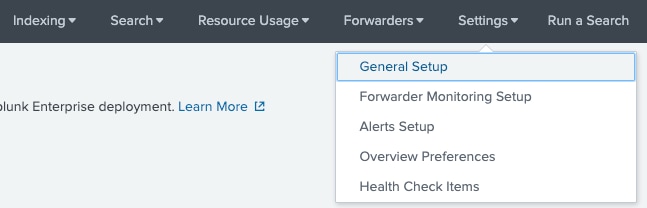
Under the DMC drop down bar, select Settings > General Setup.
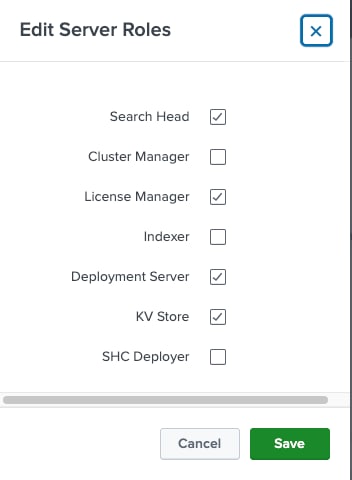
Under the This Instance panel select the Edit > Edit Server Roles to modify the roles assigned to the DS/DMC instance.

Select the Indexer role then click save.
Click the Apply Changes button to apply these changes.

Navigate to the main Settings > Forwarder Management GUI and confirm the issue is resolved.
Revision History
| Revision | Publish Date | Comments |
|---|---|---|
1.0 |
01-Oct-2026
|
Initial Release |
 Feedback
Contact Cisco
- Open a Support Case

- (Requires a Cisco Service Contract)