Share Accelerated Data Models between Search Heads in Splunk Cloud
Available Languages
Applicability
Splunk CloudDescription
Data Model Acceleration (DMA) speeds up reporting for an entire set of fields by generating .tsidx files that make up a high-performance analytics store.
You may want to leverage this same analytics store on a different search head in your Splunk Cloud stack. Splunk allows you to share data model summaries generated on one search head to a different search head.
The Source SH is where the data model is currently accelerated (commonly the ES SH). Splunk can not share out a data model that is not accelerated, since there would be no .tsidx file to share.
The Destination SH is where the data model summaries will be shared to. Splunk can configure the data models on the Destination SH, to point at the Source SH for their acceleration summaries. Acceleration does not need to be enabled on the Destination SH in order for summary sharing to work. Once Splunk configures DMA sharing on the Destination SH, the UI will update to show that the data model is accelerated.
Investigation
A DMA can be shared amongst a stand-alone Search Head and also Search Head clusters. These are some conditions that need to be met for a successful share:
- The Source data model must have acceleration enabled for successful sharing. In this example, acceleration should be enabled for data models at the Source ES SH prior to requesting DMA sharing.
- The datamodels.conf file needs to be in the same application namespace as the data model that is sharing its summary on both SH's.
See: DMA summary sharing and app namespaces - The Summary Range (acceleration.earliest_time) is either "prior to" or "equal to" the Backfill Range (acceleration.backfill_time) on the source SH/SHC DMA.
It's recommended best practice that the datamodel.json files reside only in the default directory of the App and that any local directory json file overrides should be removed.
To ensure smooth operation and accurate results when sharing data models across search heads, it is critical that all settings and data model definitions are aligned and identical. Discrepancies between Source and Destination search heads can lead to errors, unexpected results and degraded performance. This document outlines the recommended procedure for managing data model definitions and ensuring parity across environments.
Data Model Definition Management
When you edit a default Data model definition within Splunk, it can complicate the process of enabling Data model sharing, as it may result in mismatched fields across Source and Destination search heads. Such misalignment often leads to performance issues and inconsistent results when running searches.
Steps to Ensure Parity
1. Review for Custom Fields:
Before enabling data model sharing, confirm whether any custom fields have been added to the Data model definition on the Source search head. Custom fields are sometimes necessary for specific use cases and may need to be preserved.
2. No Custom Fields Present:
If no custom fields have been added, or it's determined that custom fields aren't required, ask Support to delete the local override file on both the Source and Destination search heads. This will revert the system to the default data model definition, ensuring that both search heads are in complete parity, and the JSON files are identical. This is the recommended best practice for Splunk Cloud.
3. Custom Fields Present:
If custom fields are present in the Data model (DM) definition on the Source Search Head, there are two options to ensure parity:
Option 1) Manually create any missing fields between Search Heads (SH's).
Navigate to Settings > Data models and then click the corresponding DM Title to open the Datasets page on both the Source and Destination SH's.
Compare the list of field names between the Source and Destination DM's and add any missing fields along with the matching configuration. This will ensure that all fields and field configurations are identical between both the Source and Destination SH DM's brining them into parity.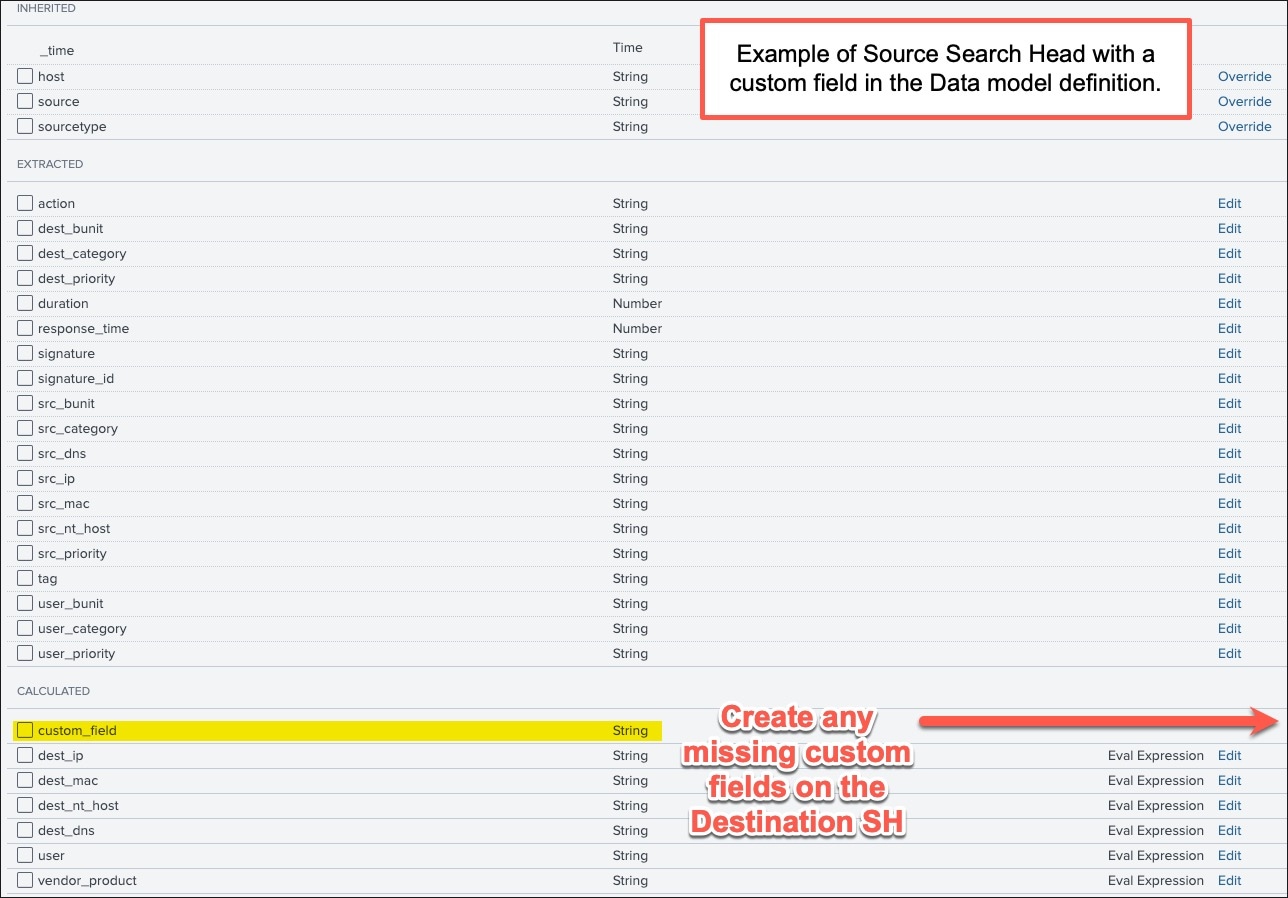
Option 2) Utilize the REST API to copy the Data model definition from the Source to the Destination SH.
The following example assumes that jq utility for parsing json is installed. In addition, the username and stackname should be replaced with appropriate values. Furthermore, the full URL, App and Data model name should also be confirmed as being valid.
Rest API Example:
dm_description=$(curl -u username "https://es.stackname.splunkcloud.com:8089/servicesNS/nobody/Splunk_SA_CIM/datamodel/model/Network_Sessions?output_mode=json" | jq -r .entry[0].content.description)curl -u username "https://stackname.splunkcloud.com:8089/servicesNS/nobody/Splunk_SA_CIM/datamodel/model/Network_Sessions?output_mode=json" --data-urlencode "description=${dm_description}"This process will align all fields across both environments, ensuring that the Data models are identical and functioning as intended.
Resolution
To request that Splunk Support enable DMA Sharing:
- Navigate to the Support Portal.
- Create a Support Case.
- Select Support > Splunk Cloud > Cloud Change Request > Standard Configuration
Related Links
REST API Reference Manual: Knowledge endpoint descriptions for datamodel/model/{name}
DMA Max Summarization Search Time and Backfill Range
How to Improve your DMAs in Splunk
Revision History
| Revision | Publish Date | Comments |
|---|---|---|
1.0 |
30-Sep-2026
|
Initial Release |
 Feedback
Contact Cisco
- Open a Support Case

- (Requires a Cisco Service Contract)