Data model stuck in building status
Available Languages
Applicability
Splunk Cloud, Splunk EnterpriseDescription
The purpose of this article is related to a Data model that has never accelerated data correctly before and is showing building status as per the screenshot below :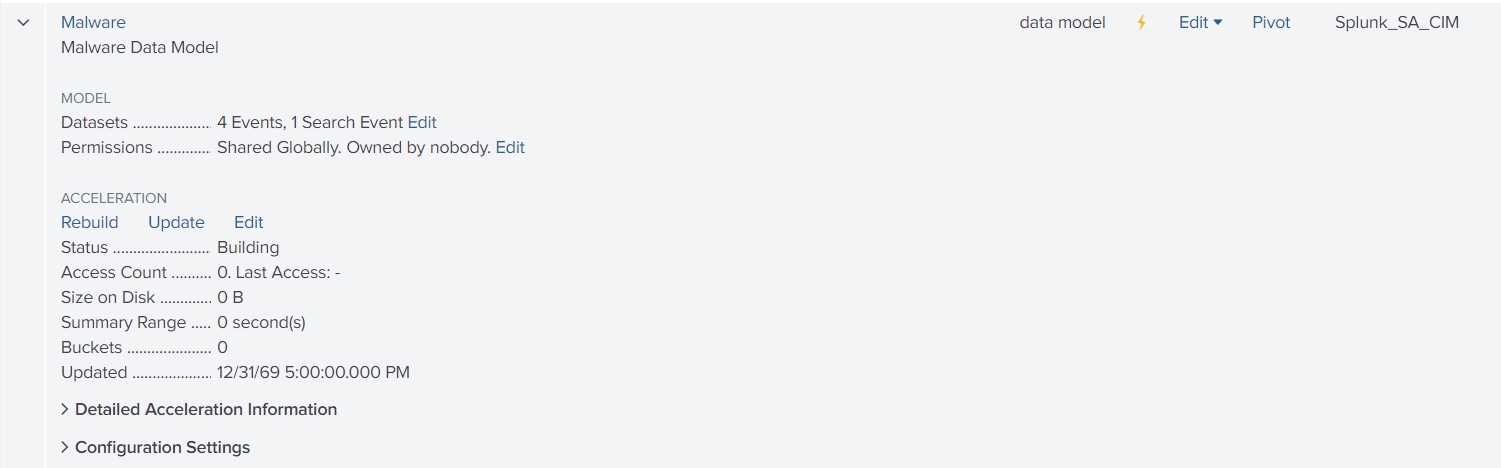
The successful status for the data model is 100.00% completed
In this article, we are going to use Malware Data Model which is included in Splunk_SA_CIM app as an example.
Investigation
1. Make sure that Data model is turn on:
In the screenshot above, JVM is turn off and Malware is turn on (noticed that JVM lightning icon is gray and Malware lightning icon is yellow
To turn on the data model, go to settings>Data models> select the data model >edit>edit acceleration > select Accelerate option with the check mark and save it
2. Make sure there are no empty values on configuration settings from the data model
To check the values go to settings>Data models> click on greater than icon from the data model (Malware in this scenario) > Configuration Settings
As an example, below will be the values from Malware
Configuration Settings
These settings can be changed by going to actions and selecting edit acceleration. Learn More
allow_old_summaries = true
allow_skew = 0
backfill_time = -10d
cron_schedule = 1-56/5 * * * *
earliest_time = -1y
hunk.compression_codec = -
hunk.dfs_block_size = 0
hunk.file_format = -
manual_rebuilds = true
max_concurrent = 4
max_time = 3600
poll_buckets_until_maxtime = false
schedule_priority = highest
workload_pool = -
*Note:the settings and values may differ if we change the data model or use custom values but noticed that there are no empty/wrong values.
3. Tried to run the following SPL to check if retrieves data with Malware Datamodel but there is no data:
| tstats summariesonly=t count values(sourcetype) from datamodel=Malware by index
*The time range can be changed depending on the data that is looking for, on this case with Malware data model there was no data in Last 30 days.
Note: This search should appear the index, the sourcetype ,and the count of events which the data model is able to accelerate. (if there are no events, the data model is not properly configured to know which events need to be accelerated)
Resolution
In order to accelerate data, the data model needs to be properly configured with the indexes and proper tags which will be the same indexes and tags configured on Event types so that way, the search strings configured on Event types will be properly accelerated. Below will be explained in detail:
Going to settings>Data models>click on the name of the data model (Malware in this scenario)
On the Constraint line, it is placed the indexes and tags which will work with the Data model:
(cim_Malware_indexes) tag=malware tag=attack
Optional Note: these tags and indexes can be edited by turning off the data model and select edit option next to Constraint line
These indexes and tags need to be properly added to Event types either edit Event type or create a new one by going to settings> Event Types.
Once Event Type is edited or created, it should show as the screenshot below:
For better visibility this search string that I used as an example:
index=cim_modactions (source=*_modalert.log* OR source=*_modworkflow.log*) Malware_Attacks
In this case, once the tags and indexes are properly configured on event types , the data model will start to accelerate that specific search string so also make sure that there are events using the search string .
Related Links
About event typesAbout data models
Revision History
| Revision | Publish Date | Comments |
|---|---|---|
1.0 |
30-Sep-2026
|
Initial Release |
 Feedback
Contact Cisco
- Open a Support Case

- (Requires a Cisco Service Contract)