Upgrade Readiness App 4.3.0 shows false alerts for splunk-visual-exporter and splunk_app_for_splunk_o11y_cloud app
Available Languages
Applicability
Splunk CloudDescription
In Splunk Cloud there are several apps which comes by default. These core/default apps are not scanned by Upgrade Readiness App. Here are the list of apps/add-on which are considered as exception available on Splunk Docs.
Below is the Alert message that user might get.
Hello Splunk Admin,
The Upgrade Readiness App detected 2 apps with deprecated Python on the https://<stack-id>.splunkcloud.com:443 instance.
• splunk-visual-exporter
• splunk_app_for_splunk_o11y_cloud
The Upgrade Readiness App detects apps with outdated Python or jQuery to help Splunk admins and app developers prepare for new releases of Splunk in which lower versions of Python and jQuery are removed. For more details about your outdated apps, see the Upgrade Readiness App on your Splunk instance listed above.
To address the issues detected by the Upgrade Readiness App, work with app developers to update their apps to use only Python 3 or higher and jQuery 3.5 or higher.
For more information about addressing issues with outdated apps, removing lower versions of Python or jQuery, and how to manage these emails, see
https://docs.splunk.com/Documentation/URA.
Investigation
The user may see a failed scan alert under the private App section of the Python scan Tab in the Upgrade readiness App, as shown below:

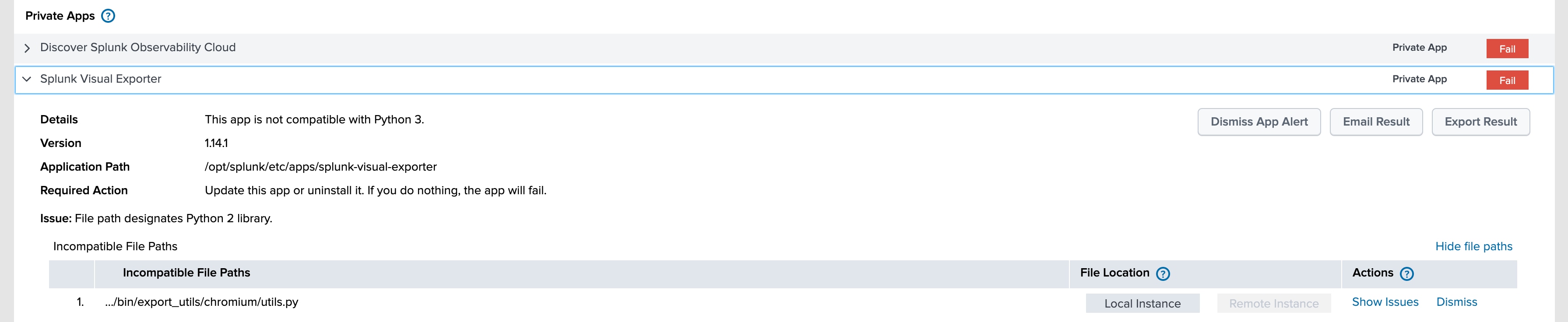
To export the scan results, user can follow the path as mentioned below:Splunk GUI --> Upgarde Readiness App --> Python scan --> Export Results
Below is the sample JSON format report generated when the scan is marked as "Fail".
        {
            "name": "splunk-visual-exporter",
            "label": "Splunk Visual Exporter",
            "version": "1.14.1",
            "app_path": "/opt/splunk/etc/apps/splunk-visual-exporter",
            "summary": {
                "Passed": 2,
                "Blocker": 0,
                "Warning": 1,
                "Skipped": 0,
                "type": "Private App",
                "app_link": "",
                "dismiss_app": 0,
                "dismiss_app_date": "",
                "Status": "WARNING"                 <--------------------- CHECK THE STATUS
            },
            "checks": [
                {
                    "name": "Python in custom Mako templates",
                    "result": "PASSED",
                    "messages": [],
                    "required_action": "None"
                },
                {
                    "description": "Check for the existence of Python scripts, which must be upgraded to be cross-compatible with Python 2 and 3 for the upcoming Splunk Enterprise Python 3 release. ",
                    "name": "Python scripts",
                    "result": "WARNING",
                    "messages": [
                        {
                            "message_filename": ".../bin/export_utils/chromium/utils.py",
                            "code": [
                                "@@ -1,6 +1,7 @@\n import re\n import logging\n from datetime import datetime\n+from six.moves import range\n \n logger = logging.getLogger('splunk.pdfgen')\n js_script_name = 'custom_headless_command.js'"
                            ],
                            "result": "warning",
                            "message_line": null,
                            "dismissed": 0,
                            "message": "@@ -1,6 +1,7 @@\n import re\n import logging\n from datetime import datetime\n+from six.moves import range\n \n logger = logging.getLogger('splunk.pdfgen')\n js_script_name = 'custom_headless_command.js'\nFile: /opt/splunk/etc/apps/splunk-visual-exporter/bin/export_utils/chromium/utils.py",
                            "instance": "both",
                            "identical": 1
                        }
                    ],
                    "required_action": "Update these Python scripts to be dual-compatible with Python 2 and 3."
                },
                {
                    "description": "Splunk Python SDK Check",
                    "name": "Splunk Python SDK Check",
                    "result": "PASSED",
                    "messages": []
                }
            ],
            "details": "This app is not compatible with Python 3.",
            "required_action": "Update this app or uninstall it. If you do nothing, the app will fail.",
            "remote_version": "1.14.1"
        },

        {
            "name": "splunk_app_for_splunk_o11y_cloud",
            "label": "Discover Splunk Observability Cloud",
            "version": "1.1.2",
            "app_path": "/opt/splunk/etc/apps/splunk_app_for_splunk_o11y_cloud",
            "summary": {
                "Passed": 2,
                "Blocker": 0,
                "Warning": 1,
                "Skipped": 0,
                "type": "Private App",
                "app_link": "",
                "dismiss_app": 0,
                "dismiss_app_date": "",
                "Status": "WARNING"    <-------------CHECK THE STATUS
            },
            "checks": [
                {
                    "name": "Python in custom Mako templates",
                    "result": "PASSED",
                    "messages": [],
                    "required_action": "None"
                },
                {
                    "description": "Check for the existence of Python scripts, which must be upgraded to be cross-compatible with Python 2 and 3 for the upcoming Splunk Enterprise Python 3 release. ",
                    "name": "Python scripts",
                    "result": "WARNING",
                    "messages": [
                        {
                            "message_filename": ".../bin/o11y_metric_timeseries.py",
                            "code": [
                                "@@ -112,14 +112,14 @@\n                             metadata_msg_size = sys.getsizeof(str(msg.properties))\n \n                     elif isinstance(msg, messages.DataMessage):\n-                        if not msg.data.items():\n+                        if not list(msg.data.items()):\n                             continue\n                         msg_time = o11y_utils.normalize_time(msg.logical_timestamp_ms)\n                         data_msg_count += 1\n-                        mts_count += len(msg.data.items())\n+                        mts_count += len(list(msg.data.items()))\n                         if data_msg_size == 0:\n                             data_msg_size = sys.getsizeof(str(msg.data))\n-                        for k, v in msg.data.items():\n+                        for k, v in list(msg.data.items()):\n                             if k in meta_data:\n                                 flat_json = meta_data.get(k).copy()\n                                 # Add fields - metric value, time to match the splunk metric store keys"
                            ],
                            "result": "warning",
                            "message_line": null,
                            "dismissed": 0,
                            "message": "@@ -112,14 +112,14 @@\n                             metadata_msg_size = sys.getsizeof(str(msg.properties))\n \n                     elif isinstance(msg, messages.DataMessage):\n-                        if not msg.data.items():\n+                        if not list(msg.data.items()):\n                             continue\n                         msg_time = o11y_utils.normalize_time(msg.logical_timestamp_ms)\n                         data_msg_count += 1\n-                        mts_count += len(msg.data.items())\n+                        mts_count += len(list(msg.data.items()))\n                         if data_msg_size == 0:\n                             data_msg_size = sys.getsizeof(str(msg.data))\n-                        for k, v in msg.data.items():\n+                        for k, v in list(msg.data.items()):\n                             if k in meta_data:\n                                 flat_json = meta_data.get(k).copy()\n                                 # Add fields - metric value, time to match the splunk metric store keys\nFile: /opt/splunk/etc/apps/splunk_app_for_splunk_o11y_cloud/bin/o11y_metric_timeseries.py",
                            "instance": "local",
                            "identical": 0
                        }
                    ],
                    "required_action": "Update these Python scripts to be dual-compatible with Python 2 and 3."
                },
                {
                    "description": "Splunk Python SDK Check",
                    "name": "Splunk Python SDK Check",
                    "result": "PASSED",
                    "messages": []
                }
            ],
            "details": "This app is not compatible with Python 3.",
            "required_action": "Update this app or uninstall it. If you do nothing, the app will fail.",
            "remote_version": "1.1.2"
        },
What to Check in Python scan report?
The user should check the scan report of the app alert if the json file displays "Status" as "WARNING" for the Failed app. Please refer to the sample file attached above.
Resolution
This is a known issue in current version (4.3.0) of Upgrade Readiness App for Splunk Cloud user (Victoria Experience) which is expected to be fixed in Upcoming versions of Upgrade Readiness App.
The workaround would be to "Dismiss" App Alert for splunk-visual-exporter and splunk_app_for_splunk_o11y_cloud as these app comes by default in Splunk Cloud (Victoria Experience).
NOTE: Dismissing app Alert for splunk-visual-exporter and splunk_app_for_splunk_o11y_cloud doesn't have any negative impact as such.
Revision History
| Revision | Publish Date | Comments |
|---|---|---|
1.0 |
30-Sep-2026
|
Initial Release |
 Feedback
Contact Cisco
- Open a Support Case

- (Requires a Cisco Service Contract)