Getting error message "Splunk could not update permissions for resource data/props/calcfields [HTTP 409] [{'type': 'ERROR', 'code': None, 'text': 'Cannot overwrite existing app object'}]", when trying to update Knowledge Object permissions.
Available Languages
Applicability
Splunk Cloud Splunk EnterrpiseDescription
Whenever a Calculated field (Knowledge Object) is created and maintained as private; props.conf file will be created in the following path:
$SPLUNK_HOME/etc/users/test_user/app_name/local
The props.conf file will save the KO information as the following output:
[test]#Field nameEVAL-test = 1+3
In addition in the metadata folder, it's local.meta file will be updated with the following information as shown in the following output:
$SPLUNK_HOME/etc/users/test_user/app_name/metadata
[props/test/EVAL-test]version = 9.2.0.1modtime = 1714675556.141268000
Once the user updates the KO permits; the information stored in props.conf and local.meta related to the KO will migrate from /SPLUNK_HOME/etc/users/test_user/app_name/ to /SPLUNK_HOME/etc/apps/app_name/
This process will migrate the information found under $SPLUNK_HOME/etc/users/test_user/app_name/local/props.conf to $SPLUNK_HOME/etc/app_name/local/props.conf.
For the user to still be able to manage the calculated field; the only information that will be stored in the props.conf file will be the stanza for the Field name as shown in the following output:
[test]
Any information related to the KO that was located under $SPLUNK_HOME/etc/users/test_user/app_name/metadata will be migrated to $SPLUNK_HOME/etc/app_name/metadata.
NOTE:
If this stanza is removed, the KO will be Orphan since it will have "No owner"
Under the following paths, you can find the information updated as shown in the following outputs:
props.conf
/SPLUNK_HOME/etc/apps/app_name/local/props.conf[test]
EVAL-test = 1+3
local.meta
$SPLUNK_HOME/etc/app_name/metadata
[props/test/EVAL-test]
access = read : [ * ], write : [ * ]
export = none
owner = test
version = 9.2.0.1
modtime = 1714735130.502903000
Below you will find the information about the issue replication in both Splunk Enterprise and Splunk Cloud
Splunk Enterprise
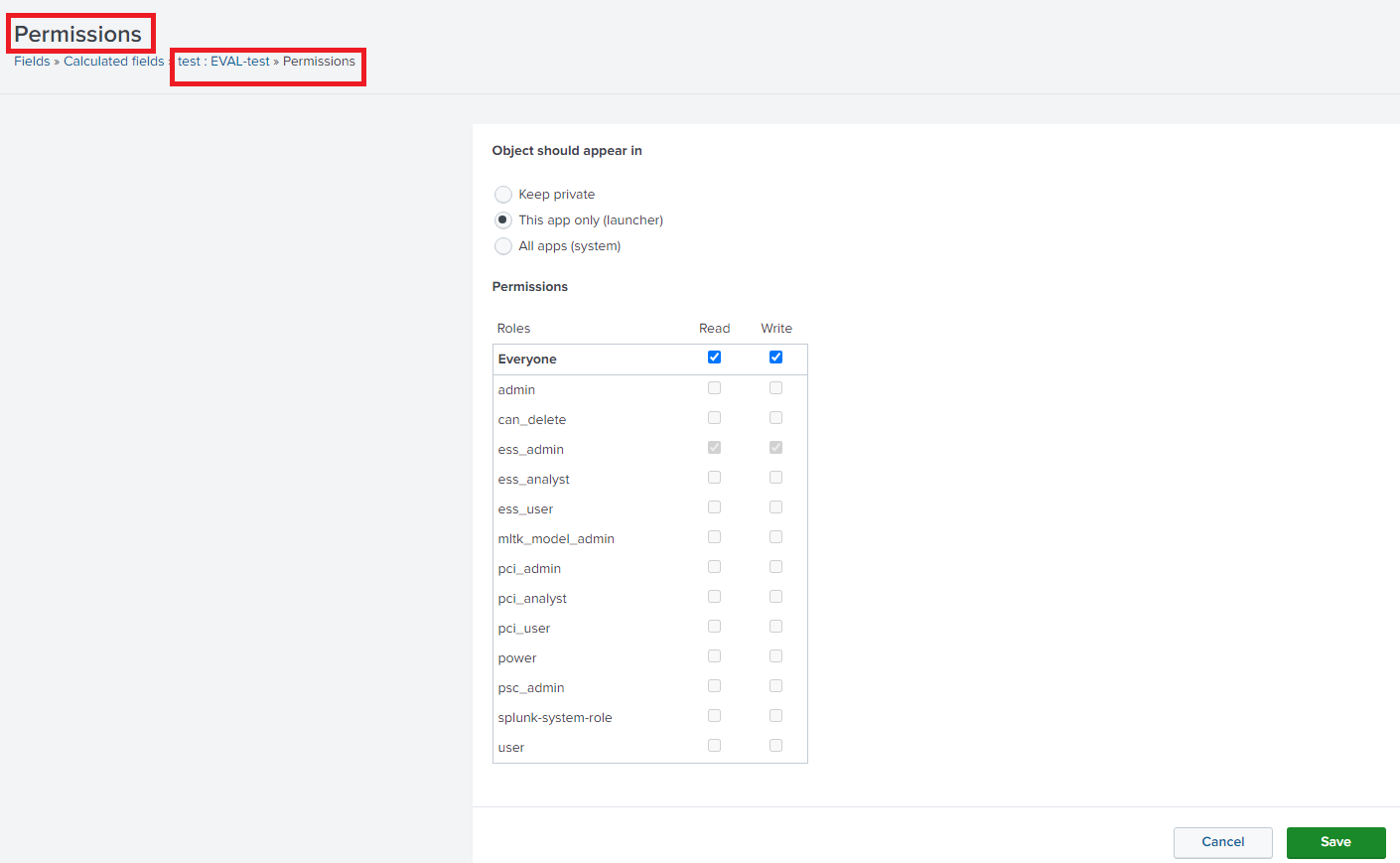
This issue is replicated whenever two or more users create any Knowledge Object with the same name and try to update the permissions. One user will be able to do it successfully, as shown in the image below.
Once user B, tries to set the permission to his private Knowledge Object which shares the same common name; it will get the following message:
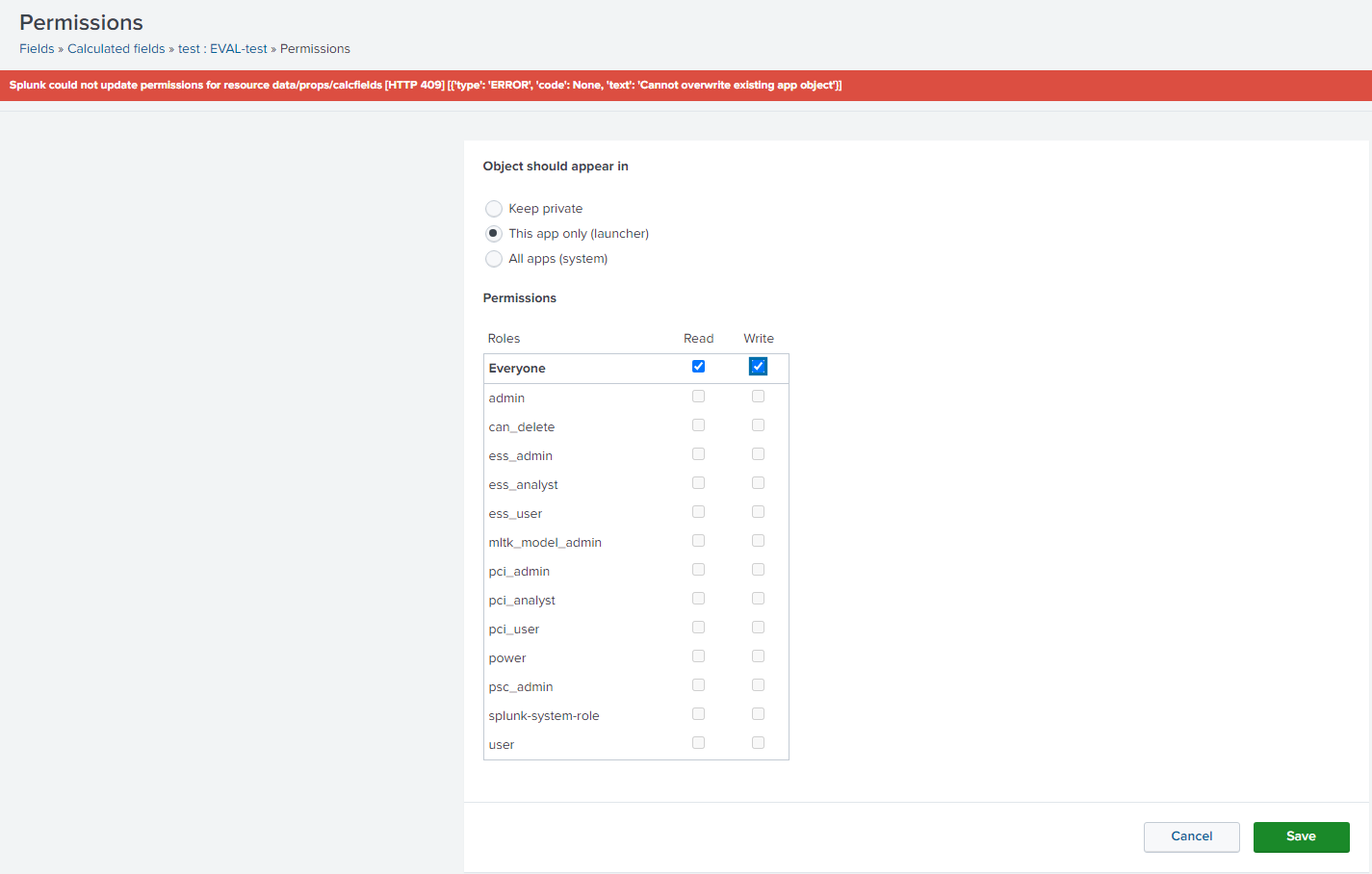
The reason behind this error is that the Knowledge Object has been previously added to both directories $SPLUNK_HOME/etc/app_name/local/props.conf and $SPLUNK_HOME/etc/app_name/metadata. Splunk will notice that the files already exist based on both files' stanzas "[test]" and "[props/test/EVAL-test]"; hence displaying the "Overwritte" error message.
NOTE:
This issue has only been seen if the app is the same. The error message was not replicated if the calculated fields were created in a different destination app.
Splunk Cloud
This issue is replicated whenever a user creates any Knowledge Object while using 000-self-service as Destination app.
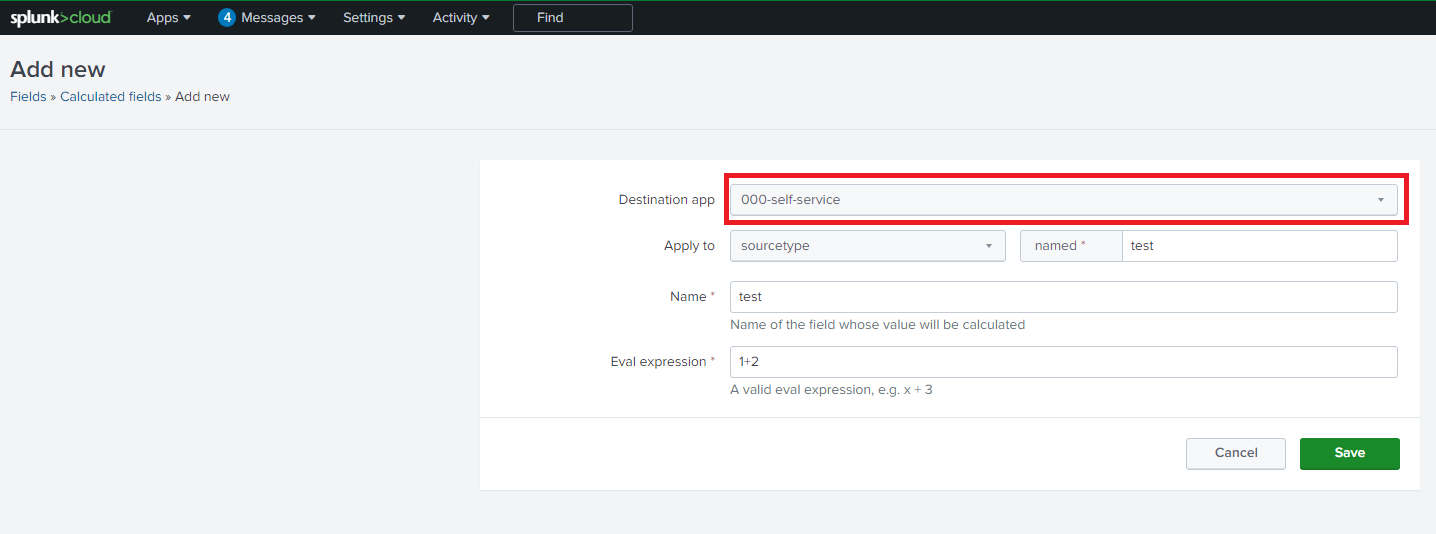
The user will be able to create the Knowledge Object successfully, as shown in the image below.

If the user tries to change the Knowledge Object permits, the user will be able to do it.
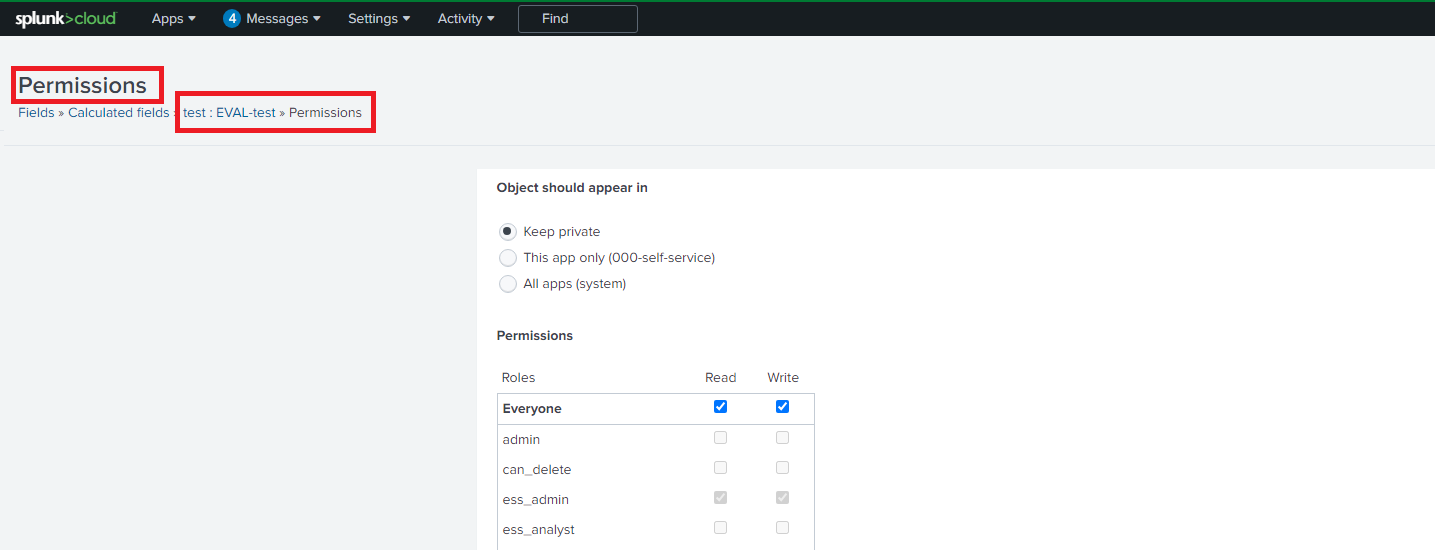
Once the permissions have been updated, the user can see that the app is being shared "Global".
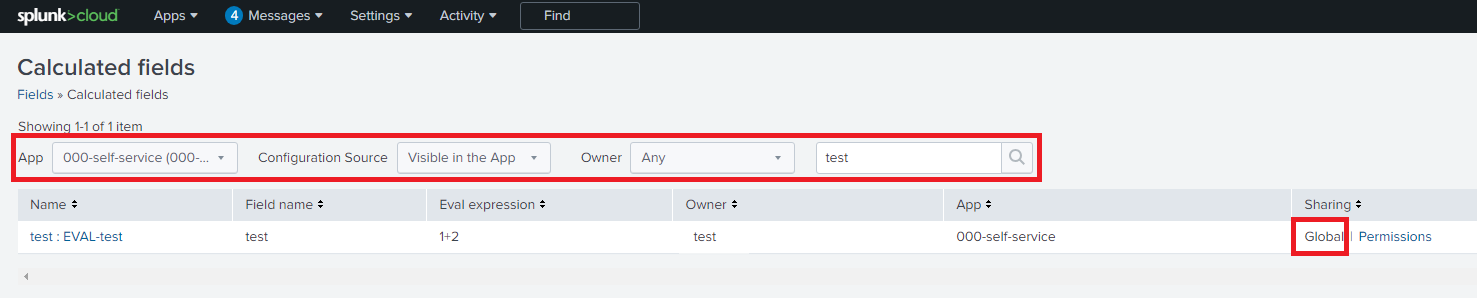
If the user refreshes the page or tries to search for the newly created Knowledge Object; the Knowledge Object is not found.

If the KO is created again, and the user tries to update its permissions; the following error message will appear.
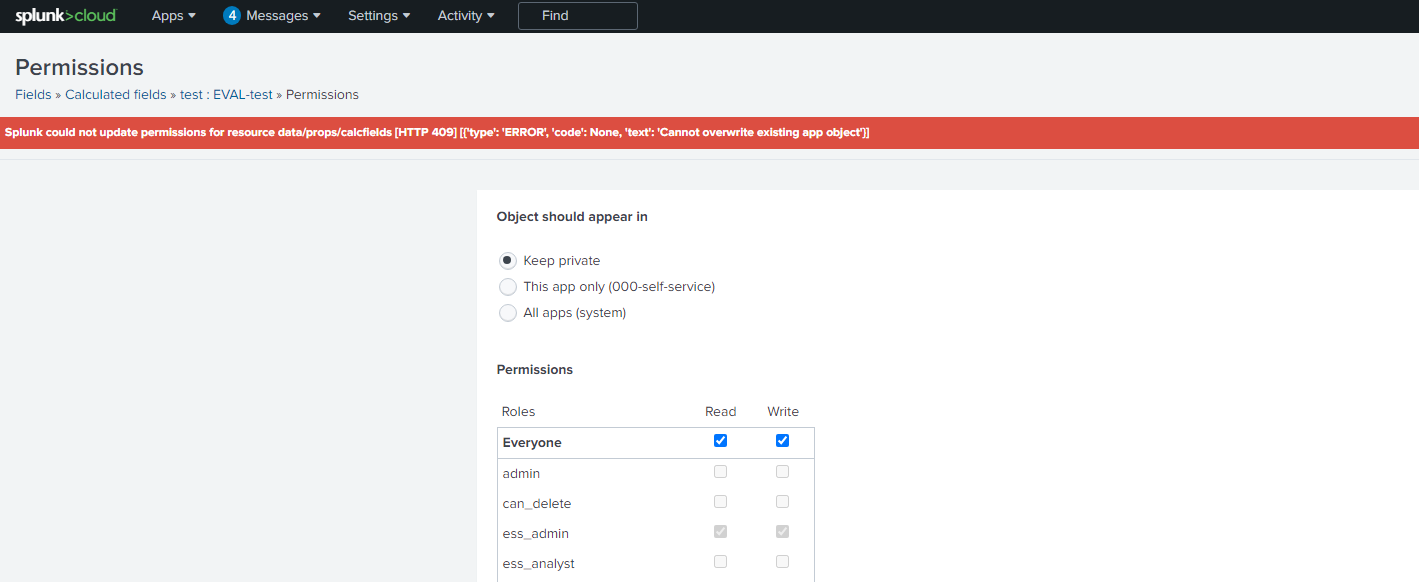
This issue is only seen whenever the user tries to use the 000-self-service to create any Knowledge Object and update its permissions to Global.
IMPORTANT:
The 000-self-service should contain only index-time assets that are read in the global context. This means sourcetypes managed via the "self-service" flow can be restricted to index-time props.conf attributes; such as indexes, sourcetypes, HEC tokens, and others. Although the advanced view of the Sourcetypes UI technically allows for search-time attributes to be added to a Sourcetype. Users can go through the knowledge-object-specific UI flows for those attributes instead "Settings > Fields > Field Extractions".
Since the 000-self-service app is an internal Splunk app where only the index time configurations reside, meaning it is a managing app. Any search-time configuration must be done either by using a custom app or any other app such as Search; excluding any Cloud Internal app.
Investigation
To investigate this issue perform the following steps:
Situation#1 Knowledge Object is seen in Splunk Web
- Go to Settings> Fields> Calculated fields/ your desired KO
- Filter the search as shown in the image below
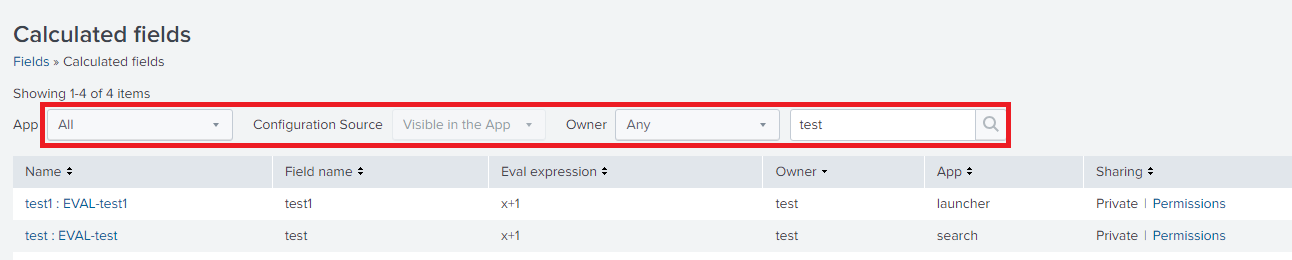
- You can specify the user, but to check if the KO exists in other users its preferable to select the Owner as "Any"
Situation#2 Knowledge Object is seen in Splunk Web but it only displays one KO
- Run the following commands to find if KO exists between different apps or users:
The output of this command will display whether the Calculated field is private or shared. If the output is only the stanza of the Calculated field, it means that it's being shared.
find /$SPLUNK_HOME/etc/users/*/*/local/props.conf -exec grep -H "Name" {} +
The output of this command will display if the calculated field is being shared and in which app, this file it will only contain the information of the calculated field. If this is being investigated in Splunk Cloud check if the shared app is any Cloud internal app like the 000-self-service app.
find /$SPLUNK_HOME/etc/apps/*/local/props.conf -exec grep -H "Name" {} +
2. Run the following command to check whether the affected app and user have the local.meta defined.
The output of this command will provide us with the name of the calculated field.
find /$SPLUNK_HOME/etc/apps/*/metadata -exec grep -H "Name" {} +
3. Run the following command to check the owner information for the calculated fields.
cat /$SPLUNK_HOME/etc/apps/app_name/metadata/local.meta
The output of this command should display the following information:
[props/test/EVAL-test1]
access = read : [ power, user ], write : [ power, user ]
export = system
owner = owner_name
version = x.x.x.x.x
modtime = xxxxxx.xxxxxxx
Note:
Replace "Name" with the name of the Knowledge Object that appears in Splunk Web; for example, if the name is "test: EVAL-test" only the portion "test" is needed since "EVAL-test" is the name of the Field whose value will be calculated.
Resolution
Perform the following steps depending on the situation:
Situation #1 The app permissions need to be switched from User A to User B (Enterprise)
- Set the App to "Private" (If the GUI option is available).
- Change the permissions using User B.
Situation #2 The app permissions need to be switch from Private to Global, but KO is not seen in Splunk Web. (Cloud)
- Validate if the destination app is any internal Cloud app
- If the app is a Cloud internal app, use either Search app or a custom app to deploy the KO.
Note:
The 000-self-service should contain only index-time assets that are read in the global context. This means sourcetypes managed via the "self-service" flow can be restricted to index-time props.conf attributes; such as indexes, sourcetypes, HEC tokens, and others. Although the advanced view of the Sourcetypes UI technically allows for search-time attributes to be added to a Sourcetype. Users can go through the knowledge-object-specific UI flows for those attributes instead "Settings > Fields > Field Extractions".
Since the 000-self-service app is an internal Splunk app where only the index time configurations reside, meaning it is a managing app. Any search-time configuration must be done either by using a custom app or any other app such as Search; excluding any Cloud Internal app.
Revision History
| Revision | Publish Date | Comments |
|---|---|---|
1.0 |
29-Sep-2026
|
Initial Release |
 Feedback
Contact Cisco
- Open a Support Case

- (Requires a Cisco Service Contract)