Edge Processor failing to connect and displays "HTTP 403 forbidden" error
Available Languages
Applicability
Splunk Cloud Edge ProcessorDescription
There is a HEC(HTTP Event Collector) destination enabled in the Edge Processor.
When trying to send the logs using Curl for testing purpose, observed the errors in the Edge Processor logs as mentioned below:
{"level":"INFO","time":"2025-01-15T13:59:47.560Z","location":"exporterhelper/retry_sender.go:118","message":"Exporting failed. Will retry the request after interval.","service":"edge-processor","hostname":"ep02-1-us-east-2.psf.cmn.cto.a.example.com","commit":"71b2c44d","version":"1.7.0","kind":"exporter","data_type":"logs","name":"splunk_hec/shared.pipelines.west_prf_hec","error":"HTTP 403 \"Forbidden\"","interval":"37.067314557s"}
Investigation
Confirm if the token works with Splunk
- Run the following command to check if the connection is successful from the Edge Processor host machine:
curl -v https://<splunk_hec_endpoint>:<hec_port>/services/collector \
 -H "Authorization: Splunk <hec_token>" \
 -H "Content-Type: application/json" \
 -d '{
 "sourcetype": "manual",
 "index": "main",
 "event": "Hello, world!"
}'
- Output:
curl -v https://ep01-1-us-west-2.prf.cmn.cto.a.xxxx.com:443/services/collector \
-H "Authorization: Splunk adc9ee72-9fca-xxxx-xxxx-xxxxcb9bef8" \
-H "Content-Type: application/json" \
-d '{
"sourcetype": "edge_test",
"index": "stress",
"event": "2025-01-17T06:45:16Z Hello, world!"
}'Trying 54.68.xx.xx:443...
Connected to ep01-1-us-west-2.prf.cmn.cto.a.xxxx.com port 443
- Run the following command to confirm if the Edge Processor HEC receiver accepts the same token as Splunk:
curl -k http://<ep_host_ip>:8088/services/collector \
 -H "Authorization: Splunk <hec_token>" \
 -H "Content-Type: application/json" \
 -d '{
 "sourcetype": "manual",
 "index": "main",
 "event": "Hello, world!"
}'
- Output:
curl -k https://ep01-1-us-west-2xxxxxx:443/services/collector \
-H "Authorization: Splunk adc9ee72-xxxx-xxxx-987e-81488cb9bef8" \
-H "Content-Type: application/json" \
-d '{
"sourcetype": "edge_test",
"index": "stress",
"event": "2025-01-16T06:30:16Z Hello, world!"
}'[root@heavyforwarder01-1 ~]# telnet ep01-1-us-east-2.prf.cmn.cto.a.xxxx.com 443Trying 52.35.xx.xxx...Connected to ep01-1-us-east-2.prf.cmn.cto.a.xxxx.com.Escape character is '^]'.
NOTE : Placeholders should be replaced with appropriate values and the <hec_token> with the HEC token which has been generated from Splunk (the same token that was provided in EP’s shared settings).
To find the HEC token, navigate to, Edge Processor tenant in a web browser > Edge Processors > Shared settings > Token authentication.
Verify if the same HEC token is used in HEC destination
- This can be checked by going into Edge Processor UI > Destinations > example_01_hec > Edit. Then the following form will be displayed.
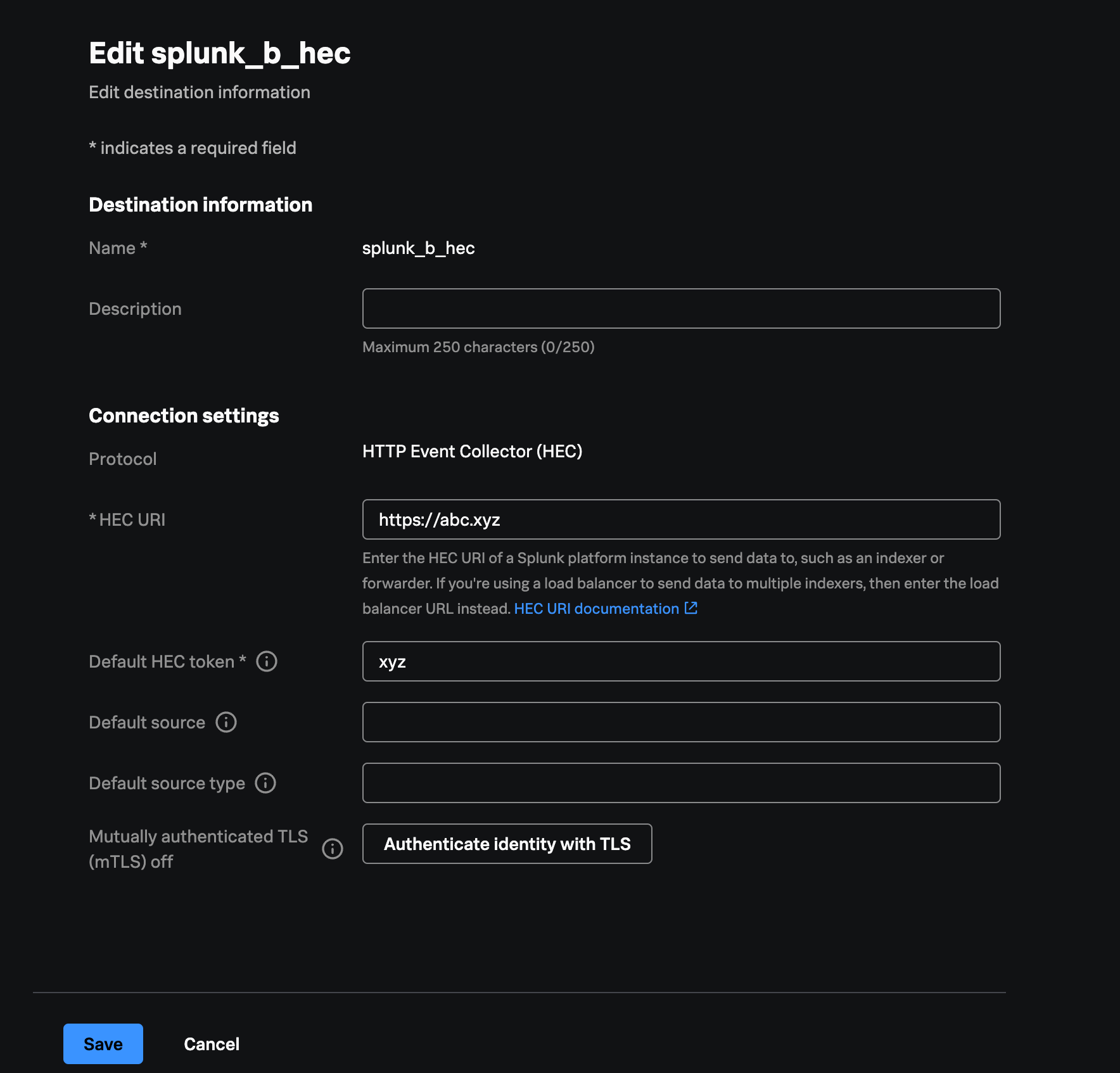
- Verify if the Default HEC token is set to correct value.
- The shared settings token is used for HEC receiver in Edge Processor i.e, sending data to Edge Processor.
- Additionally, there can be a possibility that HEC destination has invalid token.
Validate what token is being used to send data to the Edge Processor.
- The token which is used to send data to Edge Processor is used as passthrough token that gets used to send data from Edge Processor to Splunk Indexer.
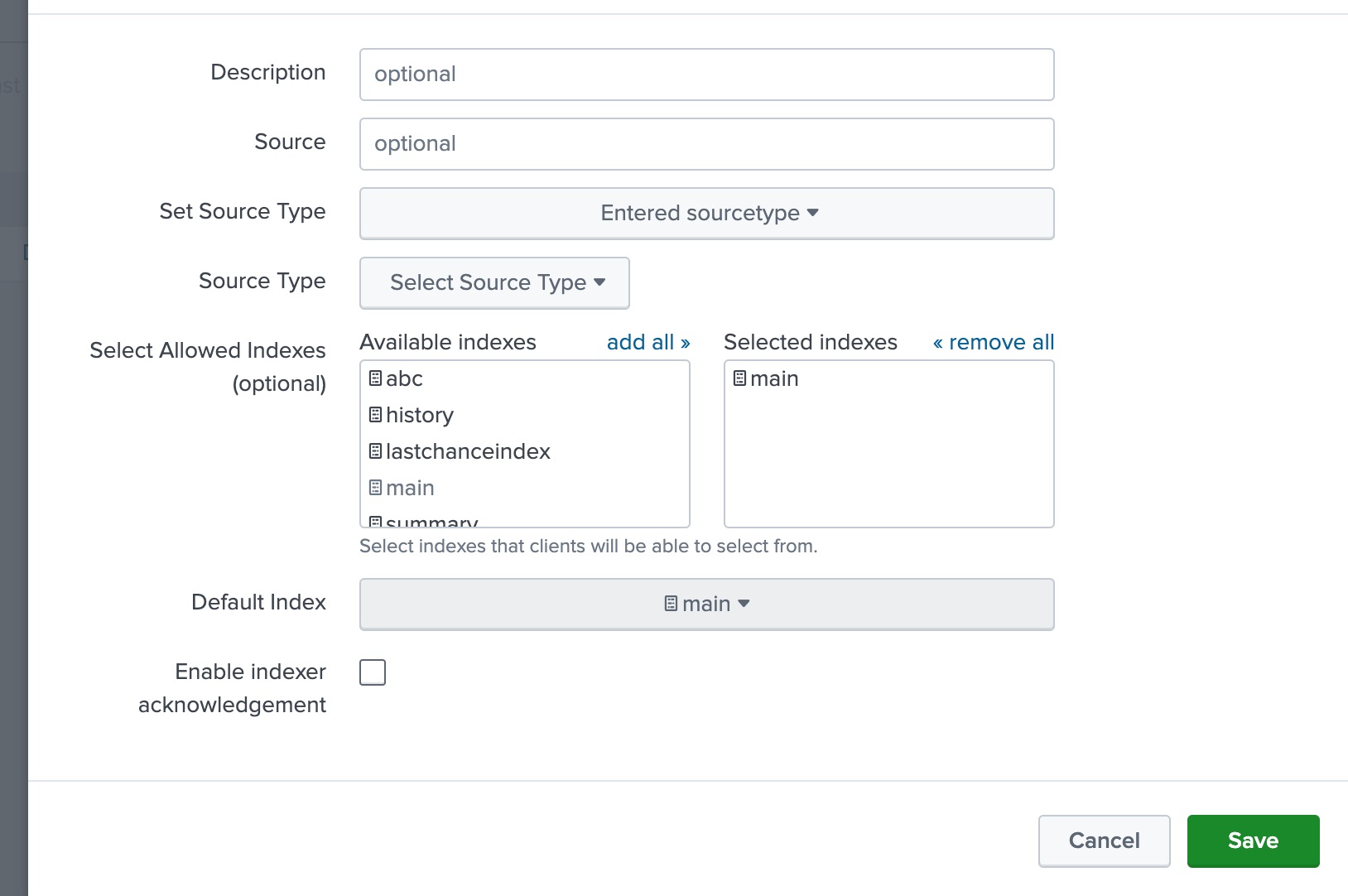
- It is necessary that the token is enabled and has sufficient permissions in Splunk indexer.
- For example, specifying the index that is needed to send to in the allowed indexes list is required. Default index can also be selected
Check if the certificates are available
- Check if the issue is due to the missing certificate. Navigate to Edge Processors service > Edge Processor page > Select and Edit > Access TLS settings > View/upload certificates
- Issue can be caused if the certificate is not available in Edge Processor.
- Or error can be the way where the certificates are split.
Resolution
- It was been identified that the "HTTP 403 forbidden error" was caused due to the missing certificate in Edge Processor. The certificate was not available in the Edge Processor.
- Post adding the certificates, reconfigured the token in shared setting to receive the logs in Edge Processor.
- After reconfiguring the token in shared settings, Edge Processor was able to connect successfully.
Related Links
- Document to verify if the token works with Splunk.
- Reference document to check on the precedence order of HEC tokens and metadata field values.
Revision History
| Revision | Publish Date | Comments |
|---|---|---|
1.0 |
29-Sep-2026
|
Initial Release |
 Feedback
Contact Cisco
- Open a Support Case

- (Requires a Cisco Service Contract)