The identity provider certificate or certificate chain will expire.
Available Languages
Applicability
Splunk Cloud Splunk EnterpriseDescription
In the Splunk Search Head under messages, there is a warning saying the identity provider (IdP) certificate will expire:
The identity provider certificate or certificate chain name=<IdP details> will expire in <number of day> day(s). Update the certificate(s) before they expire to avoid losing access to this instance.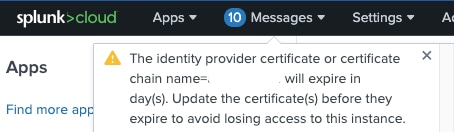
Investigation
Verify the Splunk Search Head is configured with SAML Authentication method under Settings > Authentication methods > Configure Splunk to use SAML > SAML Configuration.
Resolution
Reach out to the IdP administrator and communicate that the IdP certificate is near the expiration date.
Once the certificate is renewed, provide the new certificate in the Search Heads configured with SAML Authentication under Settings > Authentication Methods > Configure Splunk to use SAML.
This can be done with a new Metadata XML File from the Identity Provider (IdP), or using the IdP certificate chains box under the General Settings section of the SAML configuration dialog box. The text here represent one or more IdP certificates chained together. Certificate chains must be in order, starting with the root certificate, any intermediate certificates, and finally leaf certificates. Paste the entire certificate chain into the field. The chain can be comprised of a single certificate as well.
Configure single sign-on using SAML as an authentication scheme.
Revision History
| Revision | Publish Date | Comments |
|---|---|---|
1.0 |
29-Sep-2026
|
Initial Release |
 Feedback
Contact Cisco
- Open a Support Case

- (Requires a Cisco Service Contract)