Splunk DB Connect: Snowflake Connection Error - "Unable to Save Due to JWT Token Invalid Issue"
Available Languages
Applicability
Splunk Apps & Add-ons Splunk Enterprise Splunk CloudDescription
Encounter the following errors when attempting to save a Snowflake connection in Splunk DB Connect: "JWT Token is Invalid."
The issue typically arises when creating a Snowflake connection and trying to save it, with the second error being related to an invalid JWT Token caused by a time synchronization issue between systems.
Investigation
After generating a new key, the connection could not be saved due to the error message: "JWT Token is Invalid."
This error usually indicates an issue with the validity of the JWT Token.
Please refer to the below screenshot for reference: 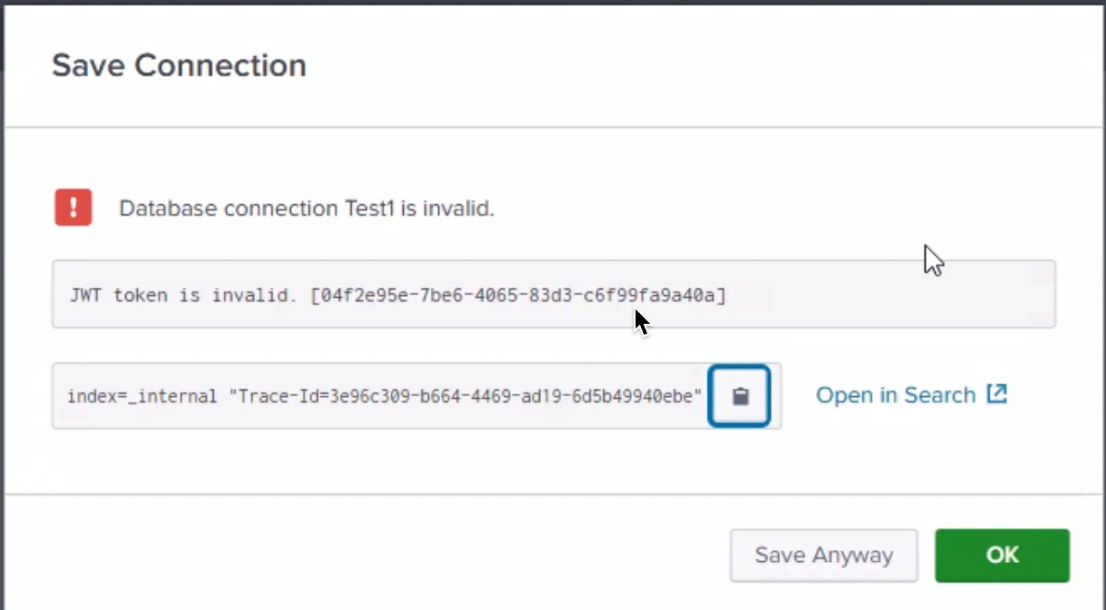
Upon further investigation, the root cause was identified as a time synchronization issue (clock skew) on the Splunk server running the Splunk DB Connect App.
The error message "JWT_TOKEN_INVALID_ISSUE_TIME" pointed to the time discrepancy.
Resolution
To resolve the issue, the following steps should be taken:
-
Verify and Correct Time Synchronization:
- The time on the Splunk server should be synchronized correctly with the system time. Time discrepancies between the server and system can lead to JWT token issues.
-
Re-attempt Saving the Connection:
- Once the time synchronization issue is resolved, the Snowflake connection should be saved successfully without any further errors.
Related Links
Revision History
| Revision | Publish Date | Comments |
|---|---|---|
1.0 |
29-Sep-2026
|
Initial Release |
 Feedback
Contact Cisco
- Open a Support Case

- (Requires a Cisco Service Contract)