Remove the warning "This search has a potential security risk"
Available Languages
Applicability
Splunk CloudDescription
The Splunk platform contains search processing language (SPL) safeguards to warn when might unknowingly run a search in Splunk Web containing commands that might be either a security or a performance risk.
If a search command that Splunk classifies as risky triggers the safeguard, a warning dialog box is displayed to provide extra context for review, and the option to accept the risk and run the query anyway.
In the Search app, the warning dialog box appears when clicking a link or typing a URL that loads a search that contains risky commands.
In dashboards, the warning dialog box appears automatically unless an input or visualization contains a search with a risky command. In this case, click the error icon to invoke the warning.
The warning does not appear when creating ad hoc searches.
This warning alerts to the possibility of either a significant impact on performance or unauthorized actions by a malicious user. Unauthorized actions include: Copying or transferring data, a practice known as data exfiltration, deleting data or overwriting data.
Investigation
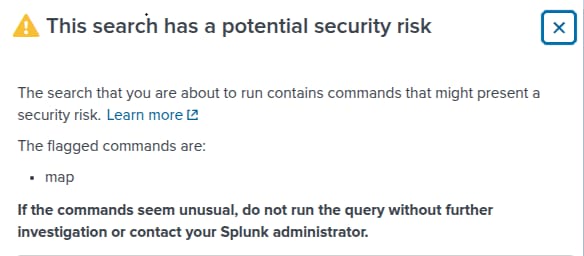
The following is an example of this message received after using the map command:
Resolution
When the SPL safeguards are deactivated:
- Splunk platform runs searches that contain risky commands and does not alert to the fact that the commands in the search are risky.
- The removal is made for the entire instance and it cannot be done for a single application.
- Deactivating the safeguards could cause problems with search performance.
- Review the list of commands that trigger the warning,
- The warning message does not represent any risk.
If after the above considerations, deactivation is necessary proceed to open a Support Case with the request.
Reference this article in the request.
Related Links
SPL safeguards for risky commands
Revision History
| Revision | Publish Date | Comments |
|---|---|---|
1.0 |
29-Sep-2026
|
Initial Release |
 Feedback
Contact Cisco
- Open a Support Case

- (Requires a Cisco Service Contract)