Encountering "KrbException: Cannot locate default realm" error while saving the MSSQL server using Kerberos authentication connection in DB Connect add-on.
Available Languages
Applicability
Splunk Cloud Splunk Enterprise Splunk Apps & Add-on Splunk Add-on for DB ConnectDescription
When saving a connection to MS SQL Server using the Kerberos authentication as connection type, the following error occurs: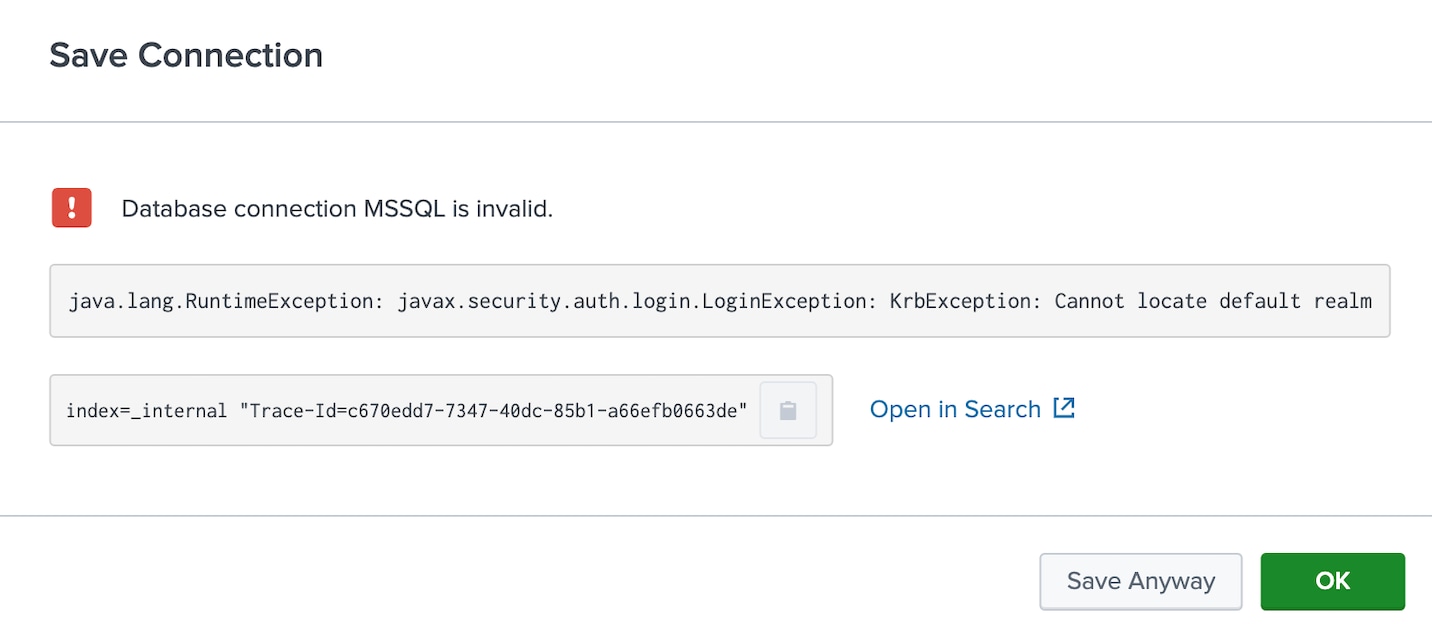
Investigation
Reviewed the appropriate error logs using the trace ID, which can be found in the error popup when saving the connection.
index=_internal "Trace-Id=a032603e-10ba-4526-973f-379d9717bf9a"2024-11-28 22:41:50.000 +0530 Trace-Id=a032603e-10ba-4526-973f-379d9717bf9a [dw-26 - POST /api/connections/status] ERROR c.s.d.s.a.s.d.impl.DatabaseMetadataServiceImpl - action=error_in_validating_connection connection=ConnectionConf(connectionType=generic_mssql, defaultDatabase=master, host=10.50.6.105, jdbcUrl=, jdbcUseSSL=true, certificate=null, port=1433, jdbcUrlSSLFormat=jdbc:sqlserver://<host>:<port>;databaseName=<database>;selectMethod=cursor;encrypt=true, jdbcUrlFormat=jdbc:sqlserver://<host>:<port>;databaseName=<database>;selectMethod=cursor, serviceClass=com.splunk.dbx2.MSSQLJDBC, jdbcDriverClass=com.microsoft.sqlserver.jdbc.SQLServerDriver,
java.lang.RuntimeException: javax.security.auth.login.LoginException: KrbException: Cannot locate default realm
at com.splunk.dbx.connector.ConnectorFactory.getJavaKerberosConnection(ConnectorFactory.java:301)
at com.splunk.dbx.connector.ConnectorFactory.getConnectionWithoutPool(ConnectorFactory.java:256)
at com.splunk.dbx.connector.ConnectorFactory.getConnection(ConnectorFactory.java:233)
at com.splunk.dbx.connector.ConnectorFactory.create(ConnectorFactory.java:143)
at com.splunk.dbx.server.api.service.database.impl.DatabaseMetadataServiceImpl.getStatus(DatabaseMetadataServiceImpl.java:175)
at com.splunk.dbx.server.api.service.database.impl.DatabaseMetadataServiceImpl.getConnectionStatus(DatabaseMetadataServiceImpl.java:145)
at com.splunk.dbx.server.api.resource.ConnectionResource.getConnectionStatus(ConnectionResource.java:90)
at java.base/jdk.internal.reflect.NativeMethodAccessorImpl.invoke0(Native Method)
at java.base/jdk.internal.reflect.NativeMethodAccessorImpl.invoke(NativeMethodAccessorImpl.java:62)
at java.base/jdk.internal.reflect.DelegatingMethodAccessorImpl.invoke(DelegatingMethodAccessorImpl.java:43)
at java.base/java.lang.reflect.Method.invoke(Method.java:566)
at org.glassfish.jersey.server.model.internal.ResourceMethodInvocationHandlerFactory.lambda$static$0(ResourceMethodInvocationHandlerFactory.java:52)
The error message javax.security.auth.login.LoginException: KrbException: Cannot locate default realm typically occurs in a Java application that is using Kerberos authentication (often in the context of interacting with a system like Hadoop, Active Directory, or other Kerberos-based services), and it indicates that Kerberos cannot find the default realm configuration in OS environment.
Resolution
The Kerberos requires a configuration file to specify the realm and Key Distribution Center (KDC) details. If the configuration file is missing or improperly configured, it will lead to realm error.
To resolve the javax.security.auth.login.LoginException: KrbException: Cannot locate default realm error, Kerberos must be properly configured for the Java application.
Check the location of the krb5.conf (Linux/Unix) or krb5.ini (Windows):
Linux/Unix: The configuration file is typically located at /etc/krb5.conf.
Windows: The file is usually located at C:\Windows\krb5.ini.
Ensure the file contains a valid realms section that specifies the default realm and KDC details.
Example of a krb5 file:
[libdefaults]
    default_realm = EXAMPLE.COM[realms]
    EXAMPLE.COM = {
        kdc = kdc.example.com
        admin_server = admin.example.com
    }[domain_realm]
    .example.com = EXAMPLE.COM
    example.com = EXAMPLE.COM
Revision History
| Revision | Publish Date | Comments |
|---|---|---|
1.0 |
29-Sep-2026
|
Initial Release |
 Feedback
Contact Cisco
- Open a Support Case

- (Requires a Cisco Service Contract)