Splunk DB Connect : Getting error code 'ORA-17056' while selecting schema in either input or in query explorer tab
Available Languages
Applicability
Splunk Enterprise Splunk CloudDescription
While selecting schema associated with Oracle database produce the below-mentioned error:
Cannot get schemaConfigured Oracle driver version: v23.2.0
Investigation
Upon checking the internal logs with the below SPL:
index=_internal sourcetype="dbx_server" log_level="ERROR"Below are the error messages which are present in the logs:
2024-10-21 15:26:02.909 +0900 Trace-Id=c00353eb-0748-47b2-8922-33266dc464d6 [dw-96 - GET /api/connections/<connection name>/metadata/schemas?catalog=] ERROR c.s.d.s.a.s.d.impl.DatabaseMetadataServiceImpl - Unable to get schemas metadata
java.sql.SQLException: ORA-17056: Non-supported character set (add orai18n.jar in the classpath): JA16SJISTILDE
	at oracle.sql.CharacterSetUnknown.failCharsetUnknown(CharacterSetFactoryThin.java:226)
	at oracle.sql.CharacterSetUnknown.convert(CharacterSetFactoryThin.java:187)
	at oracle.jdbc.driver.PhysicalConnection.throughDbCharset(PhysicalConnection.java:11694)
	at oracle.jdbc.driver.PhysicalConnection.enquoteIdentifier(PhysicalConnection.java:11774)
	at oracle.jdbc.driver.OracleStatement.enquoteIdentifier(OracleStatement.java:7075)
	at oracle.jdbc.driver.OracleStatement.getColumnIndex(OracleStatement.java:4258)
	at oracle.jdbc.driver.InsensitiveScrollableResultSet.findColumn(InsensitiveScrollableResultSet.java:292)
	at oracle.jdbc.driver.GeneratedResultSet.getString(GeneratedResultSet.java:648)
	at com.zaxxer.hikari.pool.HikariProxyResultSet.getString(HikariProxyResultSet.java)
	at com.splunk.dbx.connector.connector.impl.JdbcConnectorImpl.convertToMetaList(JdbcConnectorImpl.java:223)
	at com.splunk.dbx.connector.connector.impl.JdbcConnectorImpl.getSchemas(JdbcConnectorImpl.java:203)
	at com.splunk.dbx.server.api.service.database.impl.DatabaseMetadataServiceImpl.getSchemaMetadata(DatabaseMetadataServiceImpl.java:88)
	at com.splunk.dbx.server.api.resource.ConnectionResource.exploreConnectionSchemas(ConnectionResource.java:170)
	at java.base/jdk.internal.reflect.DirectMethodHandleAccessor.invoke(DirectMethodHandleAccessor.java:103)
	at java.base/java.lang.reflect.Method.invoke(Method.java:580)
The error message suggests that the driver does not support the character set JA16SJISTILDE and it required an additional JAR file orai18n.jar.
Resolution
To resolve this, need to merge the driver file (e.g. ojdbc8-23.2.0.0.jar) with orai18n.jar following the below steps:
- Create an empty directory on instances where JAVA is installed e.g. test.
- Place both jars (e.g. ojdbc8-23.2.0.0.jar and orai18n.jar ) into that directory
- Use command jar xf <JAR file name> to extract both JAR files one by one.
- Remove both jars (e.g. ojdbc8-23.2.0.0.jar and orai18n.jar ) from the directory.
- Compress the directory by command 'jar cf <file name for driver>.jar . ', this will require a driver which supports the character set.
Please refer to the below image for reference.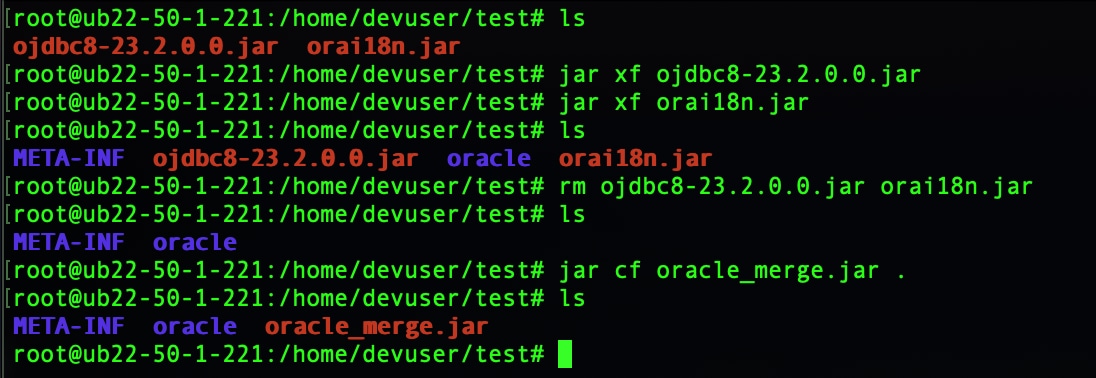
Revision History
| Revision | Publish Date | Comments |
|---|---|---|
1.0 |
29-Sep-2026
|
Initial Release |
 Feedback
Contact Cisco
- Open a Support Case

- (Requires a Cisco Service Contract)