Splunk ODBC App - Error: "The saved search failed to return results!" while fetching data into Power BI using ODBC App from Saved Searches with Token Parameters
Available Languages
Applicability
Splunk Apps and Addons Splunk Enterprise Splunk CloudDescription
This article addresses an issue encountered when fetching data from a Splunk saved search containing token parameters via the Splunk ODBC app into Power BI. When executed, the saved search fails, resulting in incomplete data retrieval
Investigation
Follow below steps to Investigate the ERROR:
1. Validate the Saved Search with Token Parameters in Splunk:
Example Saved Search with token:
index=index_name source=daily_jobs Instance=$instance$ earliest=-24h
| table field1 field2 field3 field4 field5
2. Execute the saved search in Splunk:
> Run the saved search directly in Splunk to confirm it works as expected when token parameters are provided, In order to run this In Splunk, replace the $instance$ token with a value, such as VMWare, to verify the search operates correctly with dynamic token replacement.
SPL Query to be Run:
| savedsearch SRC_POWER_BI_token Instance="Vmware"
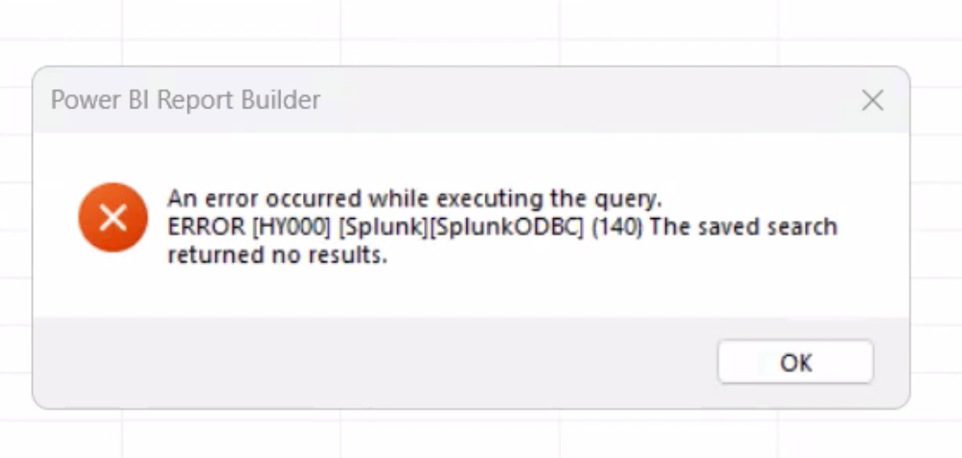
3. Attempt Execution in Power BI via ODBC and validate the ERROR:
Note: Ensure debug mode is enabled in ODBC app, if not enabled follow this Splunk document mentioned below in related links.
Power BI query:
select * from SRC_POWER_BI_token where Instance="VMWare"
Screenshot of the Error:
4. Review generated ODBC app Logs and validate below ERROR:
Refer below Document mentioned in related link to see below Error logs from ODBC.
ERROR:
Sep 18 10:14:16 INFO 25760 Statement::SQLSetStmtAttrW: Attribute: Unknown Attribute (1228)
Sep 18 10:14:16 INFO 25760 StatementAttributes::SetAttribute: Invalid attribute: 1228
Sep 18 10:14:16 ERROR 25760 Statement::SQLSetStmtAttrW: [Splunk][ODBC] (10210) Attribute identifier invalid or not supported: 1228
Sep 18 10:14:16 INFO 25760 Statement::SQLSetStmtAttrW: Attribute: Unknown Attribute (1227)
Sep 18 10:14:16 INFO 25760 StatementAttributes::SetAttribute: Invalid attribute: 1227
Sep 18 10:14:16 ERROR 25760 Statement::SQLSetStmtAttrW: [Splunk][ODBC] (10210) Attribute identifier invalid or not supported: 1227
Resolution
The Error occurs because the Splunk ODBC app executes the saved search exactly as written, without replacing token values dynamically. When additional filtering conditions are specified in POWER BI, they are appended to the end of the saved search by ODBC app,
Since the token $instance$ is not dynamically replaced, it remains as it is in the search that is executed, leading to an error.
Resultant saved search:
index=index_name source=daily_jobs Instance=$instance$ earliest=-24h
| table field1 field2 field3 field4 field5 | where instance =vmware
As of version v3.1.1 of the ODBC app, dynamic token replacement is unsupported. Therefore, the recommended solution is to simplify the saved search by removing token parameters and using a static value, Allowing the query to execute successfully and retrieve the expected results.
Related Links
ODBC Configuration: Link
Debug Mode Enable: Link
Revision History
| Revision | Publish Date | Comments |
|---|---|---|
1.0 |
29-Sep-2026
|
Initial Release |
 Feedback
Contact Cisco
- Open a Support Case

- (Requires a Cisco Service Contract)