Security risk warning: Found an empty value for allowedDomainList
Available Languages
Applicability
Splunk Cloud Splunk EnterpriseDescription
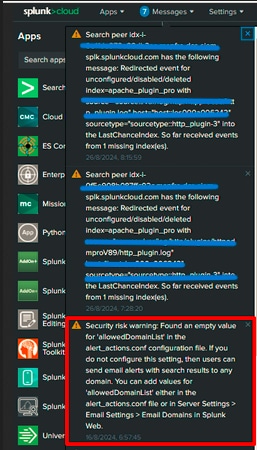
Splunk cloud is showing the below warning messages about empty email allow domain list, post Splunk Cloud upgrade to version 9.1.2312.203 or Splunk Enterprise 9.4 onwards :
Security risk warning: Found an empty value for 'allowedDomainList' in the alert_actions.conf configuration file. If you do not configure this setting, then users can send email alerts with search results to any domain. You can add values for 'allowedDomainList' either in the alert_actions.conf file or in Server Settings > Email Settings > Email Domains in Splunk Web.
Screenshot :
Investigation
This is a security risk warning message that indicates that there is no value set for allowedDomainList in the $SPLUNK_HOME/etc/system/local/alert_actions.conf file. If the configuration is not set, then users can send email alerts with search results to any domain.
- The warning is a known issue documented in the Splunk release notes - known issue.
- This warning message can be safely dismissed when it triggers either on an indexer or an indexer cluster instance.
- However, if the warning is observed in Search Head/ Search Head cluster member then that indicates a potential security risk.
Resolution
■ Follow the below steps to address the issue :
1. From GUI, navigate to Settings> Server Settings > Email Settings > Email Domains and configure the list of internet domains to which the search head can send emails as part of alert actions.
2. Alternatively, for Splunk Enterprise, this can also be applied from the backend by navigating to $SPLUNK_HOME/etc/system/local/alert_actions.con
Under the [email] stanza, specify:
[email]
allowedDomainList = <comma-separated list of domains>
For example:
[email]
allowedDomainList = example.com, partner.org
Behavior (pre–10.0.0):
- This value specifies which domains are allowed for the sendemail command and email alert action.
- If a user adds an email address whose domain is not on this list, Splunk removes that address from the recipients.
- If allowedDomainList is not configured, users can send email alerts to any domain
However starting in Splunk Enterprise 10.0.0, allowedDomainList supports three forms of configuration:
[email]
allowedDomainList = allow_all|deny_all|<comma-separated list>
allowedDomainList = allow_all|deny_all|<comma-separated list>
* A list of domains to which users can send email with the 'sendemail' command
or email alert action.
* A value of "allow_all" means the following:
* Allow all domains, which means email can be sent to all domains.
* Choosing this setting means that you accept the risk that search results
might be emailed to any domain.
* A value of "deny_all" means the following:
* Deny all domains, which means that email can't be sent to any domain.
* Choose this setting on the Splunk nodes from which you don't want
search results to be emailed.
* A value of "<comma-separated list>" means the following:
* Allow email to be sent to only the specified domains.
* This setting is recommended for Splunk nodes, such as search heads,
that need to email search results.
* If a user adds an email address for a domain that is not in this list,
Splunk software automatically removes the address from the recipient list.
* If "allow_all" is included in the list, then only the specified domains
are allowed. For example, if 'allowedDomainList=allow_all, splunk.com', then
splunk.com is the only allowed domain.
* If "deny_all" is included in this list, then no domains are allowed.
* If both "allow_all" and "deny_all" are included in this list, then no domains
are allowed.
* When this setting is specified, the 'action.email.allowedDomainList' setting
in the savedsearches.conf file has no effect.
* CAUTION: Security Risk. If you don't configure this setting, then users
can send email alerts with search results to any domain, which is a
security risk.
* No default.Refer for more information:
Related Links
Splunk Enterprise Release Note
Revision History
| Revision | Publish Date | Comments |
|---|---|---|
1.0 |
29-Sep-2026
|
Initial Release |
 Feedback
Contact Cisco
- Open a Support Case

- (Requires a Cisco Service Contract)