Splunk Add-on for ServiceNow: To create a new ServiceNow incident after 24 hours else the Splunk alert will update the existing incident.
Available Languages
Applicability
Splunk Enterprise Splunk Cloud Splunk Add-on for ServiceNowDescription
Requirement:
- A new incident in the ServiceNow instance should be created after 24 hours only and within 24 hours it should update the existing incident using Splunk Add-on for ServiceNow
Investigation
As per the default behavior of the Splunk add-on for ServiceNow, it will either create new ServiceNow incidents every time or update the existing incidents every time which does not fulfill the requirement.
- In a custom alert action, if the correlation ID value is left blank in the ServiceNow alert action, Splunk does not generate a random UUID but generates a correlation ID based on an MD5 hash of the alert name, However, since the correlation ID will be static it will only create the incident once the alert is triggered for the first time and from the second time onwards it will update the existing incident in the ServiceNow.
- If a unique correlation ID is generated every time the Splunk alert is triggered using an SPL query, it will create the ServiceNow incidents every time the Splunk alert is triggered.
However, this doesn’t fulfill the requirement.
Resolution
The rate of the correlation ID generation can be delayed to 24 hours using the event indexed date as the correlation ID will then it will remain static for one day (24 hours) and it will only generate the correlation ID after the indexed date is changed, this can be achieved by modifying the SPL query for the Splunk Alert
1) Add the below eval command in addition to the SPL query of the Splunk alert, it will create a uniqueId field along with all the SPL Query output events and append the indexed date in that field
| eval uniqueId = strftime(_time, "%Y%m%d")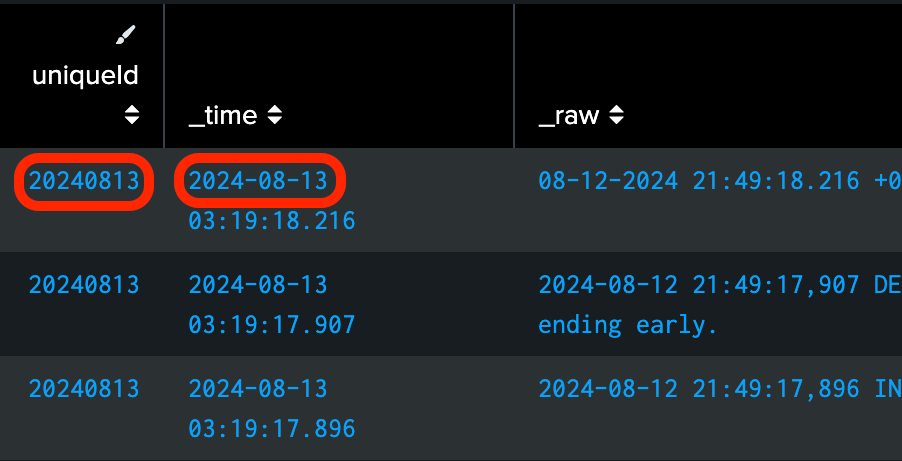
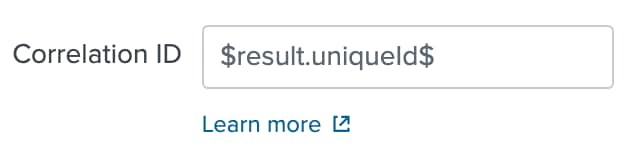
2) Navigate to Splunk Alert and select edit > expand the ServiceNow Incident Integration alert action > set the Correlation ID field with value $result.uniqueId$
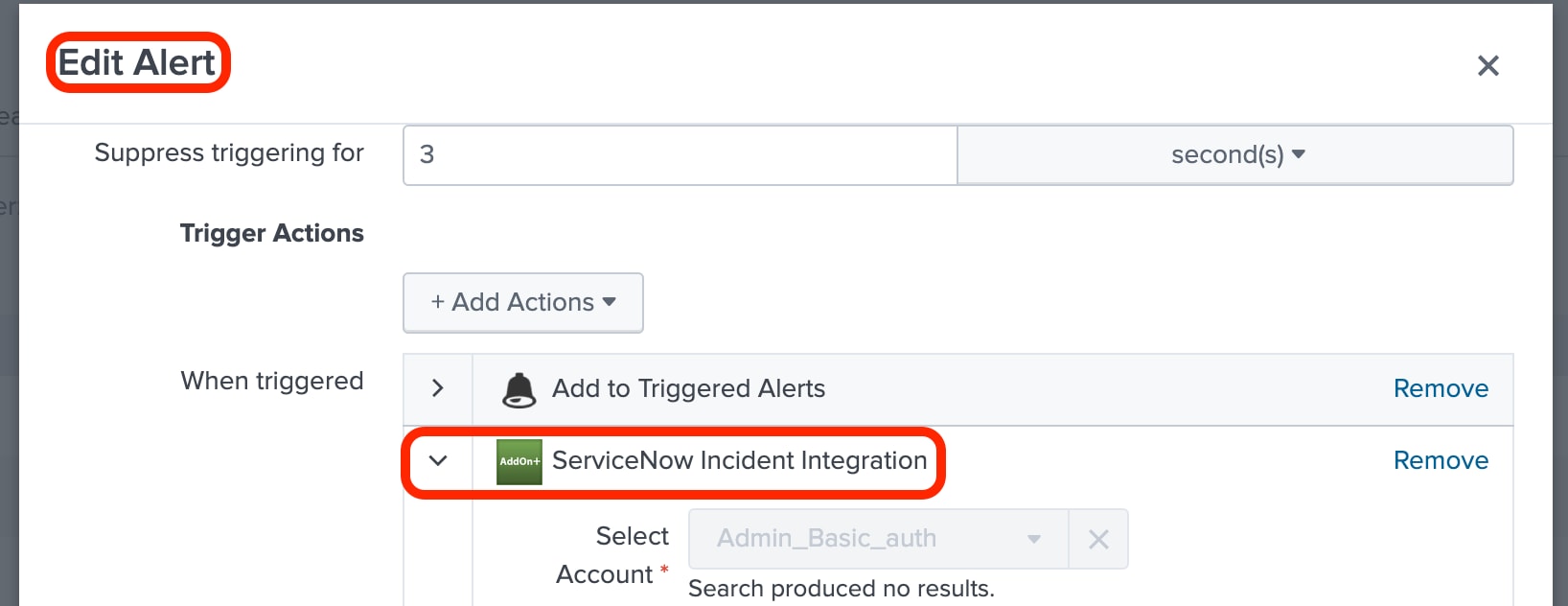
3) Save the Alert Action.
By having this configuration in the Correlation ID field, every 24 hours the unique value will be generated and appended in this field.
Revision History
| Revision | Publish Date | Comments |
|---|---|---|
1.0 |
29-Sep-2026
|
Initial Release |
 Feedback
Contact Cisco
- Open a Support Case

- (Requires a Cisco Service Contract)
This Document Applies to These Products
Related Articles
- Splunk Add-on for ServiceNow: How to create a new ServiceNow incident every time a new Splunk alert is triggered.
- Splunk Add-on for ServiceNow - Not generating incident for users
- Splunk Add-on for ServiceNow: Alternative Way for Non-Admin Users to Create Alerts and Searches
- Splunk Add-on for ServiceNow: How to Customise hostname for the Splunk URL sent to ServiceNow