Extracted fields are not visible to all users or apps
Available Languages
Applicability
Splunk Cloud Splunk EnterpriseDescription
A user has created a field extraction and permissions are set to Global. Whenever other users try to extract new fields, those fields do not show up in the interesting fields section.
Field extraction is created in the Search & Reporting app and permissions are set to all apps i.e., global.
This issue can also be present at the application level. For example, fields can be extracted in the 'Search & Reporting' app but not in other apps, such as a custom app.
Investigation
When other users try to extract the fields, they are not populated.
The permissions can be checked by navigating to Settings > Fields > Field Extractions > Field extraction name (exampleExtraction) > Permissions (set to Global)
It was found that despite the Field Extractions being shared Globally, the Field Transformations are still private.

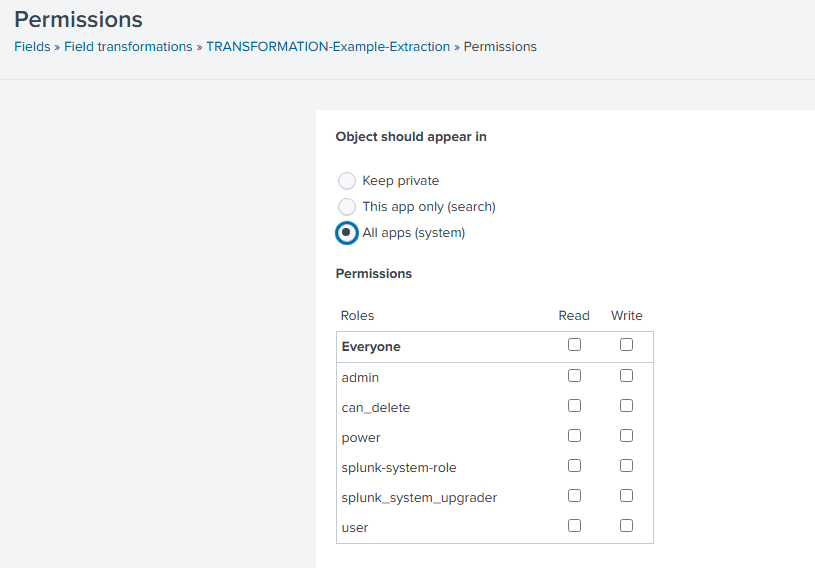
The Field Transformation permissions must be set to global for other users to see it. Locate it in the Fields Transformations page, and then click the permissions link to accomplish this.
This will open the standard permission management page used in Splunk Web for knowledge objects.
Resolution
Request the User to change the permissions of the Field Transform to Global to fix the issue.
Go to Settings > Fields > Fields Transformations > Field Transforms name > Permissions (set to Global)
Related Links
Update field transform permissions
Revision History
| Revision | Publish Date | Comments |
|---|---|---|
1.0 |
29-Sep-2026
|
Initial Release |
 Feedback
Contact Cisco
- Open a Support Case

- (Requires a Cisco Service Contract)