Unable to save the connection for the Snowflake Database for the Splunk DB Connect.
Available Languages
Applicability
Splunk DB Connect Version 3.17.2. Splunk Cloud Splunk Enterprise Java Version openjdk 17.0.11.Description
When attempting to save the connection with all field values, the process fails to save, accompanied by the following error message related to the HostName. The Error says that HostName is not matching the format of the Certificate.
JDBC driver encountered communication error. Message: Certificate for <XXXXXX.XXXXXX.us-west-2.snowflakecomputing.com> doesn't match any of the subject alternative names: [*.prod3.us-west-2.snowflakecomputing.com, *.us-west-2.snowflakecomputing.com, *.global.snowflakecomputing.com, *.snowflakecomputing.com, *.prod3.us-west-2.aws.snowflakecomputing.com].
Investigation
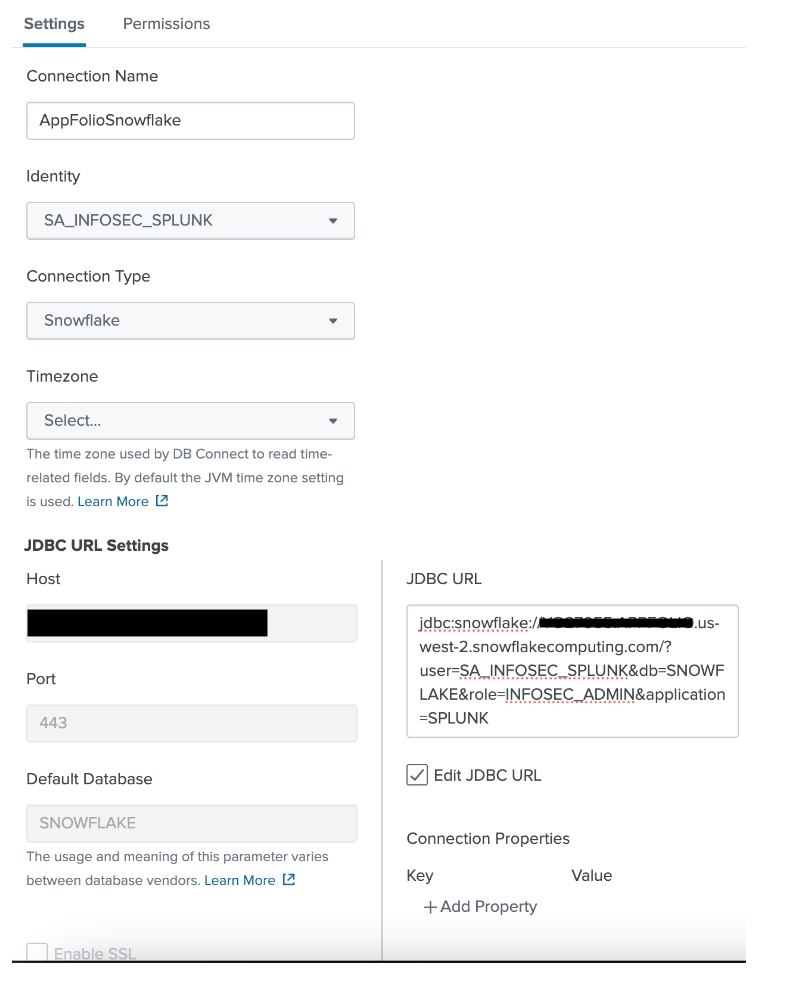
During investigation, it was noted that the error indicated HostName does not match any of the expected alternative formats required for HostName.
Below is a screenshot depicting the settings applied for the Splunk DB Connect Connection.
Resolution
- First, ensure that Java is configured to version 11 in the Splunk instance where the Splunk DB Connect Version 3.17.2 is deployed
- To identify the correct HostName, one should utilize the below SQL Query in the Snowflake Database server to get the actual HostName
select t.value:host || ':443' snowflake
from table(flatten(parse_json(system$whitelist()))) t
where t.value:type = 'SNOWFLAKE_DEPLOYMENT';- Use the correct hostname in the Connection settings > Host (in JDBC URL Settings) and it should save the connection without any issues
Related Links
https://community.snowflake.com/s/article/Integrating-Snowflake-and-Splunk-with-DBConnect
Revision History
| Revision | Publish Date | Comments |
|---|---|---|
1.0 |
29-Sep-2026
|
Initial Release |
 Feedback
Contact Cisco
- Open a Support Case

- (Requires a Cisco Service Contract)