Splunk DB Connect inputs are not working and data is not getting ingested into splunk.
Available Languages
Applicability
Splunk Cloud Splunk Enterprise Splunk DB Connect Splunk Apps and Add-onsDescription
Splunk DB Connect inputs are not working and data is not getting ingested into Splunk.
Investigation
Checked db input logs by running the below query.
index="_internal" sourcetype=*db* *<input_name>* *error*Found the below error by running the above query.
Trace-Id=
[metrics-logger-reporter-2-thread-1] ERROR
com.codahale.metrics.ScheduledReporter - Exception thrown from
Slf4jReporter#report. Exception was suppressed.
java.lang.OutOfMemoryError: Java heap space
The above error indicates that the Java Virtual Machine (JVM) has run out of memory in the heap space. The Splunk DB Connect works on Java and due to out of memory, the inputs will stop functioning.
Resolution
Need to allocate memory to the Java Heap through the below steps as per the requirement.
1. Specific Heap memory option in JVM for Task Server: Splunk DB Connect > Configuration > Settings, add -Xms1024m -Xmx2048m to Task Server JVM Options.
2. Specific Heap memory option in JVM for Query Server: Splunk DB Connect > Configuration > Settings, add -Xms1024m -Xmx2048m to Query Server JVM Options.
After adding the parameters in both JVM options, click on save.
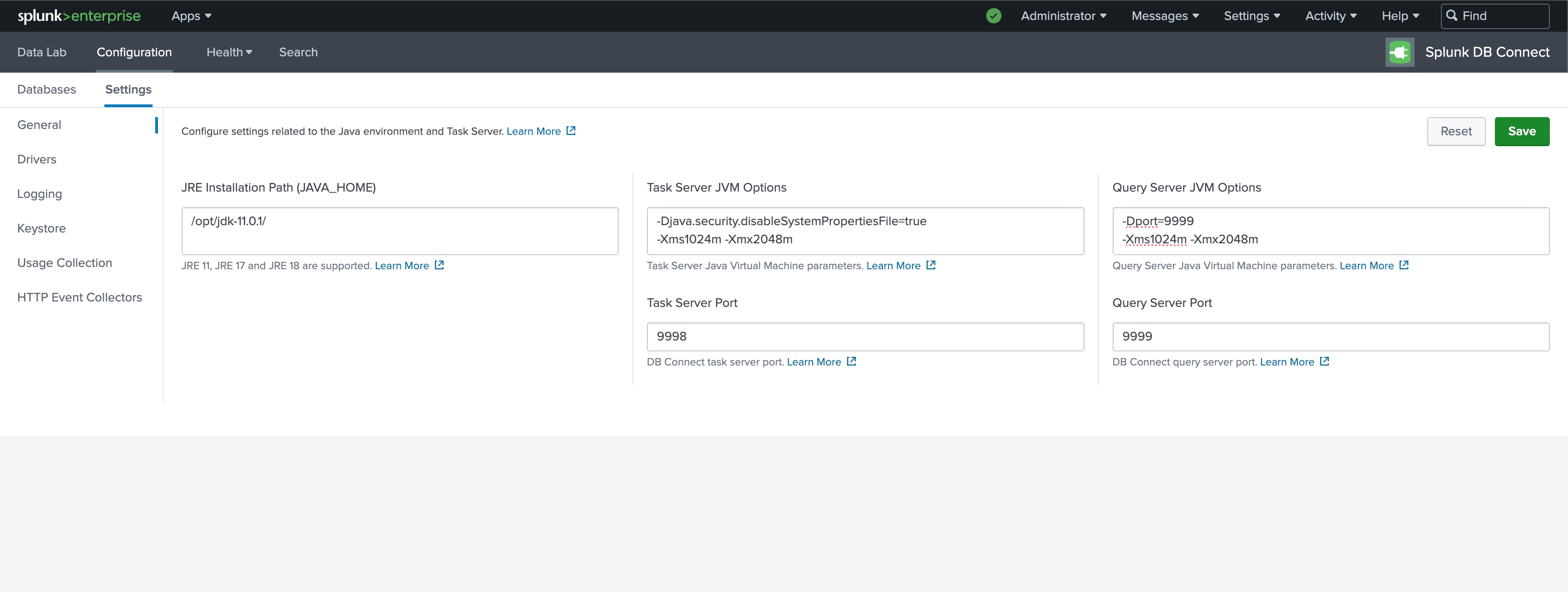
Once the task server restarted after clicking save, the added values will not be reflected on the UI. The values will be saved in the below path.
/opt/splunk/etc/apps/splunk_app_db_connect/jars
Below are the files that would be present in the jars folder where the JVM configurations are saved.
1. dbxquery.vmopts: It will store Query server JVM options details.
2. server.vmopts: It will store Task server JVM options details.
Note:
-Xmx2048m is the maximum memory assigned (to be used) to the Java heap.
Revision History
| Revision | Publish Date | Comments |
|---|---|---|
1.0 |
29-Sep-2026
|
Initial Release |
 Feedback
Contact Cisco
- Open a Support Case

- (Requires a Cisco Service Contract)