Unable to add/edit indexes
Available Languages
Applicability
Splunk Cloud - Victoria ExperienceDescription
When trying to create a new index through the indexes page in the Splunk Cloud UI, specify the value for the parameters (Index name, Max raw data size, Searchable retention (days), Dynamic Data Storage...etc) and Save the configuration, there is message box popped up saying "Saving New Index named <index_name>. Depending on the server, it may take several minutes for this index to appear in the list"; however, when trying to verify the newly added index, it never appears in the indexes list.
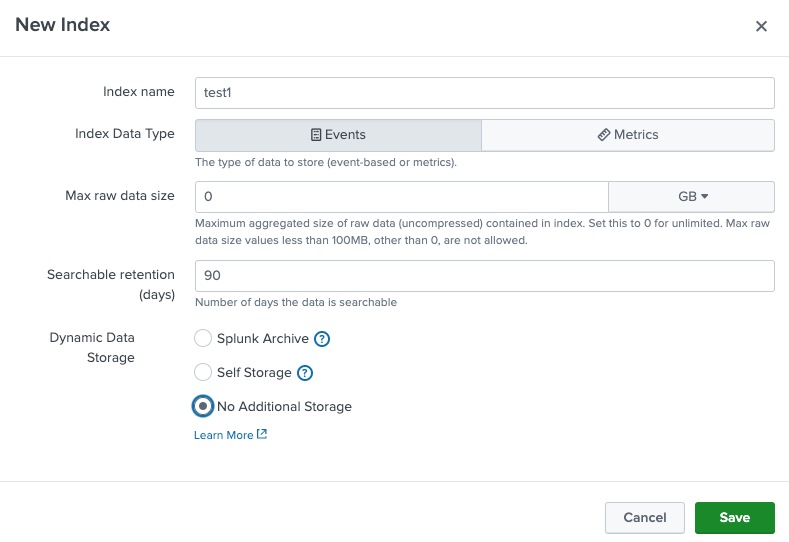
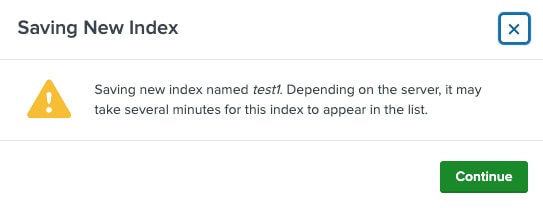
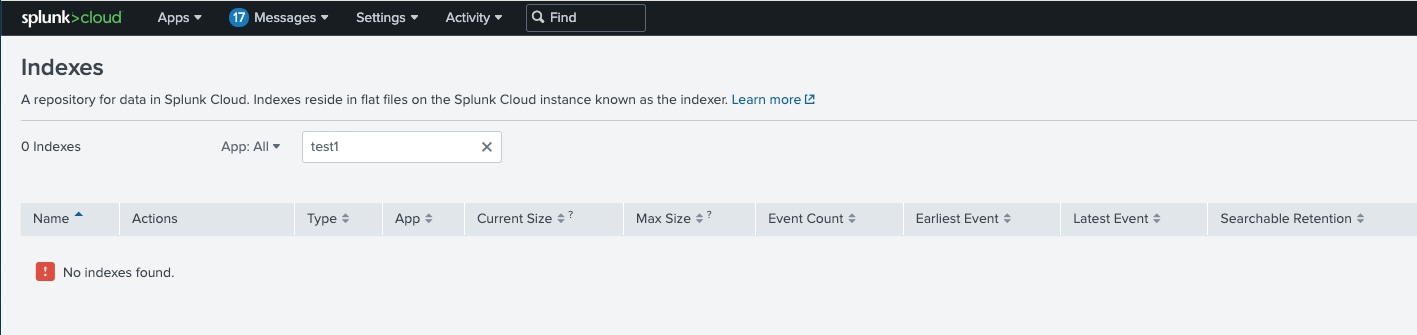
Attempted to add a new one with the same index name (e.g. test1), there is an error saying such index already exists when saving the configuration.
Similarly, when editing an existing index through the indexes page in the Splunk Cloud UI, changing one of the parameters, and Save the configuration, the change is not retained.
Investigation
Looking at the splunkd.log, there was a repeated error related to the index "identity_okta"
2024-06-12 19:55:23,737 +0000, level=ERROR, pid=2044850, tid=281473503594320, comp=remote_configs_sync, loc=remote_configs_sync:652, action=validate_candidate_configurations, status=fail, reason=[HTTP 400] Bad Request; [{'type': 'ERROR', 'code': None, 'text': 'Unable to load index configuration: stanza=identity_okta parameter=archiver.coldStorageRetentionPeriod cannot be parsed to a positive integer'}], detail=Unable to load index configuration: stanza=identity_okta parameter=archiver.coldStorageRetentionPeriod cannot be parsed to a positive integer, x-request-id=
Checked the index configuration for the index "identity_okta" in the Splunk Cloud UI, and found the Archive Retention Period set to 365 days; however in one of the indexer instances the index configuration from noah_bundle the value for Archive Retention Period or archiver.coldStorageRetentionPeriod was set to "270,365" (days)
splunk@idx-i-xxxxxxxxxxxxxxx:~$ cat var/run/splunk/noah_tmp/000-self-service/local/indexes.conf | grep -A10 identity_okta
[identity_okta]
maxTotalDataSizeMB = 0
frozenTimePeriodInSecs = 7776000
archiver.coldStorageProvider = Glacier
archiver.coldStorageRetentionPeriod = 270,365
archiver.enableDataArchive = 1
archiver.maxDataArchiveRetentionPeriod = 315360000
storage_tier = normal
Verified that index configuration for the newly added index "test1" was present in the noah_bundle as well; however, it was not synched with the /opt/splunk/etc/apps/000-self-service.
splunk@idx-i-xxxxxxxxxxxxxxx:~$ cat var/run/splunk/noah_tmp/000-self-service/local/indexes.conf | grep test1 -A6
[test1]
storage_tier = normal
maxTotalDataSizeMB = 0
frozenTimePeriodInSecs = 7776000
Due to the "invalid" value "archiver.coldStorageRetentionPeriod = 270,365" presents from the "identity_okta" index configuration, it prevented all the other Self Service change (edit/add indexes, install/update apps..etc) from completing successfully.
Resolution
Open the index configuration page for the problematic index presented in the error message. In this case, it's "identity_okta" index, verify the value for Archive Retention Period or update it to the correct value if needed (e.g. 270 days, 365 days...etc), click the Save button to save the configuration. That will update the noah_bundle and trigger a reload. After the change has been successfully synchronized, the newly created indexers are populated in the indexes list, and changes being made to the existing indexes also retained.
Revision History
| Revision | Publish Date | Comments |
|---|---|---|
1.0 |
29-Sep-2026
|
Initial Release |
 Feedback
Contact Cisco
- Open a Support Case

- (Requires a Cisco Service Contract)