"AuthorizationFailure","message":{"lang":"en-US","value":"This request is not authorized to perform this operation" error while trying to collect the data using Splunk addon for Microsoft Cloud Services
Available Languages
Applicability
Splunk Cloud Splunk Addon for Microsoft Cloud services (All versions)Description
When a user tries to bring the data from Azure Storage account using the Splunk addon for Microsoft cloud services by configuring an Storage input in the add-on, It keeps throwing the following error and stops ingesting data to Splunk.
{"odata.error":{"code":"AuthorizationFailure","message":{"lang":"en-US","value":"This request is not authorized to perform this operation.\nRequestId:d19d95c2-9002-0021-51a7-85fe5f000000\nTime:2024-04-03T09:12:53.5608626Z"}}}Investigation
SPL Queries that can be used to find the error is below:
index=_internal sourcetype="*storage*" stanza_name="<input-name>" log_level="ERROR"Below are the following errors which are present in the logs:
2024-04-03 09:12:53,568 +0000 log_level=ERROR, pid=1093942, tid=Thread-515, file=mscs_storage_dispatcher.py, func_name=_dispatch_storage_list, code_line_no=90 | [stanza_name="q1WADMTSContactDataSync_Clone" account_name="q1scvfabdiagstorage" table_list="WADMTSContactDataSync"] Exception@_dispatch_tables() ,error_message=Forbidden
{"odata.error":{"code":"AuthorizationFailure","message":{"lang":"en-US","value":"This request is not authorized to perform this operation.\nRequestId:d19d95c2-9002-0021-51a7-85fe5f000000\nTime:2024-04-03T09:12:53.5608626Z"}}}
Traceback (most recent call last):
File "/opt/splunk/etc/apps/Splunk_TA_microsoft-cloudservices/lib/mscs_storage_dispatcher.py", line 86, in _dispatch_storage_list
self._do_dispatch()
File "/opt/splunk/etc/apps/Splunk_TA_microsoft-cloudservices/lib/mscs_storage_dispatcher.py", line 97, in _do_dispatch
self._dispatch_tasks(patterns)
File "/opt/splunk/etc/apps/Splunk_TA_microsoft-cloudservices/lib/mscs_storage_table_dispatcher.py", line 79, in _dispatch_tasks
next_marker, patterns)
File "/opt/splunk/etc/apps/Splunk_TA_microsoft-cloudservices/lib/mscs_storage_table_dispatcher.py", line 117, in _get_storage_info_list
tables = table_service.list_tables(marker=marker)
File "/opt/splunk/etc/apps/Splunk_TA_microsoft-cloudservices/lib/azure/cosmosdb/table/tableservice.py", line 464, in list_tables
resp = self._list_tables(**kwargs)
File "/opt/splunk/etc/apps/Splunk_TA_microsoft-cloudservices/lib/azure/cosmosdb/table/tableservice.py", line 502, in _list_tables
operation_context=_context)
File "/opt/splunk/etc/apps/Splunk_TA_microsoft-cloudservices/lib/azure/cosmosdb/table/tableservice.py", line 1106, in _perform_request
return super(TableService, self)._perform_request(request, parser, parser_args, operation_context)
File "/opt/splunk/etc/apps/Splunk_TA_microsoft-cloudservices/lib/azure/cosmosdb/table/common/storageclient.py", line 430, in _perform_request
raise ex
File "/opt/splunk/etc/apps/Splunk_TA_microsoft-cloudservices/lib/azure/cosmosdb/table/common/storageclient.py", line 358, in _perform_request
raise ex
File "/opt/splunk/etc/apps/Splunk_TA_microsoft-cloudservices/lib/azure/cosmosdb/table/common/storageclient.py", line 344, in _perform_request
HTTPError(response.status, response.message, response.headers, response.body))
File "/opt/splunk/etc/apps/Splunk_TA_microsoft-cloudservices/lib/azure/cosmosdb/table/common/_error.py", line 115, in _http_error_handler
raise ex
azure.common.AzureHttpError: Forbidden
{"odata.error":{"code":"AuthorizationFailure","message":{"lang":"en-US","value":"This request is not authorized to perform this operation.\nRequestId:d19d95c2-9002-0021-51a7-85fe5f000000\nTime:2024-04-03T09:12:53.5608626Z"}}}
In investigation, it was discovered that public access to the storage account was disabled for all the networks meaning no other network is allowed to access the storage Account. Sample screenshot is attached below for reference.
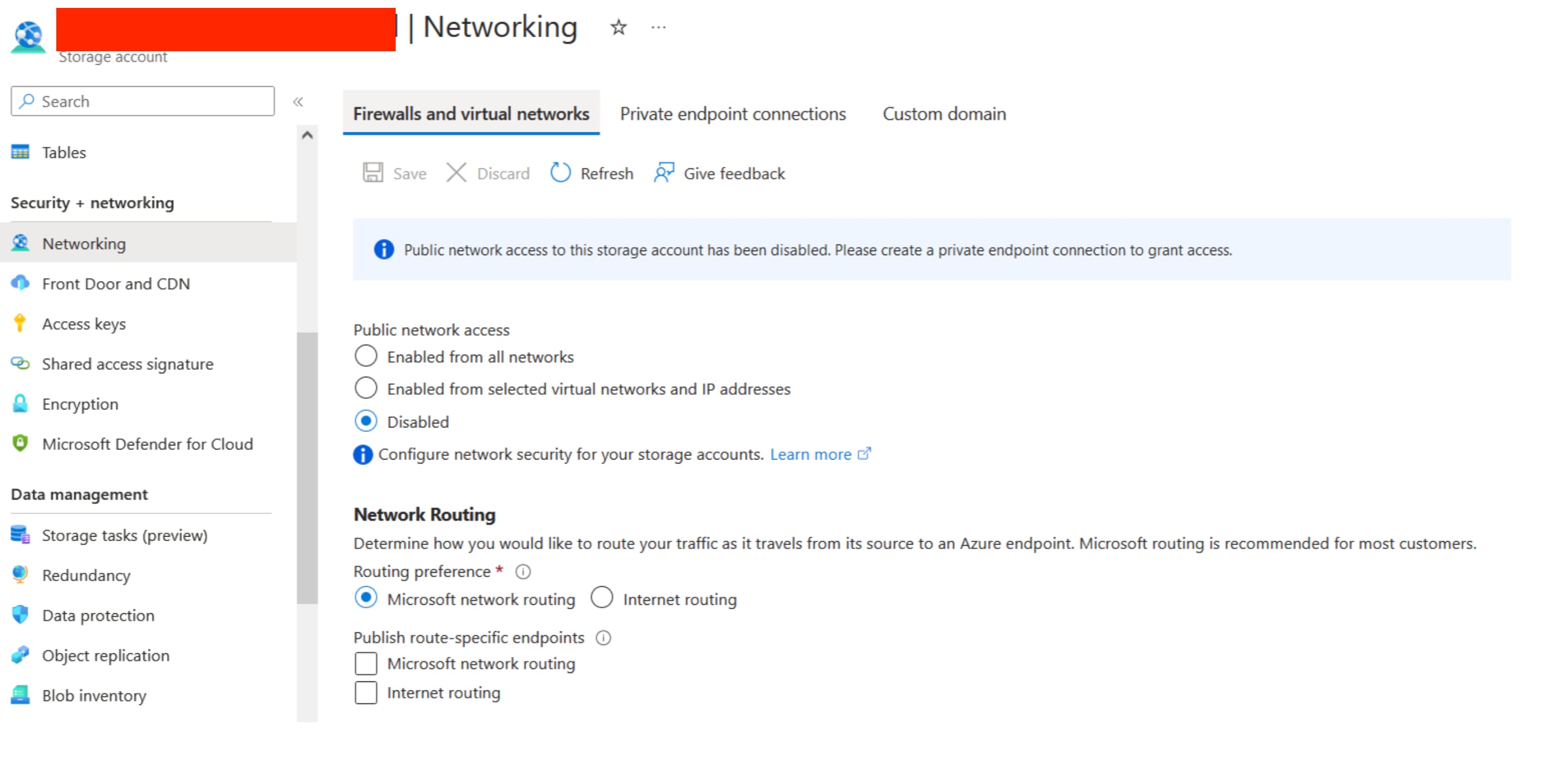
Users who deploy storage input on Splunk Cloud should receive this error as expected, as any input deployed on Splunk Cloud (Classic or Victoria) will communicate with the Azure storage blob via the public internet.
Resolution
To resolve this error, users has two options which are outlined below:
-
Users can opt to select "Enabled for selected Virtual Network and IP address" option in public network access in Azure storage account. By selecting this option, user will allow incoming traffic to the storage account specifically from the designated IP address of Splunk Cloud. If user is on Splunk Cloud with Victoria experience then they must provide IP address of SHs; whereas if they are on Classic experience; then they must provide the IP address of Input Data Manager (IDM).
-
Users can also opt "Private endpoint" option as an alternative. This option is more useful if the user is on-premises or by any chance if they are not comfortable exposing storage Account even for selected Networks.
-
Private endpoint for Azure Storage accounts allows clients on a virtual network (VNet) to securely access data over Azure private Link. The private endpoint uses a separate IP address from the VNet address space for each storage account service. Network traffic between the clients on the VNet and the storage account traverses over the VNet and a private link on the Microsoft backbone network, eliminating exposure from the public internet.
-
When user creates a private endpoint for a storage service in their VNet, a consent request is sent for approval to the storage account owner. If the user requesting the creation of the private endpoint is also an owner of the storage account, this consent request is automatically approved.
- Users can secure their storage account to only accept connections from their VNet by configuring firewall rules to deny access through its public endpoint by default. Users don't need a firewall rule to allow traffic from a VNet that has a private endpoint, since the storage firewall only controls access through the public endpoint. Private endpoints instead rely on the consent flow for granting subnets access to the storage service. That being said, users need to deploy Splunk (data input) within the same Virtual Network where they will be configuring the private endpoint. This could be a virtual machine in this scenario.
-
Please click here to view detailed documentation on Azure private endpoints.
Revision History
| Revision | Publish Date | Comments |
|---|---|---|
1.0 |
29-Sep-2026
|
Initial Release |
 Feedback
Contact Cisco
- Open a Support Case

- (Requires a Cisco Service Contract)