Splunk DB Connect seeing metrics-logger-reporter errors
Available Languages
Applicability
Splunk Cloud Splunk EnterpriseDescription
An issue has been reported where a Splunk Heavy Forwarder is receiving errors from DB Connect as the one shown below on splunkd.log
ERROR ExecProcessor - message from "/opt/splunk/etc/apps/splunk_app_db_connect/linux_x86_64/bin/dbxquery.sh"
15:48:47.931 [metrics-logger-reporter-1-thread-1] INFO c.s.d.c.h.i.ConnectionPoolMetricsLogReporter -
type=TIMER, name=unnamed_pool_-981983702_jdbc__sqlserver__//1x.xxx.xx.xxx__1453;databaseName__xxxxxxxxx;
selectMethod__cursor.pool.Wait, count=5, min=0.0, max=0.0, mean=0.0, stddev=0.0, p50=0.0, p75=0.0, p95=0.0
, p98=0.0, p99=0.0, p999=0.0, m1_rate=2.964393875E-314, m5_rate=1.3265781451719771E-117, m15_rate=3.82E-40,
mean_rate=6.228193802284865E-5, rate_unit=events/second, duration_unit=milliseconds
Investigation
When checking the splunk_app_db_connect_connection_pool_metrics.log file, similar output was seen, but they seem to be only info messages:
type=TIMER, name=unnamed_pool_-981983702_jdbc__sqlserver__//xx.xxx.xx.xxx__1453;databaseName__xxxxxxx;
selectMethod__cursor.pool.Wait, count=4003, min=2.26E-4, max=272.102367, mean=0.9742653877055208,
stddev=1.6051560196889396, p50=0.001462, p75=1.92512, p95=5.835206, p98=5.835206, p99=5.835206,
p999=5.835206, m1_rate=0.09012384658719229, m5_rate=0.060949804901074475, m15_rate=0.051481013420707204,
mean_rate=0.0469507388438691, rate_unit=events/second, duration_unit=milliseconds
Resolution
What is occurring is that the add-on is treating the output from the dbxquery info messages as an error.
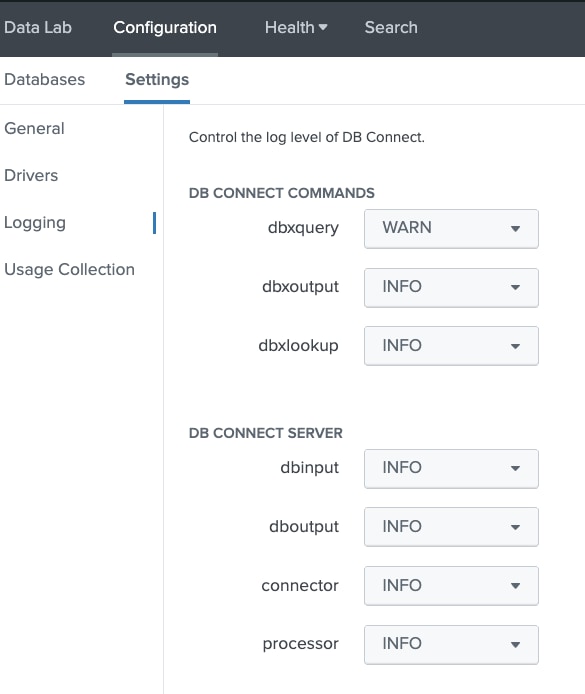
To prevent or work around this, you need to change the dbxquery debug to WARN, so it will only output these messages as an error when there is a warning or above message.
To make this change, within the app navigate to the configuration tab -> select settings ->logging:
Change from INFO to WARN or DEBUG
Revision History
| Revision | Publish Date | Comments |
|---|---|---|
1.0 |
29-Sep-2026
|
Initial Release |
 Feedback
Contact Cisco
- Open a Support Case

- (Requires a Cisco Service Contract)