"Scheduled backup job failed" on SH post the Splunk Cloud upgrade
Available Languages
Applicability
Splunk CloudDescription
Post upgrade of Splunk Cloud to 9.0.2208.1, it was seen a huge number of error messages in Splunk cloud as shown in the below picture. It is related to the ITSI app.
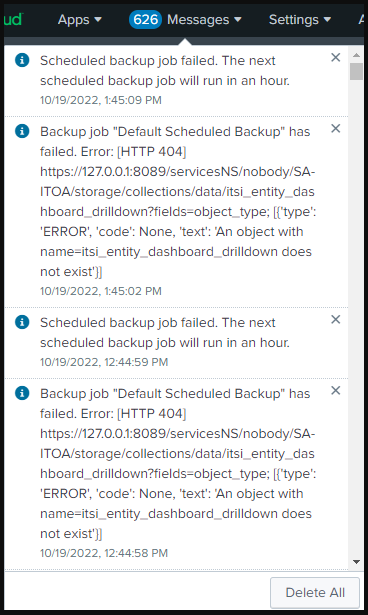
Investigation
After the upgrade of Splunk Cloud to the latest version i.e. 9.0.2208.1, ITE/ITSI SH shows the below error messages:
Scheduled backup job failed. The next scheduled backup job will run in an hour.Backup job "Default Scheduled Backup" has failed. Error: [HTTP 404] https://127.0.0.1:8089/servicesNS/nobody/SA-ITOA/storage/collections/data/itsi_entity_dashboard_drilldown?fields=object_type; [{'type': 'ERROR', 'code': None, 'text': 'An object with name=itsi_entity_dashboard_drilldown does not exist'}]Failures occurred while attempting to import some IT Service Intelligence settings from configuration files for apps and modules. Check the logs to get information about which settings failed to be imported.
While investigating, it was found that the ITE/ITSI app is using the older version i.e., 4.10.0
App ID: (https://splunkbase.splunk.com/app/5403).
After the Splunk Cloud upgrade, the older version of ITE/ITSI app became non-compatible with the upgraded cloud version.
We are hitting with a known issue here.
Resolution
To resolve the issue:
The ITE/ITSI app should be upgraded to the latest version to be compatible with the upgraded version of Cloud.
Revision History
| Revision | Publish Date | Comments |
|---|---|---|
1.0 |
29-Sep-2026
|
Initial Release |
 Feedback
Contact Cisco
- Open a Support Case

- (Requires a Cisco Service Contract)