How to update IP location database, MMDB?
Available Languages
Applicability
Splunk CloudDescription
Update the IP location database, MMDB, with a new version.Investigation
The dbip-city-lite.mmdb is delivered with Splunk out of the box. If no other MMDB file is provided, this is the IP database used.
When using the Splunk Web .mmdb file upload feature (the GeoIP lookups file), it will take precedence over manual updates to the .mmdb file path in limits.conf.
The uploaded MMDB file will be part of the knowledge bundle and will get replicated to the indexers automatically.
Resolution
Through Splunk Cloud Web UI, it is possible to upload a new .mmdb file to update the IP database.
The file to be provided can be a copy of one of the following two - only these two files are supported:
| Files |
| |
| GeoLite2-City.mmdb | This is a free IP geolocation database that is updated on its download page on a weekly basis. | |
| GeoIP2-City.mmdb | This is a paid version of the GeoLite2-City IP geolocation database that is more accurate than the free version. |
The account following the steps below needs to have a role with the upload_mmdb_files capability assigned to it.
- Go online and find a download page for the binary .tar.gz versions of the GeoLite2-City or the GeoIP2-City database files.
- Download the binary .tar.gz version of the file (GeoLite2-City or GeoIP2-City) that is most appropriate for your needs.
- Expand the binary .tar.gz version of the file.
The .tar.gz file expands into a folder which contains the GeoLite2-City.mmdb file, or the GeoIP2-City.mmdb file, depending on the download you selected. - In Splunk Web, go to Settings > Lookups > GeoIP lookups file.
- On the GeoIP lookups file page, click Choose file. Select the .mmdb file.
- Click Save.
Alternative, downloading the latest version of dbip-city-lite with MMDB format file:
1. Go online and find a ip-to-city-lite download page, and download the latest MMDB format file
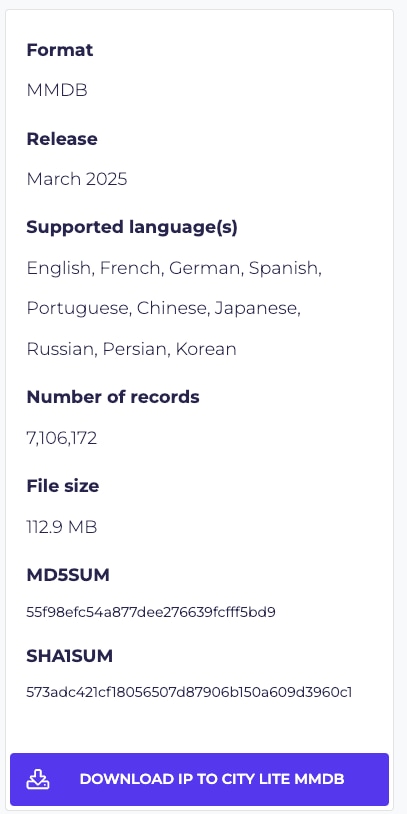
2. Expand the binary .mmdb.gz version of the file, you will get the dbip-city-lite-2025-03.mmdb
3. In Splunk Web, go to Settings > Lookups > GeoIP lookups file
5. On the GeoIP lookups file page, click Choose file. Select the .mmdb file (dbip-city-lite-2025-03.mmdb)
6. Click Save
The page displays a success message when the upload is completed.
If you upload your own .mmdb file in Splunk Web and later decide you want to revert back to the .mmdb file that was shipped with the Splunk software, go to Settings > Lookups > GeoIP lookups file and delete your uploaded file.
For additional logging, there are two log channels that can be set to DEBUG, GeoIPProcessor and GeoIPProvider. The default log level is WARN. For testing purposes, you can change these two log channels to DEBUG in the Search Head under Settings > Server settings > Server logging and search for GeoIP. The two log channels should be available, select and change the log level to DEBUG.
Run the following query for testing:
| makeresults
| eval myip="<IP address>"
| iplocation myip
Search the _internal index for the component=GeoIP*. A similar event should be available:
INFO GeoIPProvider [2602 TcpChannelThread] - Successfully read uploaded GeoIP database from /opt/splunk/etc/apps/search/lookups/GeoIP2-City.mmdb, will override default location.
Related Links
Updating the IP geolocation database file Revision History
| Revision | Publish Date | Comments |
|---|---|---|
1.0 |
29-Sep-2026
|
Initial Release |
 Feedback
Contact Cisco
- Open a Support Case

- (Requires a Cisco Service Contract)