Search Factor and Replication Factor Not Met, causing Data Durability warning in the Search Head
Available Languages
Applicability
Splunk Enterprise Splunk CloudDescription
Search Factor and Replication Factor Not Met Error in Cluster Master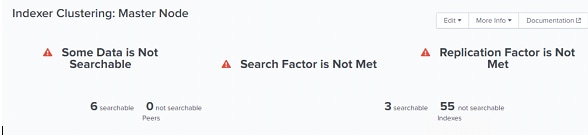
Investigation
1. Check for Search factor and replication factor value.2. Check the indexers are up and running.
3. If the above both are met and still there is an error.
Sometimes, when the indexers are rolled, the CM does not sync up with the indexers which might be causing the error.
Resolution
Restart the Cluster Master:
1. Login into the Cluster Master via CLI.
2. go to $SPLUNK_HOME/bin directory.
3. Run the following command: ./splunk restart
Once the CM restart is done, login into the Splunk Web and check if the error message has disappeared.
When the CM is synced with indexers the issue will get resolved.
For Splunk Cloud deployments the Cluster Master and Indexer Cluster rolling restart need to be coordinated with Splunk Support through a support case.
Revision History
| Revision | Publish Date | Comments |
|---|---|---|
1.0 |
29-Sep-2026
|
Initial Release |
 Feedback
Contact Cisco
- Open a Support Case

- (Requires a Cisco Service Contract)